
Join us on the Community Forums!
-
Community Guidelines
The Fitbit Community is a gathering place for real people who wish to exchange ideas, solutions, tips, techniques, and insight about the Fitbit products and services they love. By joining our Community, you agree to uphold these guidelines, so please take a moment to look them over. -
Learn the Basics
Check out our Frequently Asked Questions page for information on Community features, and tips to make the most of your time here. -
Join the Community!
Join an existing conversation, or start a new thread to ask your question. Creating your account is completely free, and takes about a minute.
Not finding your answer on the Community Forums?
- Community
- Product Help Forums
- Ionic
- Re: Sp02 graph lags by one day
- Mark Topic as New
- Mark Topic as Read
- Float this Topic for Current User
- Bookmark
- Subscribe
- Mute
- Printer Friendly Page
- Community
- Product Help Forums
- Ionic
- Re: Sp02 graph lags by one day
Sp02 graph lags by one day-Ionic
- Mark Topic as New
- Mark Topic as Read
- Float this Topic for Current User
- Bookmark
- Subscribe
- Mute
- Printer Friendly Page
- « Previous
-
- 1
- 2
- Next »
09-28-2020
18:07
- last edited on
04-10-2022
11:25
by
EdsonFitbit


 Fitbit Product Experts Alumni are retired members of the Fitbit Product Expert Program. Learn more
09-28-2020
18:07
- last edited on
04-10-2022
11:25
by
EdsonFitbit
All working as at 30th September except the Sp02 lagging.. see later post..
Health Metrics has just appeared in my App.
It's only showing graphs for RHR and Sp02. The Sp02 readings are lagging by one day.. The RHR is OK.
When will the other Metrics show up.?
Also, am I waiting for an Ionic Firmware update..?
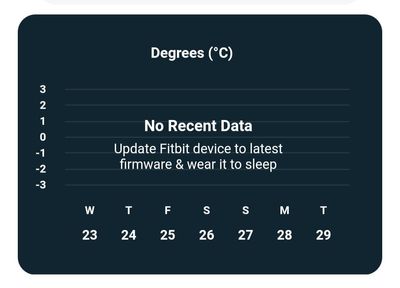
Moderator edit: updated subject for clarity
Ionic (OS 4.2.1, 27.72.1.15), Android App 3.45.1, Premium, Phone Sony Xperia XA2, Android 9.0
 Best Answer
And how can to move this to the Sense forum
Best Answer
Fitbit Product Experts Alumni are retired members of the Fitbit Product Expert Program. Learn more
@QuirkyDude No change on my Ionic..
Ionic (OS 4.2.1, 27.72.1.15), Android App 3.45.1, Premium, Phone Sony Xperia XA2, Android 9.0
Best Answer
Fitbit Product Experts Alumni are retired members of the Fitbit Product Expert Program. Learn more
That's good news. I am on iOS Fitbit 3.36 (1013) and it's still lagging .. Today's Thursday and last night's entry is associated with Wednesday
Best Answer

I have the same problem with my Sense. The Sp02 graph is lagging one day behind to the Sense. Very curious to know if Fitbit will fix this.
Best Answer
Has there been any update to resolve this issue? I noted a remark above that it has been resolved for Android users.
Best Answer
Fitbit Product Experts Alumni are retired members of the Fitbit Product Expert Program. Learn more
Apologies.. That lasted only a short time.
It's still lagging but the data is there..
Ionic (OS 4.2.1, 27.72.1.15), Android App 3.45.1, Premium, Phone Sony Xperia XA2, Android 9.0

Any fix Fitbit ?
Having the same issue on my sense. Spo2 graph in heqlthmetrics lags a day behind.
Best Answer
good news I read today - Thanks Fitbit
Here's what else is new in the OS 5.2 update:
- Blood oxygen tracking will now show up on your wrist alongside the rest of your stats in the Today dashboard. You'll also be able to see your nightly value and range from the last night on the watch.
It’s finally fixed..
update 05/07/2021: showed ok only for a day. Now it’s off again..
Best Answer
The update means you can see in the same day if you swipe to the today app
days and the graph works fine . However when I’m back in Melbourne it goes
back to one day lagging.
I suppose it must be working in US too and it could be the reason this
never get fixed . Could be time zone related !

I suspected that may be the problem as I am in Canberra. The mystery is why are all the other metrics ok, with only the SpO2 graph lagging by a day? It should be easy to fix if the other graphs all include the current day!
Best Answer
tonight and expecting it to revert back with a lag! 😊
Best Answer
So i had this issue for a month now, and it took me around 10 minutes to understand the problem. Looks like no one got around in 2 years to fix this. 😄
I like to check sleep when i have just woke up and still in bed. When you synchronise your sleep - spo2 is still running in background (red light on your watch is still on). It is still on because you have not moved and it possibly assumes you are still sleeping. So it does not show up in todays result because it is still running. Get out of bed and try to move your arm around, fit bit then turns of spo2 tracking and when you now synchronise again - spo2 will show up with your todays result.
I would say this is Fitbit programming issue. If we are awake and we synchronise our sleep data, fit bit should automatically turn off spo2 tracking. Obviously we are not sleeping anymore if we synchronise our watch right? So fix this.
My wife does not have this issue because she is always already out of bed when synchronising.
So there you go. Check the red light, if it still runs, walk around or do something till it goes out, then synchronise again.
For solving this issue without Fitbit help, they owe me one new Fitbit device for this. Have a nice day.
Best Answer
 Community Moderators ensure that conversations are friendly, factual, and on-topic. We're here to answer questions, escalate bugs, and make sure your voice is heard by the larger Fitbit team. Learn more
Hello everybody, thank you for visiting the Fitbit Community.
Currently, there is a voluntary Safety Recall of Fitbit Ionic Smartwatches.
For more information, please visit this thread.
I am going to close this thread since it is too old, but if there is anything else we can help you with, please don't hesitate to start a new topic.
Have a nice day.
Have you received the answer you were looking for? Choose the post as the best answer!
Hai ricevuto la risposta che stavi cercando? Accetta il post come soluzione!
¿Has recibido la respuesta que estabas buscando? ¡Acepta el post como solución!
Best Answer
- « Previous
-
- 1
- 2
- Next »