
Join us on the Community Forums!
-
Community Guidelines
The Fitbit Community is a gathering place for real people who wish to exchange ideas, solutions, tips, techniques, and insight about the Fitbit products and services they love. By joining our Community, you agree to uphold these guidelines, so please take a moment to look them over. -
Learn the Basics
Check out our Frequently Asked Questions page for information on Community features, and tips to make the most of your time here. -
Join the Community!
Join an existing conversation, or start a new thread to ask your question. Creating your account is completely free, and takes about a minute.
Not finding your answer on the Community Forums?
- Community
- Product Help Forums
- Ionic
- Re: Using Fitbit Pay
- Mark Topic as New
- Mark Topic as Read
- Float this Topic for Current User
- Bookmark
- Subscribe
- Mute
- Printer Friendly Page
- Community
- Product Help Forums
- Ionic
- Re: Using Fitbit Pay
Using Fitbit Pay
ANSWERED- Mark Topic as New
- Mark Topic as Read
- Float this Topic for Current User
- Bookmark
- Subscribe
- Mute
- Printer Friendly Page
10-03-2017
13:09
- last edited on
04-10-2018
14:17
by
MattFitbit


 Community Moderators ensure that conversations are friendly, factual, and on-topic. We're here to answer questions, escalate bugs, and make sure your voice is heard by the larger Fitbit team. Learn more
10-03-2017
13:09
- last edited on
04-10-2018
14:17
by
MattFitbit
Update 04/10/2018 - Chase is now officially supported by Fitbit Pay! So, if you have a Chase Visa card, it can now be added to your Fitbit Wallet.
------------------------------------------------------------------------------------------------------------------------------------------
Update 10/6/2017 - Note that Windows Pay is not yet available via the Windows 10 app, and will be coming soon.
------------------------------------------------------------------------------------------------------------------------------------------
With the availability of Fitbit Ionic, we are excited to announce Fitbit Pay! This feature will allow you to add credit and debit cards to your watch to make contactless payments, wherever you are.
The video below will help you get up and running with Fitbit Pay:
If you have further questions about using Fitbit Pay, check the following help resources:
- Which banks and card issuers currently work with Fitbit Pay?
- How secure is Fitbit Pay?
- How do I see a list of my transactions?
- What else should I know about Fitbit Pay?
Answered! Go to the Best Answer.

Every time I attempt to set up the Fitbit Pay wallet via the Fitbit App on my phone I receive a message saying that there was an error registering the Ionic with Fitbit Wallet. My phone is syncing with the Ionic, I'm receiving notifications, etc. but the Wallet results in that error every time I try to launch it. Anyone else seeing that issue?

Do you happen to be on the development firmware? I had a problem where my card got setup and was finished but couldn't activate on the ionic itself. Once I got the update for the developer firmware, it then worked.
 Best Answer
I've tried both. My Ionic was on the non-development version and I was unable to start the Wallet on the phone, with the development version I thought it might have been fixed but unfortunately, I'm seeing the same results.
Best Answer
Firmware version: 27.30.3.2
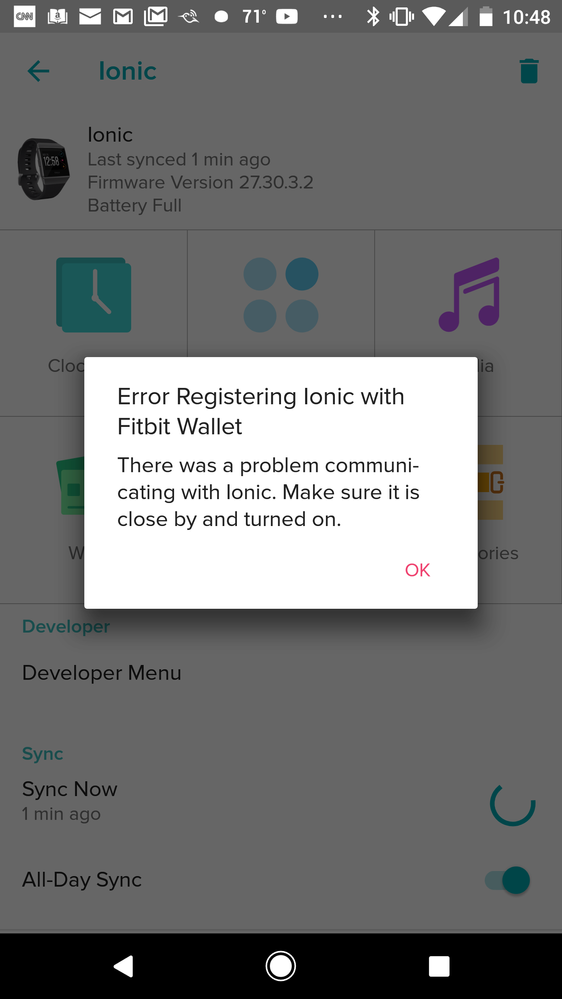
I open up the wallet inside the app, it starts with the welcome screens. I hit "Get Started" and immediately it opens up a dialog with "Error Registering Ionic with Fitbit Wallet" as the title and "There was a problem communicating with Ionic. Make sure it is close by and turned on."
Best Answer
Just wanted everyone to know that eventually, a picture of the AMEX card displayed and I was able to sync the card without issue.
I'm not sure what was going on, perhaps its simply traffic.
Win for FitBit Ionic!
Ok, right firmware... so you are hitting the issue at a different step...that's a new one for me.
Best Answer
I was seeing the same issue with the previous non-developer version of the firmware and I'm seeing the same error when attempting to set a pin.
Best Answer
SunsetRunner
Hey there.
I'm one of the few that ONLY uses the Windows 10 app on a PC/Laptop by the looks of things. It appears that there is no Wallet option - assuming that the app needs an update for Microsoft Windows platforms?
Any joy Windows users?



@Cantryboy @stevk @davidf100010 @Testimony777 We’re working with more issuing banks to support Fitbit Pay. Working with bank issuers can be a slow moving process due to security checks and agreement confirmations. I don’t have any info on when Wells Fargo, Chase, Citibank, or USAA will be supported at this time but our help article will be updated as more banks become supported, so check back soon. When I hear something new I'll update this thread.
@Ras11 Can you provide a screenshot of what you see when you tap on Wallet? Have you tried quitting the app and reopening? Something else you can try is logging out/in from the app.
@AndrewFitz Sounds like you see the Wallet app but when you select it, the on-screen prompts don't load. Can you send a screenshot of what the Wallet app looks like when you try to open it on your Windows 950xl phone and computer?
@mwhiteford @Syrinx Supported UK/Netherlands banks will be coming soon, no estimated time frame yet, check back soon.
@xTommyG Thanks for the screenshot. Have you tired restarting the app or logging out/in from app to see if that helps. Let me know.
@garethgreenaway Can you provide a screenshot of the error message? Have you tried giving your phone and Ionic a restart.
Thanks for reaching out and letting me know about your experience with Fitbit Pay. My plan is to gather as much feedback as possible and relay it to our team.
If possible, can you provide me with the following info:
Mobile/computer Platform : ?
OS version: ?
App version: ?
@CarlosCFitbit Thanks for the reply. I'm attaching a screenshot of what I see when attempting to load up the wallet inside the Fitbit app. I had restarted the watch but had not done a full restart of the phone yet. I just tried that and it got past the error message. It looks like my bank is not supported yet (Citibank) but it's progress at least. Thanks
 Best Answer
I just want to report a successful purchase at my local hardware store using Fitbit Pay. The only differences from the video are that I didn't get a pulse from the watch nor a checkmark on its screen. Also different was that I had to confirm the purchase on the reader and sign on it. I've seen those last two things with Apple Pay too though so they must depend on the vender's setup/equipment.

@CarlosCFitbitAs you can see windows 10 phone and PC App does not have option for wallet. The one inside Apps tile no setting.
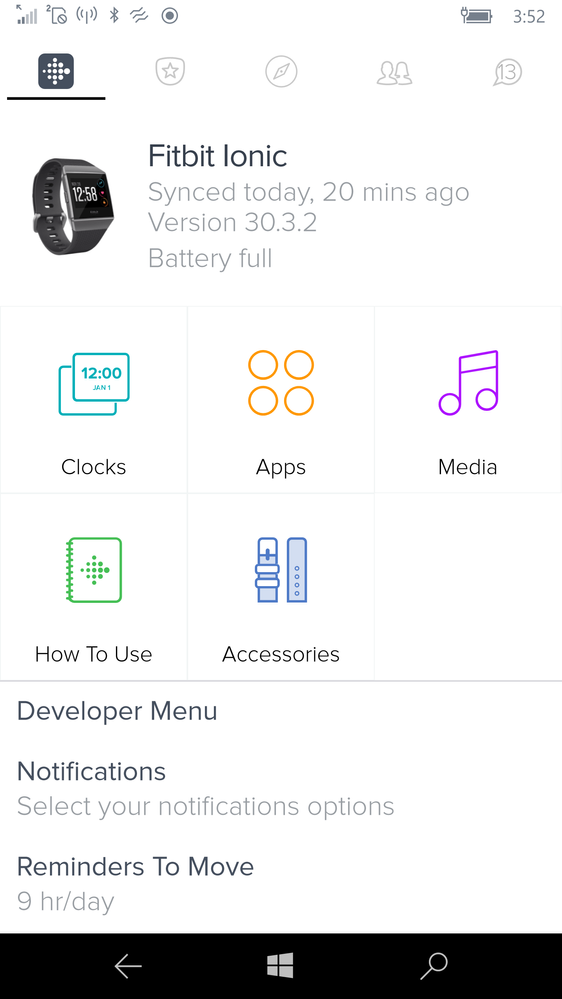
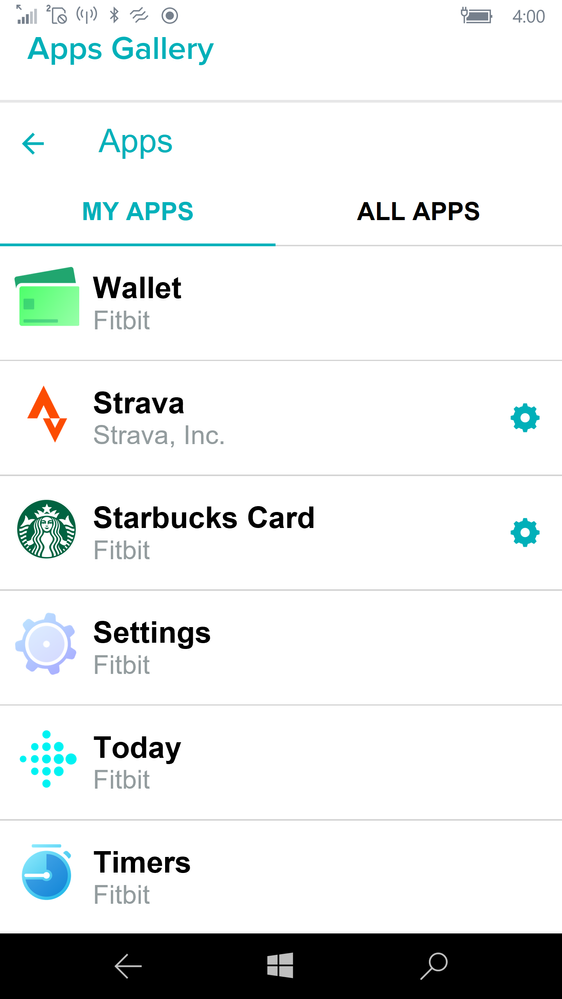

Any chance the US users will align with the Australian users and simply Tap to Pay without hitting the button?
-Glenn
I also did signed out of the app as well as reinstall the app on the phone, check for update, made sure location is in US. Non of the above worked to install wallet tile or have the option for setting in wallet app under Apps.
Best Answer
I am also having issues setting up. Im in Australia. I have a compatible bank.
when I click on the wallet on the app and then click on "get started" it doesn't do anything. it's like it just flickers and that's it. won't actually let me move on to the next step. I have a Samsung Galaxy 5 phone.
Best Answer
My windows 10 950 phone is the same as Ras11. No setting button for the wallet.

I have the exact same problem.
I click 'Get Started', screen flickers and goes back to the main screen...
Tried uninstalling the app, unpairing the watch...
Not sure
@JackieJ86 wrote:I am also having issues setting up. Im in Australia. I have a compatible bank.
when I click on the wallet on the app and then click on "get started" it doesn't do anything. it's like it just flickers and that's it. won't actually let me move on to the next step. I have a Samsung Galaxy 5 phone.
Best Answer