
Join us on the Community Forums!
-
Community Guidelines
The Fitbit Community is a gathering place for real people who wish to exchange ideas, solutions, tips, techniques, and insight about the Fitbit products and services they love. By joining our Community, you agree to uphold these guidelines, so please take a moment to look them over. -
Learn the Basics
Check out our Frequently Asked Questions page for information on Community features, and tips to make the most of your time here. -
Join the Community!
Join an existing conversation, or start a new thread to ask your question. Creating your account is completely free, and takes about a minute.
Not finding your answer on the Community Forums?
- Community
- Features
- Menstrual Health Tracking
- Re: Female Health Icon on Android
- Mark Topic as New
- Mark Topic as Read
- Float this Topic for Current User
- Bookmark
- Subscribe
- Mute
- Printer Friendly Page
- Community
- Features
- Menstrual Health Tracking
- Re: Female Health Icon on Android
Female Health Icon on Android
- Mark Topic as New
- Mark Topic as Read
- Float this Topic for Current User
- Bookmark
- Subscribe
- Mute
- Printer Friendly Page


 Fitbit Product Experts Alumni are retired members of the Fitbit Product Expert Program. Learn more
On computer click on the dots upper left corner. Put a check mark in the tile and click done
Phone: Scroll down on dashboard and tap edit Add the tile there

Wendy | CA | Moto G6 Android
Want to discuss ways to increase your activity? Visit the Lifestyle Forum
 Best Answer
When I click on the dots in the upper left corner nothing is there. All it says is "More Coming Soon! You have added all the tiles we have available." then there is a Done button. I have not added the female health tracker. I can't even find it!
Best Answer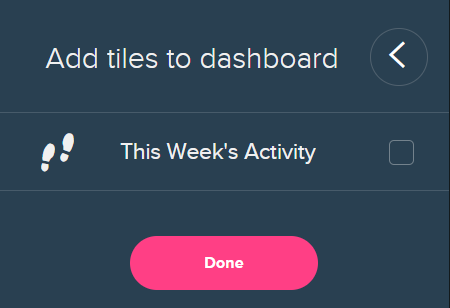



 Community Moderators ensure that conversations are friendly, factual, and on-topic. We're here to answer questions, escalate bugs, and make sure your voice is heard by the larger Fitbit team. Learn more
Hey guys @juanie313 @medep19 @SunsetRunner, it's nice to see you here! If you are on Android, please make sure that your Fitbit app is up-to-date. The latest version for Android Fitbit app should be on 2.72.1 which can allow you to see the Female Health Tracking tile.
If after updating the Fitbit app, you cannot see the tile, do the following:
- Log out of your Fitbit app
- Force quit the app
- Turn off the Bluetooth
- Shut off your phone and turn it on after 1-2 minutes
- Turn on the Bluetooth
- Log back into your Fitbit app
- Tap or click Edit at the bottom of the dashboard.
- Tap or click the + icon in the top left corner of the female health tile.
- Tap or click Done.
On the other hand, clarifying what my friend @WendyB mentioned. This newly launched feature is available exclusively in the Fitbit app for iOS, Windows, and Android. Your female health data will not be available on your dashboard through Fitbit.com.
If you are interested, please take a look if you haven't already. For anything else you would like to see implemented in this feature for the future, consider visiting our Feature Suggestions board. Look under the label "Female Health Tracking" for existing ideas that might match your own and vote.  However, I was making some research and was able to find these ideas asking for the same:
That's why the tile is not appearing in the Fitbit.com Dashboard, just as the image you posted @juanie313.
Hope this helps!
Was my post helpful? Give it a thumbs up to show your appreciation! Of course, if this was the answer you were looking for, don't forget to make it the Best Answer! Als...
Best Answer
@MarreFitbit I did all the steps that you told me to and still now Female Health Tile to add. When I click on the edit at the bottom the only thing that it is showing me is the tiles that I already have on there and they have the minus sign by them. There is no other tiles to add.
Best Answer
@MarreFitbit I was able to get it added. I thought I had updated my app but it must not completed the update. It is there now. Thanks for the help.
Best Answer
Community Moderators ensure that conversations are friendly, factual, and on-topic. We're here to answer questions, escalate bugs, and make sure your voice is heard by the larger Fitbit team. Learn more
You're very welcome sweetie @medep19! I'm glad to hear that you were able to get the Female tile after updating your Fitbit app. 
Hope to see you participating in the Community more often since I think it would be awesome for you to explore our Community. You can go ahead and log to any of the topics that might be of your interest in our Discussion boards. Feel free to comment and contribute with your knowledge and experience.
Happy stepping!
Was my post helpful? Give it a thumbs up to show your appreciation! Of course, if this was the answer you were looking for, don't forget to make it the Best Answer! Als...
Best Answer