
Join us on the Community Forums!
-
Community Guidelines
The Fitbit Community is a gathering place for real people who wish to exchange ideas, solutions, tips, techniques, and insight about the Fitbit products and services they love. By joining our Community, you agree to uphold these guidelines, so please take a moment to look them over. -
Learn the Basics
Check out our Frequently Asked Questions page for information on Community features, and tips to make the most of your time here. -
Join the Community!
Join an existing conversation, or start a new thread to ask your question. Creating your account is completely free, and takes about a minute.
Not finding your answer on the Community Forums?
- Community
- Product Help Forums
- One
- Re: Dashboard Adds/Doesn't Show Tiles
- Mark Topic as New
- Mark Topic as Read
- Float this Topic for Current User
- Bookmark
- Subscribe
- Mute
- Printer Friendly Page
- Community
- Product Help Forums
- One
- Re: Dashboard Adds/Doesn't Show Tiles
Inaccurate flights- Fitbit One
- Mark Topic as New
- Mark Topic as Read
- Float this Topic for Current User
- Bookmark
- Subscribe
- Mute
- Printer Friendly Page
07-01-2017
07:57
- last edited on
08-28-2025
20:21
by
EstuardoFitbit


07-01-2017
07:57
- last edited on
08-28-2025
20:21
by
EstuardoFitbit
I have averaged 15-20 flights for two years with my One. Starting on 7/20/17 thru 7/23, I have registered 76, 127, 82, and 52 flights. The spikes seem to occur between 11:00 am and noon.
 Best Answer

 Community Moderator Alumni are previous members of the Moderation Team, which ensures conversations are friendly, factual, and on-topic. Moderators are here to answer questions, escalate bugs, and make sure your voice is heard by the larger Fitbit team. Learn more
@Brookell welcome aboard! Thanks for joining us. That definitely sounds weird. Have you tried different browsers? I also recommend clearing cookies and cache and try again. Make sure you select this button and mark all the tiles you want to show:
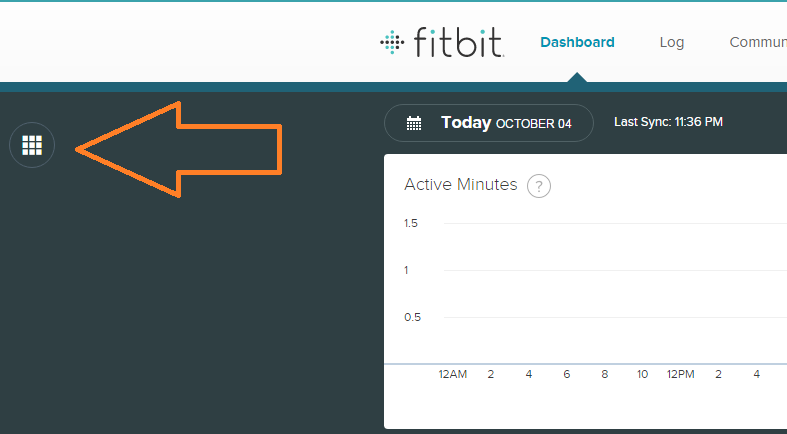
I really hope this helps. Keep me posted! 
Did you receive the answer you were looking for? Mark the post as an accepted solution! 🙂
Best Answer
07-11-2017
09:01
- last edited on
11-24-2025
06:26
by
MarreFitbit
Community Moderator Alumni are previous members of the Moderation Team, which ensures conversations are friendly, factual, and on-topic. Moderators are here to answer questions, escalate bugs, and make sure your voice is heard by the larger Fitbit team. Learn more
07-11-2017
09:01
- last edited on
11-24-2025
06:26
by
MarreFitbit
@Brookell thanks for clarifying that info. In order to show your tiles using your app check out these posts: Tiles disappeared from dashboard & Missing tiles.
Hope this helps. Keep me posted!
Did you receive the answer you were looking for? Mark the post as an accepted solution! 🙂
Best Answer
This doesn't help because the tiles show that they are there under edit. I'd already checked this because it's so obvious.
Best Answer
07-12-2017
18:28
- last edited on
11-24-2025
06:15
by
MarreFitbit
Community Moderator Alumni are previous members of the Moderation Team, which ensures conversations are friendly, factual, and on-topic. Moderators are here to answer questions, escalate bugs, and make sure your voice is heard by the larger Fitbit team. Learn more
07-12-2017
18:28
- last edited on
11-24-2025
06:15
by
MarreFitbit
@Brookell it's nice to hear back from you! Thanks for the explanation. If possible could you please post a screenshot about it?
I'll be looking forward to your new comments!
Did you receive the answer you were looking for? Mark the post as an accepted solution! 🙂
Best Answer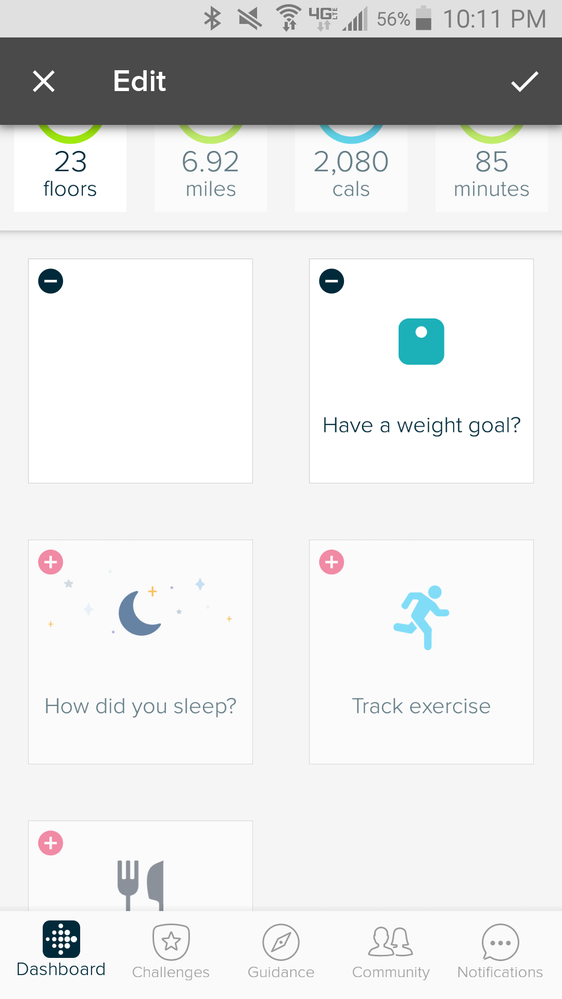
07-17-2017
13:11
- last edited on
08-13-2025
13:23
by
MarreFitbit
Community Moderator Alumni are previous members of the Moderation Team, which ensures conversations are friendly, factual, and on-topic. Moderators are here to answer questions, escalate bugs, and make sure your voice is heard by the larger Fitbit team. Learn more
07-17-2017
13:11
- last edited on
08-13-2025
13:23
by
MarreFitbit
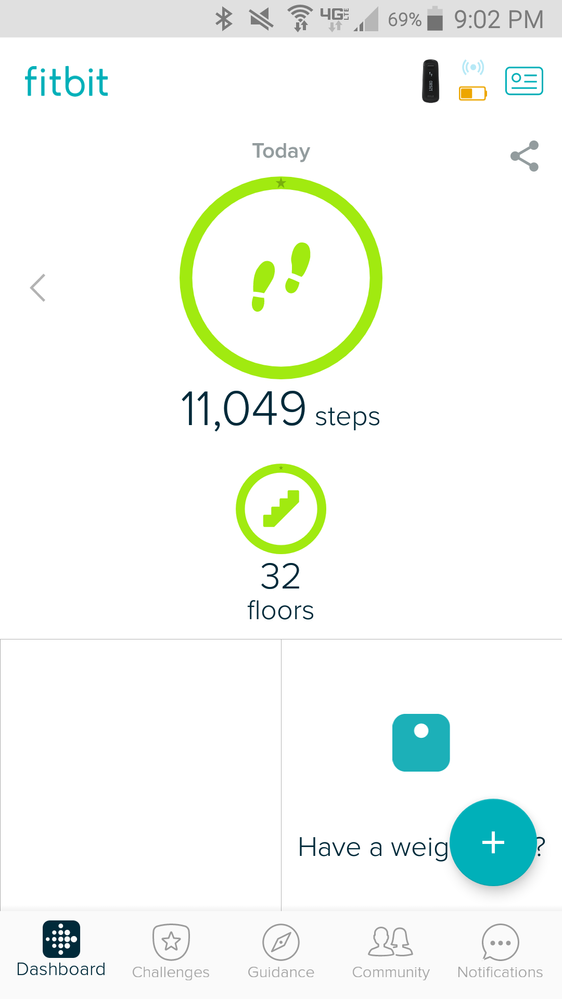
@Brookell thanks for getting back to me and for posting the screenshots! Have you checked that you're running your Fitbit app latest version? Do let me know!
Please note that the latest version for the Fitbit app for Android was released on July 13th and that's version 2.53.
Hey, what happens when you tap the pink plus sing in the top left of your tiles? I also see that miles, calories and active minutes aren't selected either.
If you're not able to tap on them to add them to your Dashboard, then I suggest logging out from your app, restarting your mobile device and then logging back in.
Hope this helps. Keep me posted! 
Did you receive the answer you were looking for? Mark the post as an accepted solution! 🙂
Best Answer
Yes, I have the latest version and it updates automatically. I've had the issue since the new dashboard came out. I never had any issues with the old dashboard in the over 4 years I used it.
I am able to add other tiles, but don't want them. The sleep tile regularly appears on its own as well. I've also tried to rearrange the tiles, but the water still has the same issue.
Best Answer
07-19-2017
16:16
- last edited on
08-13-2025
13:22
by
MarreFitbit
Community Moderator Alumni are previous members of the Moderation Team, which ensures conversations are friendly, factual, and on-topic. Moderators are here to answer questions, escalate bugs, and make sure your voice is heard by the larger Fitbit team. Learn more
07-19-2017
16:16
- last edited on
08-13-2025
13:22
by
MarreFitbit
@Brookell okay, I suggest removing all of your tiles and then adding them again. Let me know what happens.
I was investigating further and I wasn't able to find any known issue as of yet with the tiles being affected after the new dashboard update.
I recommend logging out, restarting your mobile device and then logging back in again. Your info should be refreshed. Hope this helps!
Did you receive the answer you were looking for? Mark the post as an accepted solution! 🙂
Best Answer
07-25-2017
14:02
- last edited on
08-13-2025
13:22
by
MarreFitbit
Community Moderator Alumni are previous members of the Moderation Team, which ensures conversations are friendly, factual, and on-topic. Moderators are here to answer questions, escalate bugs, and make sure your voice is heard by the larger Fitbit team. Learn more
07-25-2017
14:02
- last edited on
08-13-2025
13:22
by
MarreFitbit
@Brookell that definitely doesn't sound like normal behavior. Please make sure that you're running your app's latest version. Just out of curiosity, are you also experiencing this issue from Fitbit.com Dashboard as well? Do let me know!
Looking forward to hearing back from you!
Did you receive the answer you were looking for? Mark the post as an accepted solution! 🙂
Best Answer
07-26-2017
17:23
- last edited on
08-13-2025
12:45
by
MarreFitbit
Community Moderator Alumni are previous members of the Moderation Team, which ensures conversations are friendly, factual, and on-topic. Moderators are here to answer questions, escalate bugs, and make sure your voice is heard by the larger Fitbit team. Learn more
07-26-2017
17:23
- last edited on
08-13-2025
12:45
by
MarreFitbit
@Brookell thanks for clarifying this info for me. What happens when you try to tap the plus "+" sign located in the upper left corner of your tiles? Do let me know.
If your tracker is properly paired and your app is running the latest version all of your tiles should show in your mobile dashboard.
Keep me posted!
Did you receive the answer you were looking for? Mark the post as an accepted solution! 🙂
Best Answer