
Join us on the Community Forums!
-
Community Guidelines
The Fitbit Community is a gathering place for real people who wish to exchange ideas, solutions, tips, techniques, and insight about the Fitbit products and services they love. By joining our Community, you agree to uphold these guidelines, so please take a moment to look them over. -
Learn the Basics
Check out our Frequently Asked Questions page for information on Community features, and tips to make the most of your time here. -
Join the Community!
Join an existing conversation, or start a new thread to ask your question. Creating your account is completely free, and takes about a minute.
Not finding your answer on the Community Forums?
- Community
- Product Help Forums
- One
- Re: setup question
- Mark Topic as New
- Mark Topic as Read
- Float this Topic for Current User
- Bookmark
- Subscribe
- Mute
- Printer Friendly Page
- Community
- Product Help Forums
- One
- Re: setup question
setup question
- Mark Topic as New
- Mark Topic as Read
- Float this Topic for Current User
- Bookmark
- Subscribe
- Mute
- Printer Friendly Page
01-03-2016
14:22
- last edited on
01-03-2016
17:02
by
MatthewFitbit


01-03-2016
14:22
- last edited on
01-03-2016
17:02
by
MatthewFitbit
Is there an easy way to set up this device?
Moderator Edit: Clarified subject
 Best Answer
 Fitbit Product Experts Alumni are retired members of the Fitbit Product Expert Program. Learn more
Hi @easyara. There sure is. If you tell us what device you're using to set your Fitbit One tracker and have run into difficulties, perhaps we can offer more focused tips. But for now, perhaps this link will help:
Please click here >>> How do I set up my tracker?
TW
Fitbit Product Experts Alumni are retired members of the Fitbit Product Expert Program. Learn more
Hi @Peter01. Which operating system are you running on your computer?


____________________________________________________________________________
(If this tip solved the problem for you, please mark this post solved, as this will be helpful to other users experiencing similar issues.)
Best Answer
Best Answer
Fitbit Product Experts Alumni are retired members of the Fitbit Product Expert Program. Learn more
Hi @Peter01. Here are a few tips.
- Please make sure that your Windows Xp has the latest update.
- Double-check and make sure that you've downloaded the Windows PC Fitibit Connect and not Win 10.
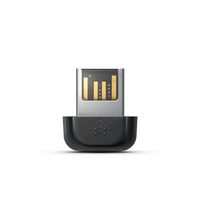
- Please make sure that the Fitbit dongle is plugged into a USB port on your computer.
Fitbit dongle - If you have all this and still no joy, disconnect the dongle, sign-off your account, clear your internet cache, and do a complete PC shut-down; then reboot again and once disc activity has ceased, plug-in the Fitbit dongle again and wait for the system to recognize it. The fire up Fitbit Connect and tell me what is the date/time stamp for your last successful sync shown at the top left of your dashboard page.
- Still no joy! Try restarting your One, using these instructions: click here Restart.
Hope this helps. Please let us know how it goes.
____________________________________________________________________________
(If this tip solved the problem for you, please mark this post solved, as this will be helpful to other users experiencing similar issues.)
Best Answer
Fitbit Product Experts Alumni are retired members of the Fitbit Product Expert Program. Learn more
Hi again @Peter01. I presume that when you set up your tracker with your Xp computer, that you followed the usual set-up instructions, as detailed out in this help document, yes?
Hope this helps. Please let us know how it goes.
____________________________________________________________________________
(If this tip solved the problem for you, please mark this post solved, as this will be helpful to other users experiencing similar issues.)
Best Answer
Best Answer
Fitbit Product Experts Alumni are retired members of the Fitbit Product Expert Program. Learn more
Hi @Peter01. On your main dashboard page, the one that's blank, you should see a small icon that looks something like this:

If you click on it, you'll be able to select the tiles that you'd like to see on your dashboard.
Hope this helps. Please let us know how it goes.
____________________________________________________________________________
(If this tip solved the problem for you, please mark this post solved, as this will be helpful to other users experiencing similar issues.)
Best Answer
Best Answer
Fitbit Product Experts Alumni are retired members of the Fitbit Product Expert Program. Learn more
No image posted @Peter01. To post an image, you first have to save it on your computer and use the 9th icon from the left when you're on the compose page.
Best Answer
Best Answer
Fitbit Product Experts Alumni are retired members of the Fitbit Product Expert Program. Learn more
Hi @Peter01. Which browser are you using?
____________________________________________________________________________
(If this tip solved the problem for you, please mark this post solved, as this will be helpful to other users experiencing similar issues.)
Best Answer
Best Answer
Fitbit Product Experts Alumni are retired members of the Fitbit Product Expert Program. Learn more
Hi again @Peter01. There's no harm in having a second browser installed and see how it goes. It may not work, but there no harm in trying. I would download and install Firefox and see what happens with you sign on at www.fitbit.com. 
Hope this helps. Please let us know how it goes.
____________________________________________________________________________
(If this tip solved the problem for you, please mark this post solved, as this will be helpful to other users experiencing similar issues.)
Best Answer
Best Answer
Fitbit Product Experts Alumni are retired members of the Fitbit Product Expert Program. Learn more
What do you mean 'blocked'? Are you on a corporate computer? If not, there is something in your firewall settings that is preventing you downloading and installing Firefox. Please clarify.
TW
Best Answer
Best Answer