
Join us on the Community Forums!
-
Community Guidelines
The Fitbit Community is a gathering place for real people who wish to exchange ideas, solutions, tips, techniques, and insight about the Fitbit products and services they love. By joining our Community, you agree to uphold these guidelines, so please take a moment to look them over. -
Learn the Basics
Check out our Frequently Asked Questions page for information on Community features, and tips to make the most of your time here. -
Join the Community!
Join an existing conversation, or start a new thread to ask your question. Creating your account is completely free, and takes about a minute.
Not finding your answer on the Community Forums?
- Community
- Product Help Forums
- Other Charge Trackers
- Fitbit won’t turn on since doing update
- Mark Topic as New
- Mark Topic as Read
- Float this Topic for Current User
- Bookmark
- Subscribe
- Mute
- Printer Friendly Page
- Community
- Product Help Forums
- Other Charge Trackers
- Fitbit won’t turn on since doing update
Fitbit won’t turn on since doing update
ANSWERED- Mark Topic as New
- Mark Topic as Read
- Float this Topic for Current User
- Bookmark
- Subscribe
- Mute
- Printer Friendly Page
11-20-2017
15:06
- last edited on
09-06-2020
20:15
by
MatthewFitbit


11-20-2017
15:06
- last edited on
09-06-2020
20:15
by
MatthewFitbit
Hi. I attempted to do that in app update. It started just fine and even gave me the Partial scroll bar on my charge. However, not it won’t come on. Won’t even charge. My battery was completely full prior to the update. Any suggestions?
Answered! Go to the Best Answer.
Accepted Solutions

 Fitbit Product Experts Alumni are retired members of the Fitbit Product Expert Program. Learn more
This is what mine looked like half way through the update.
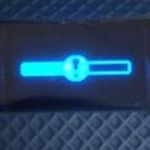
Thisia how I completed the update.
Go to your Bluetooth settings on your iPhone and find your tracker, tap the (!) exclamation point and select "Forget this device".
To pair your tracker's Bluetooth from the Fitbit app do the following:
From your mobile Dashboard tap the Account icon
Tap your tracker's picture on the left side
Tap Notifications; move the slide over till it turns green, then a pop-up message should appear requesting permission to set up your tracker to your iPhone's Bluetooth
Tap Pair when prompted too
Let the download complete, be patience.
Now do a sync
More info on how I got it to complete the download
https://help.fitbit.com/articles/en_US/Help_article/2047

ALAN | VAN,B.C. Canada Community Council Member
Versa, Charge, Charge HR, Ionic, Ace, Aria 2 scale, Flyer headphones - iOS
Click here Fitbit help for more solutions
>Contact
Fitbit Product Experts Alumni are retired members of the Fitbit Product Expert Program. Learn more
This is what mine looked like half way through the update.
Thisia how I completed the update.
Go to your Bluetooth settings on your iPhone and find your tracker, tap the (!) exclamation point and select "Forget this device".
To pair your tracker's Bluetooth from the Fitbit app do the following:
From your mobile Dashboard tap the Account icon
Tap your tracker's picture on the left side
Tap Notifications; move the slide over till it turns green, then a pop-up message should appear requesting permission to set up your tracker to your iPhone's Bluetooth
Tap Pair when prompted too
Let the download complete, be patience.
Now do a sync
More info on how I got it to complete the download
https://help.fitbit.com/articles/en_US/Help_article/2047
ALAN | VAN,B.C. Canada Community Council Member
Versa, Charge, Charge HR, Ionic, Ace, Aria 2 scale, Flyer headphones - iOS
Click here Fitbit help for more solutions
>Contact

This did not work for me. My Fitbit is locked and I can not restart it. I have tried all methods of trying to unlock it. Nothing works! Is this a ploy to force you to buy new Fitbits? Has anyone been able to get theirs unlocked???
When it came back on I had to remove it from my Fitbit app and from my
Bluetooth. Then when I set it up again it worked.
--
~ Jennice L. Battle ~
 Best Answer
Thanks so much. This helped me out.
Best Answer
