
Join us on the Community Forums!
-
Community Guidelines
The Fitbit Community is a gathering place for real people who wish to exchange ideas, solutions, tips, techniques, and insight about the Fitbit products and services they love. By joining our Community, you agree to uphold these guidelines, so please take a moment to look them over. -
Learn the Basics
Check out our Frequently Asked Questions page for information on Community features, and tips to make the most of your time here. -
Join the Community!
Join an existing conversation, or start a new thread to ask your question. Creating your account is completely free, and takes about a minute.
Not finding your answer on the Community Forums?
- Community
- Product Help Forums
- Other Charge Trackers
- Re: Step counter.
- Mark Topic as New
- Mark Topic as Read
- Float this Topic for Current User
- Bookmark
- Subscribe
- Mute
- Printer Friendly Page
- Community
- Product Help Forums
- Other Charge Trackers
- Re: Step counter.
How do I edit or adjust my Step Goal?
ANSWERED- Mark Topic as New
- Mark Topic as Read
- Float this Topic for Current User
- Bookmark
- Subscribe
- Mute
- Printer Friendly Page
03-13-2018
04:03
- last edited on
09-08-2020
18:54
by
MatthewFitbit


03-13-2018
04:03
- last edited on
09-08-2020
18:54
by
MatthewFitbit
How do I change the step goal on Charge 2 ? Thanks
Moderator edit: updated subject for clarity
Answered! Go to the Best Answer.
Accepted Solutions


 Community Moderators ensure that conversations are friendly, factual, and on-topic. We're here to answer questions, escalate bugs, and make sure your voice is heard by the larger Fitbit team. Learn more
Welcome to the Fitbit Community @Jeantil! Follow these steps to change your step goal:
- From the Fitbit app dashboard, tap or click the Account icon.
- Scroll to the Goals section.
- Tap the goal you want to view or adjust.
- Tap the individual element of the goal and follow the onscreen instructions to adjust it.
Note that you can also set and manage your goals using the fitbit.com dashboard, but the personalized guidance is only available in the Fitbit apps.
Now, to change the number of steps, floors, etc. on the Web based Dashboard you'll need to the "Activity Goals" tile (it should look like my image) and change the amount of steps, calories, or whatever goal you want to adjust:
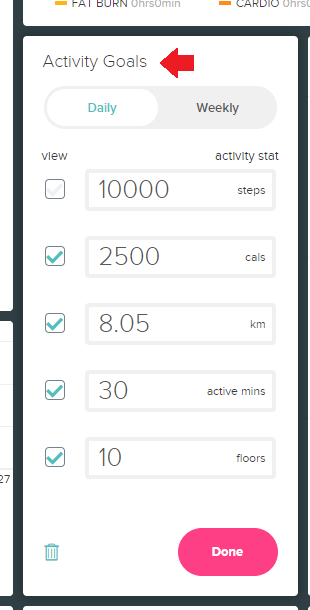
Hope this helps, I'll be around if you need further assistance!
Was my post helpful? Give it a thumbs up to show your appreciation! Of course, if this was the answer you were looking for, don't forget to make it the Best Answer! Als...
Community Moderators ensure that conversations are friendly, factual, and on-topic. We're here to answer questions, escalate bugs, and make sure your voice is heard by the larger Fitbit team. Learn more
Welcome to the Fitbit Community @Jeantil! Follow these steps to change your step goal:
- From the Fitbit app dashboard, tap or click the Account icon.
- Scroll to the Goals section.
- Tap the goal you want to view or adjust.
- Tap the individual element of the goal and follow the onscreen instructions to adjust it.
Note that you can also set and manage your goals using the fitbit.com dashboard, but the personalized guidance is only available in the Fitbit apps.
Now, to change the number of steps, floors, etc. on the Web based Dashboard you'll need to the "Activity Goals" tile (it should look like my image) and change the amount of steps, calories, or whatever goal you want to adjust:
Hope this helps, I'll be around if you need further assistance!
Was my post helpful? Give it a thumbs up to show your appreciation! Of course, if this was the answer you were looking for, don't forget to make it the Best Answer! Als...
I cannot locate where to change my activity goal on my new Charge 2. Can you help? Thank you. I want to change my steps.

SunsetRunner
My app doesn't have the weekly and daily tabs. I'd like to increase my weekly goal but keep the daily goals the same-unless I can enter different goals for different days.

@SunsetRunner The view that was posted in a screen shot comes from your fitbit.com (web) dashboard, not a phone app. When you are on your web dashboard, you will see a gear icon when you hover your cursor over the tile. Make your changes there.
Laurie | Maryland
Sense 2, Luxe, Aria 2 | iOS | Mac OS
Take a look at the Fitbit help site for further assistance and information.
Billye
 Best Answer
Community Moderators ensure that conversations are friendly, factual, and on-topic. We're here to answer questions, escalate bugs, and make sure your voice is heard by the larger Fitbit team. Learn more
Best Answer
Community Moderators ensure that conversations are friendly, factual, and on-topic. We're here to answer questions, escalate bugs, and make sure your voice is heard by the larger Fitbit team. Learn more
Welcome on board @Roysdgtr! Well, if you're on your Mac, I'd appreciate if you go to www.fitbit.com.
Once you're there, I'd like you to look for the tile that says "Today". Once you're in there, if you hover the mouse you'll see at the bottom of that tile a gear icon and an option that says "See More >". Click on the gear icon. See my image below:

Then, you'll get the following, and here you can change your goals:
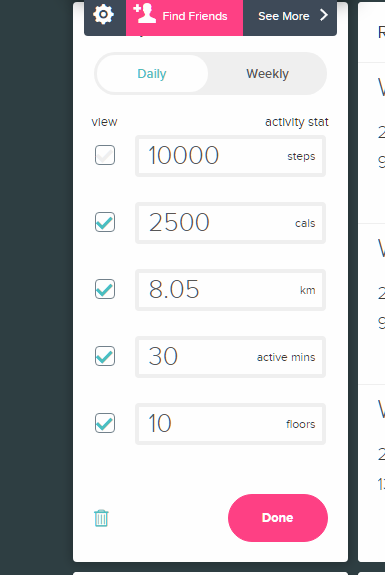
Don't forget to sync your tracker after making the changes. 
Let us know if you need further assistance!
Was my post helpful? Give it a thumbs up to show your appreciation! Of course, if this was the answer you were looking for, don't forget to make it the Best Answer! Als...
________________________
"Hope is the thing with feathers
That perches in the soul
And sings the tune without the words
And never stops at all."…Emily Dickinson
Judy (Stitt) Graessle
roysdgtr@iCloud.com
Best Answer
If you go to your dashboard via the website (not the app) and hover over either the Today module or the This Week module, at the bottom left corner of the module is a gear. Click on the gear and you will be able to adjust your daily or weekly goals respectively.
Best Answer

Hello,
the option is now available in (Fitbit Mobile app): Account / Activity & Welness / Daily Activity/ you just have to click on each activity and you can modify it.
hope it helps.
Best Answer
Can you tell me how to do it now? 2021, the app isn’t the same. There is no “goals section” anymore. At least no place to set number of steps to strive for, etc. Thanks
Best Answer
Hello,
the option is now available in (Fitbit Mobile app): Account / Activity & Welness / Daily Activity/ you just have to click on each activity and you can modify it.
hope it helps.
Well that sure was easy! Thank you. I think because it was gray it didn’t look editable. But that was simple , thanks again!
Best Answer