
Join us on the Community Forums!
-
Community Guidelines
The Fitbit Community is a gathering place for real people who wish to exchange ideas, solutions, tips, techniques, and insight about the Fitbit products and services they love. By joining our Community, you agree to uphold these guidelines, so please take a moment to look them over. -
Learn the Basics
Check out our Frequently Asked Questions page for information on Community features, and tips to make the most of your time here. -
Join the Community!
Join an existing conversation, or start a new thread to ask your question. Creating your account is completely free, and takes about a minute.
Not finding your answer on the Community Forums?
- Community
- Product Help Forums
- Other Charge Trackers
- How do I turn off "Quick View"?
- Mark Topic as New
- Mark Topic as Read
- Float this Topic for Current User
- Bookmark
- Subscribe
- Mute
- Printer Friendly Page
- Community
- Product Help Forums
- Other Charge Trackers
- How do I turn off "Quick View"?
How do I turn off "Quick View"?
ANSWERED- Mark Topic as New
- Mark Topic as Read
- Float this Topic for Current User
- Bookmark
- Subscribe
- Mute
- Printer Friendly Page
04-26-2019
15:46
- last edited on
11-17-2020
11:08
by
MatthewFitbit


04-26-2019
15:46
- last edited on
11-17-2020
11:08
by
MatthewFitbit
How can i disable the quick view. I don't like that the face lights up very time i move my wrist. when i had my charge 2 i was able to set it so the the face would only light up when i hit the side button.
Moderator edit: updated subject for clarity
Answered! Go to the Best Answer.
Accepted Solutions


 Community Moderators ensure that conversations are friendly, factual, and on-topic. We're here to answer questions, escalate bugs, and make sure your voice is heard by the larger Fitbit team. Learn more
@tweety256 It's great to see you in our Fitbit Community! Regarding your inquiry about how to turn off the "Quick View" on your Charge 3, please press the side button for 2 seconds and once the tracker vibrates, you will see 2 options: "Screen Wake" and "Notifications". Please tap the "Screen Wake" option in order to turn off the "Quick View" feature.
Thank you so much for your help @SunsetRunner!
I'll be around if you have any questions! 😀

SunsetRunner
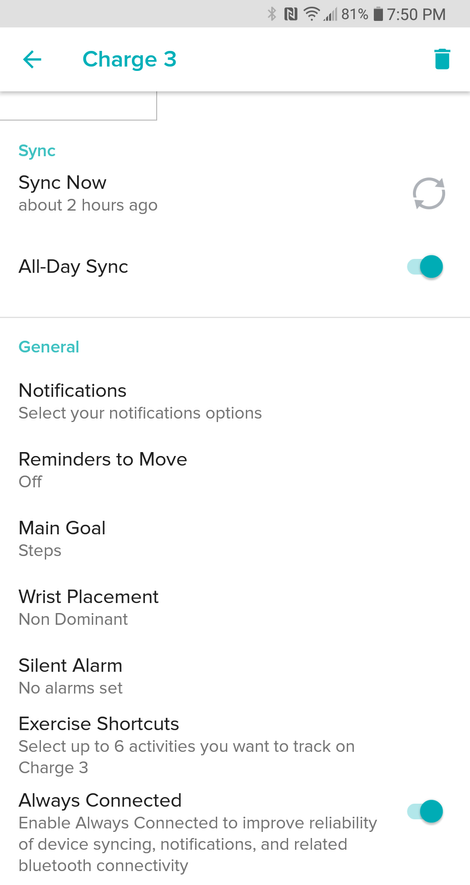
You can also turn this “quick view” feature off for the Charge 3, @tweety256 . From the Fitbit app on your phone, tap Account —> Charge 3 —> Quick view. You can toggle it on/off from there.
SunsetRunner
@tweety256 - I’m sorry my instructions did not help. Which phone do you have? Hopefully another Charge 3 user will step in.
 Best Answer
I have an android. but i have also tried to find the quick view toggle on my app on my amazon fire tablet and with my account on the website. non of these options show the quick view toggle.
Best Answer
SunsetRunner
@tweety256 - My grandson has a charge 3. I’ll be seeing him this evening. Between the two of us, we’ll figure it out for you!
Community Moderators ensure that conversations are friendly, factual, and on-topic. We're here to answer questions, escalate bugs, and make sure your voice is heard by the larger Fitbit team. Learn more
@tweety256 It's great to see you in our Fitbit Community! Regarding your inquiry about how to turn off the "Quick View" on your Charge 3, please press the side button for 2 seconds and once the tracker vibrates, you will see 2 options: "Screen Wake" and "Notifications". Please tap the "Screen Wake" option in order to turn off the "Quick View" feature.
Thank you so much for your help @SunsetRunner!
I'll be around if you have any questions! 😀
thank you @JuanJoFitbit that worked perfect. do you know how i can customize my display like you could with the charge 2. i don't like the stairs count to show the watch. i find the stair count is never correct. when i had my charge 2 i would only have only have steps, heart rate and distance as an option to show on the watch. i would see the other item when i opened the app.
Best Answer
Me too! I'm troubleshooting why my Charge 3 all of a sudden in last 3 days won't hold charge more than just about 24 hours
Best Answer
SunsetRunner
I’m afraid I cannot find an answer on customizing the screen on the charge 3. But @MC15 , you should try restarting your device. To do so:
- Attach your charge 3 to the charger
- While attached, press and hold the side button until the Fitbit logo appears and you feel a vibration.
- Try going thru this process 2 or 3 times.
That should snap it back to normal.
Best Answer
That worked yesterday but today my fitbit face went dark but with only lighted pixels down the middle of the screen. Tried again plugging in to charger, holding button side down, got it to vibrate, unplugged it and then plugged back in again when it wouldn't show. Now it's totally dark again.
Best Answer
This same thing is happening to me. It's vibrating, has green lights, and is vibrating in response to clock face changes from my app, but absolutely no display. App says it's 33% charged.
Best Answer
I still cannot get any response. I think I'm going to have to make time to call them and sit waiting till I get someone on the phone. That's what happened to me last year when I had other problems with my Charge 3. When they finally realized I tried everything they sent me another one.

I have a Charge three and her screen shot looks like I mine. There is no Quick View showing. I’ve looked everywhere on the app and it’s not to be found.
I have a charge 2, and recently the quickview disappeared from my phone ap. When I called fitbit help line I was told that this was deliberate, part of the latest update. I don't like the light coming on at night, and I don't like having to push the button on my tracker whenever I want to know the time or the steps.
The help person did figure out that the quick view can be turned on and off on the website -- login on the computer (not the phone), click the settings icon on the upper right, the quckview icon is there. I can turn it on and off from my computer. Not as convenient as doing it on my phone, but doable.
I'm very disappointed in fitbit that they removed this option from my phone ap. I hope it returns with the next update. PLEASE!
addedum: last evening when I was turning off my phone, the quick view option again appeared on my phone. I turned quick view off.
This morning the quick view does not appear on either my phone or my computer. I am again talking to to the help desk.
>> The step I missed was "click on charge 2" after clicking on settings (the gear icon).
Must be on the dashboard, and not in community.
Best Answer
addedum #2: after you do the settings/charge2/quick view on the dashboard, you must go back to your phone and do a sync.
so it is a two device process in the morning, and a one device process in the evening. I hope this changes so I can do both processes on my phone.
Best Answer
I learned (when I was talking to help people about my quickview/charge2 problem) that quick view can be changed on the tracker.
Hold down the button on the right for 3-5 seconds.
Best Answer