
Join us on the Community Forums!
-
Community Guidelines
The Fitbit Community is a gathering place for real people who wish to exchange ideas, solutions, tips, techniques, and insight about the Fitbit products and services they love. By joining our Community, you agree to uphold these guidelines, so please take a moment to look them over. -
Learn the Basics
Check out our Frequently Asked Questions page for information on Community features, and tips to make the most of your time here. -
Join the Community!
Join an existing conversation, or start a new thread to ask your question. Creating your account is completely free, and takes about a minute.
Not finding your answer on the Community Forums?
- Community
- Product Help Forums
- Other Versa Smartwatches
- Re: Replying to Texts on the FitBit Versa
- Mark Topic as New
- Mark Topic as Read
- Float this Topic for Current User
- Bookmark
- Subscribe
- Mute
- Printer Friendly Page
- Community
- Product Help Forums
- Other Versa Smartwatches
- Re: Replying to Texts on the FitBit Versa
Replying to Texts on the FitBit Versa
- Mark Topic as New
- Mark Topic as Read
- Float this Topic for Current User
- Bookmark
- Subscribe
- Mute
- Printer Friendly Page

Hi, I really like the FitBit Versa, but the reply to text application does not work. When I see a text message on the watch there are no options to reply to texts.
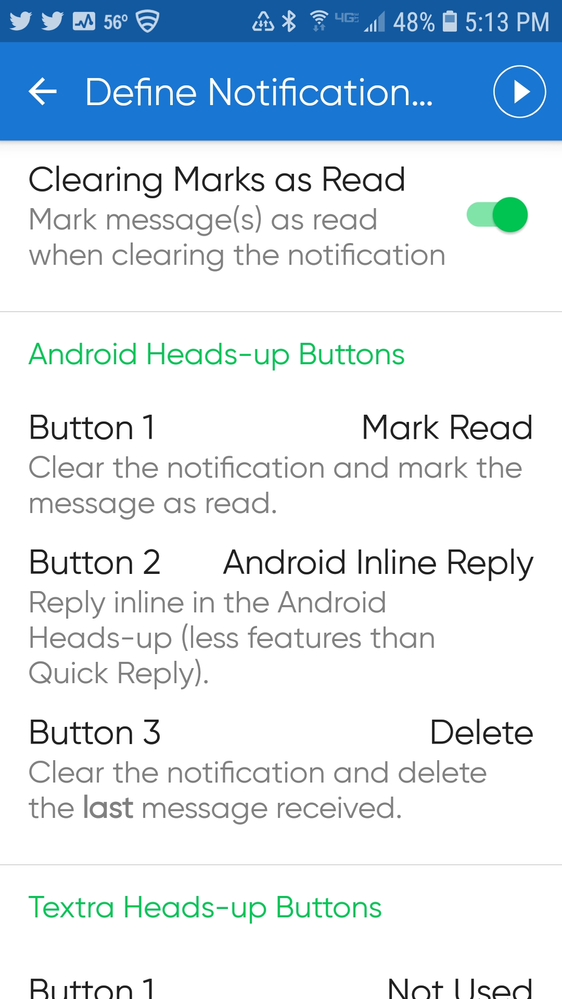
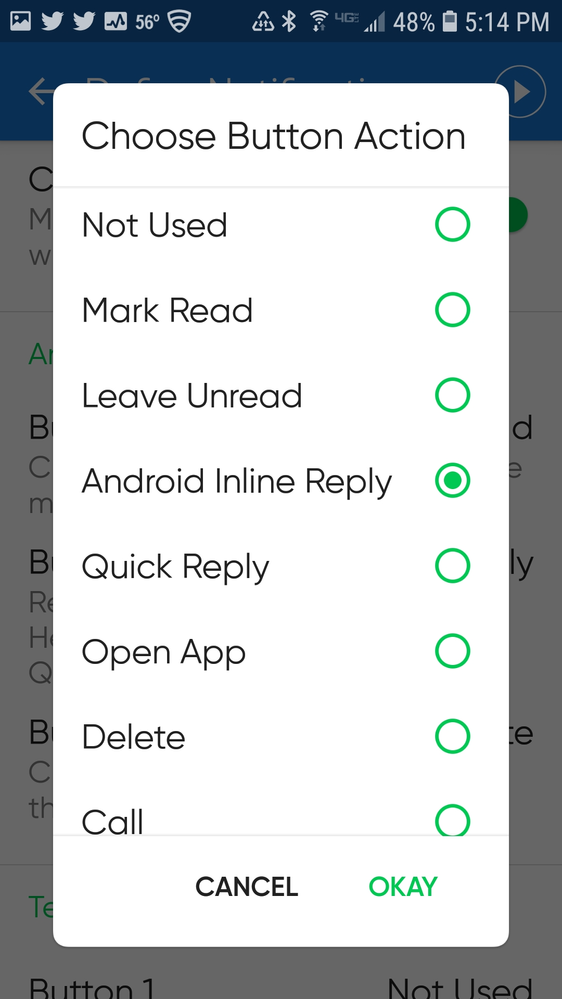

@Rperry I think the problem is that the Galaxy S5 isn't running Android 7.0 which is the minimum iOS required for the Quick Reply option. Check the Android OS version that you have.
Versa SE, Charge 2, Samsung Galaxy S10+
 Best Answer
Awesome, thank you. The Textra steps above worked perfectly on my S9+
Best Answer
I have a Galaxy S7 and I do not see the "inline reply" under the Textra Heads-Up Buttons. I have it under the Android Heads-Up Button. What am I doing wrong?
Best Answer
Would that be the same as "Android version 8.0.0? I'm sorry, I'm not familiar with the things internally like that.
Best Answer
@afoun028 Yes. If you are running Android 8.0 everything should work for you. I'm really not sure why you wouldn't have that option for button 2. However, without setting Button 2 to the Android In-Line Reply, using Textra you won't be able to reply. Maybe try a different texting app?
Versa SE, Charge 2, Samsung Galaxy S10+
Best Answer
I have just learned from Fitbit that IOS users do not have the ability to use quick reply with the Versa. The video on your website showing this as a feature was one of the primary selling points for me. The video is misleading as it doesn’t in any way say - “this will only work if you have an Android phone”. It is ridiculous that this feature is only available to Android users and not iPhone.
Please fix this and add this as a feature for IPhone users.
@Rperry I waited until my cellular carrier pushed out the higher Android OS to me. You might be able to install it yourself but you should check that your phone can handle the higher OS. Might be time to move to a newer phone. I would search the internet for information.
Versa SE, Charge 2, Samsung Galaxy S10+
Best Answer
I cannot get quick replys. I have a note 5. I texted textra. I went to define notification
And set up marked read, quick reply and close.
All I get on my versa is marked read, open and close. I have tried everything!! Help
Best Answer
@Nicolel123 It won't work with "Quick Reply" for button 2. You have to set button 2 to "Android In-Line Reply". Do you have this option?
Versa SE, Charge 2, Samsung Galaxy S10+
Best Answer
Best Answer
@Nicolel123 Yes you can use any texting app.
Versa SE, Charge 2, Samsung Galaxy S10+
Best Answer
How do I get my versa to give me quick replys
Best Answer
I'm not familiar with other messaging apps. Perhaps search the forum with the name of the messaging app you use. BTW, Message+ from Verizon is problematic.
Versa SE, Charge 2, Samsung Galaxy S10+
Best Answer