
Join us on the Community Forums!
-
Community Guidelines
The Fitbit Community is a gathering place for real people who wish to exchange ideas, solutions, tips, techniques, and insight about the Fitbit products and services they love. By joining our Community, you agree to uphold these guidelines, so please take a moment to look them over. -
Learn the Basics
Check out our Frequently Asked Questions page for information on Community features, and tips to make the most of your time here. -
Join the Community!
Join an existing conversation, or start a new thread to ask your question. Creating your account is completely free, and takes about a minute.
Not finding your answer on the Community Forums?
- Community
- Developers
- SDK Development
- Re: Countdown watch face?
- Mark Topic as New
- Mark Topic as Read
- Float this Topic for Current User
- Bookmark
- Subscribe
- Mute
- Printer Friendly Page
- Community
- Developers
- SDK Development
- Re: Countdown watch face?
Countdown watch face?
- Mark Topic as New
- Mark Topic as Read
- Float this Topic for Current User
- Bookmark
- Subscribe
- Mute
- Printer Friendly Page

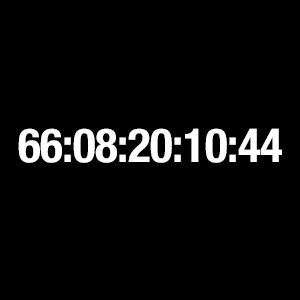
Exactly – a countdown to the day they turn 100. I kind of like the idea of having it as a clock face and not an app – a constant reminder of life passing instead of moving forward. Any ideas on where I should start? I’m a designer, but a programming noob.
 Best Answer
If you can wait until this evening, I can put the start of a project up on github that you/we can work off of.... Otherwise start the basic clock project on studio.fitbit.com
Best Answer
Here is a basic version of the main code:
import clock from "clock";
import document from "document";
import { preferences } from "user-settings";

import * as util from "../common/utils";

// Update the clock every second
clock.granularity = "seconds";

// Get a handle on the <text> element
const myLabel = document.getElementById("myLabel");

//This is the target
//This could be entered through the settings
// or by using the web API to poll the user DOB and adding 100 to the years.
let end = new Date("2082-12-03");

// Update the <text> element every tick with the current time
clock.ontick = (evt) => {
  //Now Date/time
  let today = evt.date;

  //Difference in miliseconds
  let diff = Math.abs(end - today);

  let years = parseInt(diff / 31536000000);
  diff -= years * 31536000000;

  let days = parseInt(diff / 86400000);
  diff -= days * 86400000

  let hours = parseInt(diff / 3600000)
  diff -= hours * 3600000

  let mins = parseInt(diff / 60000)
  diff -= mins * 60000

  let secs = parseInt(diff / 1000)
  diff -= secs * 1000

  console.log()
  myLabel.text = util.zeroPad(years) + ":" + util.zeroPad(days) + ":" + util.zeroPad(hours) + ":" + util.zeroPad(mins) + ":" + util.zeroPad(secs);
}
Let me know if you want to know more, work together, etc.
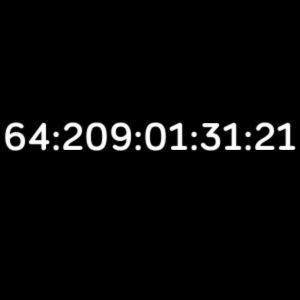
Wow! I’m speechless – magic happens when I sleep. I’ll get back to you ...
Thanks!
Best Answer
 Fitbit Product Experts Alumni are retired members of the Fitbit Product Expert Program. Learn more
Best Answer
Fitbit Product Experts Alumni are retired members of the Fitbit Product Expert Program. Learn more
Best Answer
want just the whole number part of the division, then I remove it and take
the next biggest chunk.
Best Answer
Thanks again! You kickstarted me into actually getting somewhere with the idea – I’ll keep playing with the clock face during the weekend.
So far I’ve mono spaced the digits and I’m toying with animations ... I’ll keep you posted.
Best Answer
Good to hear. Feel free to message me if you have any questions. If you don't mind; I might work on an app version that does arbitrary events.
Best Answer
Looking forward to see your app.
Best Answer Best Answer
I'm using your code from this post in a Christmas countdown app I'm working on. I noticed that it is using UTC time. Is there a quick way to make it use the correct time for the user's timezone? For example it's running 8 hours ahead of my time(PST). Might be a simple fix, I'm not very savvy with writing code. Thanks for the help.
Best Answer
It seems that you will have to use the companion to do this:
https://community.fitbit.com/t5/SDK-Development/Force-companion-to-pass-info/m-p/3010132#M6532).%C2%...
I can see about writing an example to do this tonight maybe.
Thank you, any help is appreciated.
I don't know much about coding but I learn well from examples, trial/error.
Best Answer Fitbit Product Experts Alumni are retired members of the Fitbit Product Expert Program. Learn more
Best Answer
Fitbit Product Experts Alumni are retired members of the Fitbit Product Expert Program. Learn more
Best Answer
Pretty easy if I remember correctly – it has been a few years and my fitbit died long before me.
Best Answer
Sent from my iPhone
Best Answer