
Join us on the Community Forums!
-
Community Guidelines
The Fitbit Community is a gathering place for real people who wish to exchange ideas, solutions, tips, techniques, and insight about the Fitbit products and services they love. By joining our Community, you agree to uphold these guidelines, so please take a moment to look them over. -
Learn the Basics
Check out our Frequently Asked Questions page for information on Community features, and tips to make the most of your time here. -
Join the Community!
Join an existing conversation, or start a new thread to ask your question. Creating your account is completely free, and takes about a minute.
Not finding your answer on the Community Forums?
- Community
- Health & Wellness
- Sleep Well
- Re: Sleep tracker disappeared!
- Mark Topic as New
- Mark Topic as Read
- Float this Topic for Current User
- Bookmark
- Subscribe
- Mute
- Printer Friendly Page
- Community
- Health & Wellness
- Sleep Well
- Re: Sleep tracker disappeared!
Sleep Tile disappeared
ANSWERED- Mark Topic as New
- Mark Topic as Read
- Float this Topic for Current User
- Bookmark
- Subscribe
- Mute
- Printer Friendly Page
02-27-2019
00:41
- last edited on
06-11-2021
09:19
by
WilsonFitbit


02-27-2019
00:41
- last edited on
06-11-2021
09:19
by
WilsonFitbit
Switched on my phone to look at sleep tracker just now, and the sleep tracker tile has disappeared. How do I find it again?! Has that function been discontinued? Very disgruntled....
Moderator edit: subject for clarity
Answered! Go to the Best Answer.
 Best Answer
Accepted Solutions

@PJs2019 @Mary27 Are you using the new Fitbit dashboard or the old? If you're on the new dashboard, simply click into the "Discover" tab at the bottom of your app, then click on "Health & Fitness Stats". From there, you can add the sleep metric back to your dashboard if it was inadvertently removed.
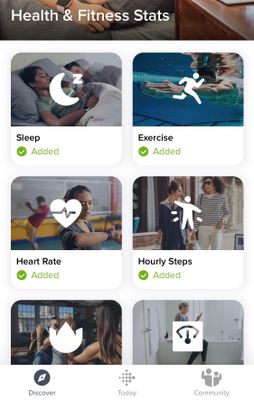
If you're on the old Dashboard with "tiles", check out this post.
Want to discuss ways to increase your activity? Visit Get Moving in the Lifestyle Discussion Forum.

Sleep tile disappeared about a week ago.i have tried all manoeuvres suggested to no avail. The FitBit is about 6 months old.
i would like a communication from the company as to what can be done or how I can be compensated..
@PJs2019 @Mary27 Are you using the new Fitbit dashboard or the old? If you're on the new dashboard, simply click into the "Discover" tab at the bottom of your app, then click on "Health & Fitness Stats". From there, you can add the sleep metric back to your dashboard if it was inadvertently removed.
If you're on the old Dashboard with "tiles", check out this post.
Want to discuss ways to increase your activity? Visit Get Moving in the Lifestyle Discussion Forum.

Me too! Has anyone seen a fix to this open button issue?
Has anyone found a fix for this? Same issue. Sleep disappeared and open is highlighted to click.


Sent from my iPad
From what I see (Fitbit can prove me wrong)
The sleep tracker is there but you can’t select to see it in the app unless you pay for the premium service, at one time all the stats where visible but they are slowly moving to a subscription model
And they do
after the last update the Fitbit had disconnected from my phone and iPad
when reconnecting the option to join premium and get your sleep analysis was the main display
for some reason when the Fitbit was not connected the sleep tracker disappeared ? But everything else was visible
Apologies to all
Sent from my iPad
06-03-2021
15:45
- last edited on
06-11-2021
09:07
by
WilsonFitbit

06-03-2021
15:45
- last edited on
06-11-2021
09:07
by
WilsonFitbit
The same thing happened to me. I went to the Discover - Heath & Fitness Stats and can see the Sleep icon but it will not let me add it. Very unhappy.
I agree. I would like a response as well from the company. I use this mainly to track my sleep.
I did this and the add option is not available.
Moderator Edit: Merged posts


 Community Moderators ensure that conversations are friendly, factual, and on-topic. We're here to answer questions, escalate bugs, and make sure your voice is heard by the larger Fitbit team. Learn more
Hello everyone. @peggys123 Welcome to the community forums.
I'm sorry for the experience and thank you for the information and for the steps you've tried prior to posting. Please make sure that your Fitbit device is currently paired to your Fitbit account, but if it's not paired, I recommend setting it up one more time by following the steps here: How do I set up my Fitbit device?
Once your Fitbit device is set up, please try to add the Sleep tile. For more information about how to add tiles, check: How do I use the Fitbit app?
Hope this helps.
Best Answer
SunsetRunner
I have the same issue which started after an iPhone update. Haven’t been able to get sleep or steps stats on the phone app since then. The answer from 2019 doesn’t help, the option to add sleep is not able to be selected. Even with a premium membership, which I have.
I tried all that you suggested. Pulled up health and fitness app, then sleep, still doesn’t allow me to “open” the sleep, hourly steps, or heart rate to add to my app screen. Please help! I am in a study for Am Cancer Society using the Fitbit 5 and need this info!