
Join us on the Community Forums!
-
Community Guidelines
The Fitbit Community is a gathering place for real people who wish to exchange ideas, solutions, tips, techniques, and insight about the Fitbit products and services they love. By joining our Community, you agree to uphold these guidelines, so please take a moment to look them over. -
Learn the Basics
Check out our Frequently Asked Questions page for information on Community features, and tips to make the most of your time here. -
Join the Community!
Join an existing conversation, or start a new thread to ask your question. Creating your account is completely free, and takes about a minute.
Not finding your answer on the Community Forums?
- Community
- Product Help Forums
- Surge
- Re: initiate sync?
- Mark Topic as New
- Mark Topic as Read
- Float this Topic for Current User
- Bookmark
- Subscribe
- Mute
- Printer Friendly Page
- Community
- Product Help Forums
- Surge
- Re: initiate sync?
initiate sync?
ANSWERED- Mark Topic as New
- Mark Topic as Read
- Float this Topic for Current User
- Bookmark
- Subscribe
- Mute
- Printer Friendly Page

There used to be a button on the PC app (is it an app and not a program anymore?) that would trigger a sync. Now it seems to sync once a day at a time of it's own choosing. Have they removed the sync option deliberately? I wonder why?
Answered! Go to the Best Answer.
 Best Answer
Accepted Solutions

 Fitbit Product Experts Alumni are retired members of the Fitbit Product Expert Program. Learn more
That where I have been trying to take you. It doesn't say Connect until you download and install
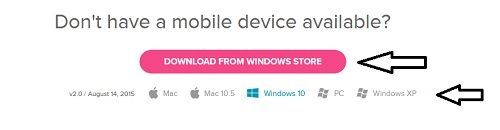
Here is the link again to where you need to go to download it
Download for Windows store Pick the version you want to download

Wendy | CA | Moto G6 Android
Want to discuss ways to increase your activity? Visit the Lifestyle Forum
Best Answer
Fitbit Product Experts Alumni are retired members of the Fitbit Product Expert Program. Learn more
Not quite sure I understand your question
You have never been able to sync on the computer unless you are talking about Fitbit connect. Which is a program on your computer. You just need to locate it
But in the App open it up tap on the Image of the Device. And you will see where to sync there
Wendy | CA | Moto G6 Android
Want to discuss ways to increase your activity? Visit the Lifestyle Forum
Best Answer
Thanks for your response.
I have the app set to All-Day Sync but it only seems to sync when it chooses, no rhyme or reason, about once a day. That doesn't sound like All-Day Sync. Or am I misinterpreting?
Best Answer
Also...
Where is the best place to get the Fitbit Connect software? Can't seem to find it on their site and I am wary of these squirrelly download sites?
Thanks again.
Best Answer
Fitbit Product Experts Alumni are retired members of the Fitbit Product Expert Program. Learn more
Windows store is squirrelly? Please Scroll down
Wendy | CA | Moto G6 Android
Want to discuss ways to increase your activity? Visit the Lifestyle Forum
Best Answer
Already have the Fitbit app. I thought somebody said that there is something else called Fitbit Connect?
Best Answer
Fitbit Product Experts Alumni are retired members of the Fitbit Product Expert Program. Learn more
That where I have been trying to take you. It doesn't say Connect until you download and install
Here is the link again to where you need to go to download it
Download for Windows store Pick the version you want to download
Wendy | CA | Moto G6 Android
Want to discuss ways to increase your activity? Visit the Lifestyle Forum
Best Answer
Oops. Silly me! I was using the website on the PC and that does not control sync.
Thanks for your patient advice.
Seems like only one device can be connected to the Surge at a time.
Best Answer