
Join us on the Community Forums!
-
Community Guidelines
The Fitbit Community is a gathering place for real people who wish to exchange ideas, solutions, tips, techniques, and insight about the Fitbit products and services they love. By joining our Community, you agree to uphold these guidelines, so please take a moment to look them over. -
Learn the Basics
Check out our Frequently Asked Questions page for information on Community features, and tips to make the most of your time here. -
Join the Community!
Join an existing conversation, or start a new thread to ask your question. Creating your account is completely free, and takes about a minute.
Not finding your answer on the Community Forums?
- Community
- Features
- Third-Party Integrations
- Re: Fitbit won't sync to MyFitnessPal
- Mark Topic as New
- Mark Topic as Read
- Float this Topic for Current User
- Bookmark
- Subscribe
- Mute
- Printer Friendly Page
- Community
- Features
- Third-Party Integrations
- Re: Fitbit won't sync to MyFitnessPal
My Fitness Pal
- Mark Topic as New
- Mark Topic as Read
- Float this Topic for Current User
- Bookmark
- Subscribe
- Mute
- Printer Friendly Page


 Best Answer

 Community Moderators ensure that conversations are friendly, factual, and on-topic. We're here to answer questions, escalate bugs, and make sure your voice is heard by the larger Fitbit team. Learn more
Welcome to the Fitbit Community @Organicjen. It's great to have you here. Thank you for your efforts while trying to resolve this issue before contacting us. Please try the following steps:
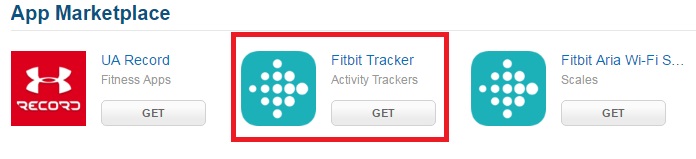
- Go to MyFitnessPal apps
- Select "Get" from the "Fitbit Tracker" option
- Choose "Deny"
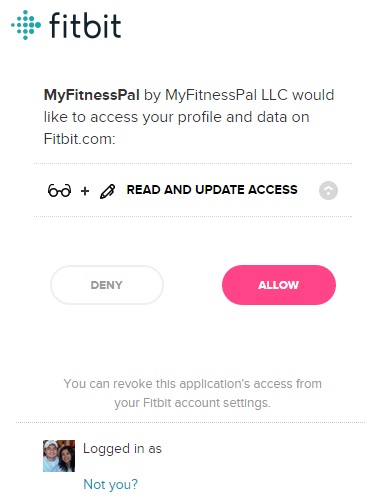
- Check out if the app has been unlinked from your Fitbit account by going to your online Dashboard > Applications
- Then, try again to link your two accounts.
Hope this helps. Let me know how it goes.
I moved this thread tot he Third-Party Integrations board because it's more related to the topic. Catch you later. 
Have you received the answer you were looking for? Choose the post as the best answer!
Hai ricevuto la risposta che stavi cercando? Accetta il post come soluzione!
¿Has recibido la respuesta que estabas buscando? ¡Acepta el post como solución!
Community Moderators ensure that conversations are friendly, factual, and on-topic. We're here to answer questions, escalate bugs, and make sure your voice is heard by the larger Fitbit team. Learn more
Thanks for the update and for your patience while dealing with this situation @Organicjen. In this case it could be a good idea reaching out MyFitnessPal Customer Support. They might be able to check out why it shows that you have two accounts with them and may allow access to the right account.
Keep up the super stepping. 
Have you received the answer you were looking for? Choose the post as the best answer!
Hai ricevuto la risposta che stavi cercando? Accetta il post come soluzione!
¿Has recibido la respuesta que estabas buscando? ¡Acepta el post como solución!
Best Answer
https://community.myfitnesspal.com/en/discussion/10126506/mfp-fitbit-linking-problem-so-frustratred
I can't see how my fitness pal would be able to help me. How can I ask them about a second account I have absolutely no details for? Has anyone ever had a solution to this issue?
Community Moderators ensure that conversations are friendly, factual, and on-topic. We're here to answer questions, escalate bugs, and make sure your voice is heard by the larger Fitbit team. Learn more
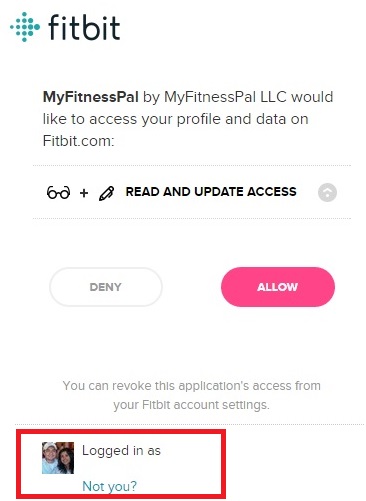
@Organicjen You can see the email address of the account you are linking by doing the process above and checking the section "Logged in as". There is actually no other option to see what email address is linked to your account.
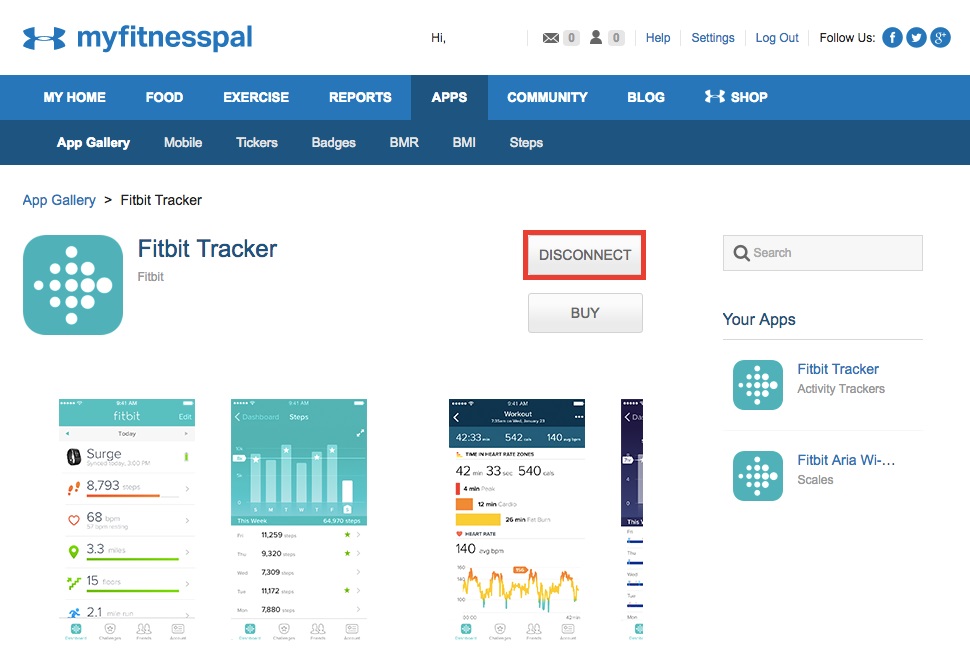
Please confirm if you have clicked "Disconnect" as shown in the screen shot below:
If the above still doesn't resolve the issue please be so kind to provide me with a screen shot of the message you are receiving that your Fitbit is synced to another MFP account.
Looking forward to your new comments. 
Have you received the answer you were looking for? Choose the post as the best answer!
Hai ricevuto la risposta che stavi cercando? Accetta il post come soluzione!
¿Has recibido la respuesta que estabas buscando? ¡Acepta el post como solución!
Best Answer
Best Answer
Community Moderators ensure that conversations are friendly, factual, and on-topic. We're here to answer questions, escalate bugs, and make sure your voice is heard by the larger Fitbit team. Learn more
Those are great news @Organicjen. I'm glad to hear that you are now back on track.
On another note, you are welcome to visit the Discussions board. You could find interesting topics to join and discuss out there.
Hope to see you around more often. 
Have you received the answer you were looking for? Choose the post as the best answer!
Hai ricevuto la risposta che stavi cercando? Accetta il post come soluzione!
¿Has recibido la respuesta que estabas buscando? ¡Acepta el post como solución!
Best Answer
This STILL is not working for me! I have tried literally EVERY fix listed in this thread - it really irritating!! 😐 Ive moved over from Garmin and am regretting that!
I have been able to successfully sync the information from MFP to my fitbit account however, the fitbit information is not being logged with MFP.
I have tried disconnecting and reconnecting the apps, uninstalling and reinstalling both app, in addition to trying to fix the issue while logged onto my accounts online at my desktop.
Fitbit is still receiving information from MFP in regards to calorie consumption but nothing from Fitbit is syncing with MFP. Now when I check the fitbit application settings it no longer says that myfitnesspal is an authorized app and won't let me add it. Help.
Best Answer
SunsetRunner
Contacted mfp and they confirmed there was a problem. I am now back on.
If you are still having issues
Disconnect on your MFP via website, then disconnect on your fitbit website account
Re connect then via your MFP account on website
Best Answer Best Answer
SunsetRunner
Hi @Cbonneyx
Have moved this thread from the Charge HR to the Third-Party Integrations section to increase the chance of getting a solution.
Your post will get more attention here.
Best Answer
Every now and then, my MFP says '0 tracker steps '
I have dsconected my acounts and revoked access etc. Then re connected then, still no change.
Best Answer
SunsetRunner
Hi @Daniiin_n
Have moved this thread from the Alta to the Third-Party Integrations section to increase the chance of getting a solution.
Your post will get more attention here.
Best Answer
Hi - just wondering if there is anyone else having issues with fitbit exercise syncing properly to mfp? I worked out this a.m. and burned 311 calories, but MFP is only showing a calorie burn of 143 calories. The same thing happened yesterday. Any ideas?
TIA...
Best Answer
 Best Answer