
Join us on the Community Forums!
-
Community Guidelines
The Fitbit Community is a gathering place for real people who wish to exchange ideas, solutions, tips, techniques, and insight about the Fitbit products and services they love. By joining our Community, you agree to uphold these guidelines, so please take a moment to look them over. -
Learn the Basics
Check out our Frequently Asked Questions page for information on Community features, and tips to make the most of your time here. -
Join the Community!
Join an existing conversation, or start a new thread to ask your question. Creating your account is completely free, and takes about a minute.
Not finding your answer on the Community Forums?
- Community
- Features
- Third-Party Integrations
- Sync LG Health steps with Fitbit
- Mark Topic as New
- Mark Topic as Read
- Float this Topic for Current User
- Bookmark
- Subscribe
- Mute
- Printer Friendly Page
- Community
- Features
- Third-Party Integrations
- Sync LG Health steps with Fitbit
Sync LG Health steps with Fitbit
- Mark Topic as New
- Mark Topic as Read
- Float this Topic for Current User
- Bookmark
- Subscribe
- Mute
- Printer Friendly Page

 Best Answer

 Community Moderator Alumni are previous members of the Moderation Team, which ensures conversations are friendly, factual, and on-topic. Moderators are here to answer questions, escalate bugs, and make sure your voice is heard by the larger Fitbit team. Learn more
Hi @Lida24 it is nice to have you in the Fitbit community with us. I'm sorry to hear you forgot to put your Fitbit this morning (tends to happen to me too  ) but I'm glad to hear you track your steps with your phone.
It is not possible to sync LG health with Fitbit. However, I encourage you to manually log your steps with the help of your Fitbit dashboard. Go to Log - Activities - scroll down until you see:
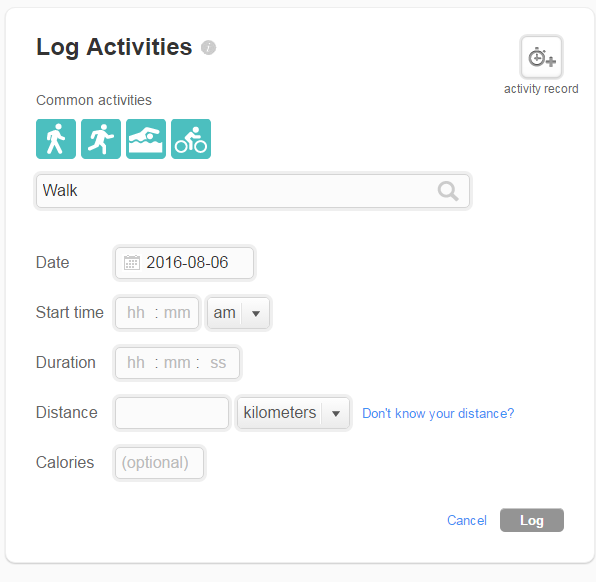
And there you go!
Hope this information helps!

Hey Carlos, has that changed yet? If not is there a way to download the data into a spreadsheet or something?

 Community Moderator Alumni are previous members of the Moderation Team, which ensures conversations are friendly, factual, and on-topic. Moderators are here to answer questions, escalate bugs, and make sure your voice is heard by the larger Fitbit team. Learn more
Hello @Walking4Health, its nice to see new faces around. So far this is not possible. You can download or export data into a spreadsheet but only in your Fitbit account by accessing to the option "Data Export" Here you are able to download your Fitbit data as an XLS file (Microsoft Excel) or CSV, which can be opened by many paid, free or shareware applications.
See you around. If you have more questions just let me know.
"Great things are done by a series of small things brought together.” What's Cooking?


