
Join us on the Community Forums!
-
Community Guidelines
The Fitbit Community is a gathering place for real people who wish to exchange ideas, solutions, tips, techniques, and insight about the Fitbit products and services they love. By joining our Community, you agree to uphold these guidelines, so please take a moment to look them over. -
Learn the Basics
Check out our Frequently Asked Questions page for information on Community features, and tips to make the most of your time here. -
Join the Community!
Join an existing conversation, or start a new thread to ask your question. Creating your account is completely free, and takes about a minute.
Not finding your answer on the Community Forums?
- Community
- Developers
- Web API Development
- Re: Authorize in Ionic/ngCordova app
- Mark Topic as New
- Mark Topic as Read
- Float this Topic for Current User
- Bookmark
- Subscribe
- Mute
- Printer Friendly Page
- Community
- Developers
- Web API Development
- Re: Authorize in Ionic/ngCordova app
Authorize in Ionic/ngCordova app
ANSWERED- Mark Topic as New
- Mark Topic as Read
- Float this Topic for Current User
- Bookmark
- Subscribe
- Mute
- Printer Friendly Page

I am working on an Ionic (http://ionicframework.com) app that supports both iOs and Android. It is basically an AnjularJS web app that is wrapped by ngCordova so it can be used like a native app on mobile devices.
To load the authorization page, we would like to use the inAppBrowser plugin (http://ngcordova.com/docs/plugins/inAppBrowser/). This opens a browser window that overlays the app. The browser window shows the url of the webpage and a "Done" or "X" button to return the user to the app. Does this satisfy the conditions outlined under Obtaining Consent in the API docs?
Answered! Go to the Best Answer.
Accepted Solutions


 Fitbit Developers oversee the SDK and API forums. We're here to answer questions about Fitbit developer tools, assist with projects, and make sure your voice is heard by the development team.
@wvogt @Alxn: Apologies for the delay. I had to look at the source for this. Unfortunately, inAppBrowser plugin is using UIWebView in iOS and WebView in Android instead of SFSafariViewController and Chrome Custom Tabs. So instead you should open the authorization in the native browser and use an custom URL scheme to return to your app.
And maybe submit a feature request to the plugin author to update to the more secure embedded browser options. If you link it, I'll +1 it.
Fitbit Developers oversee the SDK and API forums. We're here to answer questions about Fitbit developer tools, assist with projects, and make sure your voice is heard by the development team.
Sure,
We haven't implemented the Fitbit connection page yet, but here are some
screen shots of that show what the browser window looks like.
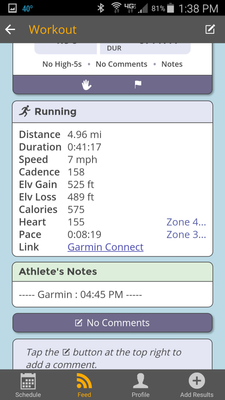
The first image shows our application with a hyperlink to Garmin Connect at the bottom of the Running section.
Clicking that link opens up the browser overlay that shows the website.
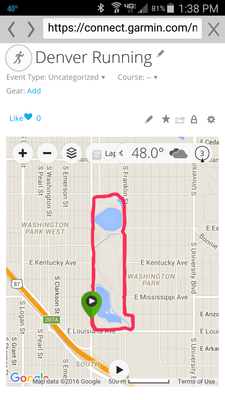
The URL is at the top, with an X next to it. When the user touches the X, the overlay is closed, and they are back in the application where they left it. On iOS devices, the URL bar is at the bottom of the page and has a "Done" button rather than an X.
We would use this same method with Fitbit, by having a "Connect with
Fitbit" button that would open the browser overlay with the URL clearly
visible.
Does that work?
Thanks,
Wade
 Best Answer
Hi @JeremiahFitbit, I actually have the very same question regarding the inappbrowser plugin. Could you have a closer look and verify if it complies with the fitbit policies?
Best Answer
Fitbit Developers oversee the SDK and API forums. We're here to answer questions about Fitbit developer tools, assist with projects, and make sure your voice is heard by the development team.
@wvogt @Alxn: Apologies for the delay. I had to look at the source for this. Unfortunately, inAppBrowser plugin is using UIWebView in iOS and WebView in Android instead of SFSafariViewController and Chrome Custom Tabs. So instead you should open the authorization in the native browser and use an custom URL scheme to return to your app.
And maybe submit a feature request to the plugin author to update to the more secure embedded browser options. If you link it, I'll +1 it.

Jeremiah,
Wondering if the rules are still the same: Apple is turning down apps that are not using the in-app browser right now so going to an external link would be a definite challenge.
Could you let us know if there is a change on fitbit's end?
Thank you!
Gregory
Best Answer