
Join us on the Community Forums!
-
Community Guidelines
The Fitbit Community is a gathering place for real people who wish to exchange ideas, solutions, tips, techniques, and insight about the Fitbit products and services they love. By joining our Community, you agree to uphold these guidelines, so please take a moment to look them over. -
Learn the Basics
Check out our Frequently Asked Questions page for information on Community features, and tips to make the most of your time here. -
Join the Community!
Join an existing conversation, or start a new thread to ask your question. Creating your account is completely free, and takes about a minute.
Not finding your answer on the Community Forums?
- Community
- Developers
- Web API Development
- Make your OAuth2.0 request in less than 1 minute.
- Mark Topic as New
- Mark Topic as Read
- Float this Topic for Current User
- Bookmark
- Subscribe
- Mute
- Printer Friendly Page
- Community
- Developers
- Web API Development
- Make your OAuth2.0 request in less than 1 minute.
Make your OAuth2.0 request in less than 1 minute.
- Mark Topic as New
- Mark Topic as Read
- Float this Topic for Current User
- Bookmark
- Subscribe
- Mute
- Printer Friendly Page
- « Previous
-
- 1
- 2
- Next »



 Fitbit Developers oversee the SDK and API forums. We're here to answer questions about Fitbit developer tools, assist with projects, and make sure your voice is heard by the development team.
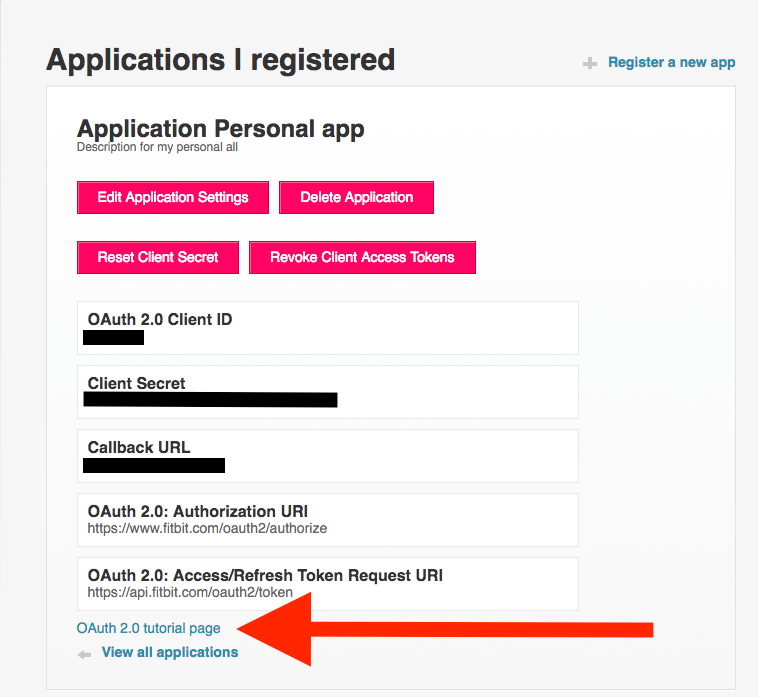
Please make sure to check out our tutorial page with step-by step instructions on how to obtain access token or how to use code and refresh token flow.
Note: each access token issued by Fitbit is JWT token. Use jwt.io to get insights about what data this token has. Worth noting refresh token is not JWT token.

Okay, I found out where I went wrong! Two things:
- OAuth 2.0 Application Type: Server
- I read that to pull data from your own profile database it had to be either Client or Personal. This was confusing, but setting it to Server fixed it apparently.
- Callback URL: https://app-settings.fitbitdevelopercontent.com/simple-redirect.html
- All other examples I've seen used "https://localhost" and Fitbit REALLY doesn't like that.
 Best Answer


what did you paste in the box to get the auth token? Never run a curl request before and have 0 idea how to
 Fitbit Developers oversee the SDK and API forums. We're here to answer questions about Fitbit developer tools, assist with projects, and make sure your voice is heard by the development team.
Most computers these days have curl installed as part of the operating system. If not, you can download the tools from https://curl.se/. Once setup, cut/paste the curl statement provided and execute it at a command prompt. The result will provide the access token and refresh token, similarly to this
{"access_token":"eyJhbGciOiJIUzI1NiJ9.eyJhdWQiOiIyMkJYVEwiLCJzdWIiOiI2SzVaXQiLCJ0eXAiOiJhY2Nlc3NfdG9rZW4iLCJzY29wZXMiOiJ3aHIgd251dCB3cHJvIHdzbGUgd3dlaSB3c29jIHdhY3Qgd3NldCB3bG9jIiwiZXhwIjoxNjQ5ODA1ODAwLCJpYXQiOjE2NDk3NzcwMDB9.6I8wkZZ_ytudFujdXGDIK85QSNNlm6274Pt93c34xAI","expires_in":28800,"refresh_token":"3e46e3a7cdcb6c19943a7cc9f0f18c3cca54fe08757df12e5449","scope":"heartrate nutrition sleep social activity location profile settings weight","token_type":"Bearer","user_id":"123ABC"}
Enter your response into the field at step 2.
Senior Technical Solutions Consultant
Fitbit Partner Engineering & Web API Support | Google
Best Answer
So do I copy/paste everything starting from "curl" and ending at ..."/token"? Instructions aren't clear to me.
Fitbit Developers oversee the SDK and API forums. We're here to answer questions about Fitbit developer tools, assist with projects, and make sure your voice is heard by the development team.
Yes, you will copy the entire curl statement and execute it at a command prompt on your machine. If you get an error that curl cannot be found, then you will need to download and install the curl application (https://curl.se/).
Senior Technical Solutions Consultant
Fitbit Partner Engineering & Web API Support | Google

Is there any flow that can allow for indefinite valid authentication? I want to have a stand-alone device running that can access a personal fitbit, but the token would eventually time out and I'd need to get back in and get a new code. Is there any way to make it so the stand-alone device can just keep running?
Best Answer
Fitbit Developers oversee the SDK and API forums. We're here to answer questions about Fitbit developer tools, assist with projects, and make sure your voice is heard by the development team.
Fitbit does not support an authorization flow that creates a single, non-expiring access token. But, there are 2 options that are close
1. Authorization Code Grant Flow - this authorization flow creates a short-lived token and a single use, refresh token. When the access token expires, you use the refresh token to obtain a new access token and refresh token. By maintaining the tokens through this process, the application maintains access to the user's data until the Fitbit user revokes consent. See https://dev.fitbit.com/build/reference/web-api/developer-guide/best-practices/#Using-Tokens-Effectiv...
2. Implicit Grant Flow - this authorization flow is less secure than the Authorization Code Grant Flow because it is susceptible to man-in-the-middle attacks. However, this flow will create an access token that can last for up to 1 year. The application will not receive a refresh token. When the access token expires, the user will need to go through the authorization flow again for the application to obtain an new access token.
Gordon
Senior Technical Solutions Consultant
Fitbit Partner Engineering & Web API Support | Google
Best Answer
Hello @IoanbsuFitbit Are there any considerations in getting tokens via CURL vs Postman/Insomnia/ Nodejs Axios library?
I'm getting proper tokens from CURL commands, but migrating such request to Axios... it just ends in weird encoded data response.
I just posted a sample here: https://community.fitbit.com/t5/SDK-Development/OAuth2-0-Code-Grant-Flow-Getting-weird-encoded-respo...
Best Answer
Hi
Does this below change impact on Oauth2 Auth (fitbit.com/oauth2/) https://dev.fitbit.com/build/reference/web-api/troubleshooting-guide/oauth2-tutorial/
https://community.fitbit.com/t5/Fitbit-Premium/Deprecating-the-Dashboard-on-8-July/m-p/5615052
Thank you,
Naveen
Best Answer
Fitbit Developers oversee the SDK and API forums. We're here to answer questions about Fitbit developer tools, assist with projects, and make sure your voice is heard by the development team.
Hi @knaveen
The deprecation dashboard has no impact to the Web API. The dashboard, found by logging into https://www.fitbit.com, is one of the tools Fitbit users can use to see or edit their data. We will be focusing our resources on the mobile experience.
Senior Technical Solutions Consultant
Fitbit Partner Engineering & Web API Support | Google
Best Answer
Thank you so much.
From my understanding, Fitbit's OAuth2.0 services, including the authorization endpoint at https://www.fitbit.com/oauth2/authorize, continue to operate as usual after dashboard deprecated on fitbit.com.
Is this correct? please confirm.
Best Answer
Hi,
This is a nice tool, but I have found that it doesn't include the redirect_uri in the initial authorization URL?
I am trying to debug our authorisation url to test the Fitbit login page but its missing the redirect_uri
Best Answer
Hi there, I got "403 Forbidden" message after clicking <OAuth 2.0 tutorial page>. The message of Forbidden showed up no matter when I checked an old App generated in 2022 or a new one just registered. Would it be the issue caused by "Redirect URL"? I put it as " http://127.0.0.1:0808/ " as usual. Thanks any help in advance.
Best Answer
Fitbit Developers oversee the SDK and API forums. We're here to answer questions about Fitbit developer tools, assist with projects, and make sure your voice is heard by the development team.
Hi @YvonneLee
Try changing the redirect URI to https://localhost:0808/ and see if that works.
Senior Technical Solutions Consultant
Fitbit Partner Engineering & Web API Support | Google
Best Answer
- « Previous
-
- 1
- 2
- Next »