
Join us on the Community Forums!
-
Community Guidelines
The Fitbit Community is a gathering place for real people who wish to exchange ideas, solutions, tips, techniques, and insight about the Fitbit products and services they love. By joining our Community, you agree to uphold these guidelines, so please take a moment to look them over. -
Learn the Basics
Check out our Frequently Asked Questions page for information on Community features, and tips to make the most of your time here. -
Join the Community!
Join an existing conversation, or start a new thread to ask your question. Creating your account is completely free, and takes about a minute.
Not finding your answer on the Community Forums?
- Community
- Developers
- Web API Development
- Make your OAuth2.0 request in less than 1 minute.
- Mark Topic as New
- Mark Topic as Read
- Float this Topic for Current User
- Bookmark
- Subscribe
- Mute
- Printer Friendly Page
- Community
- Developers
- Web API Development
- Make your OAuth2.0 request in less than 1 minute.
Make your OAuth2.0 request in less than 1 minute.
- Mark Topic as New
- Mark Topic as Read
- Float this Topic for Current User
- Bookmark
- Subscribe
- Mute
- Printer Friendly Page



 Fitbit Developers oversee the SDK and API forums. We're here to answer questions about Fitbit developer tools, assist with projects, and make sure your voice is heard by the development team.
Please make sure to check out our tutorial page with step-by step instructions on how to obtain access token or how to use code and refresh token flow.
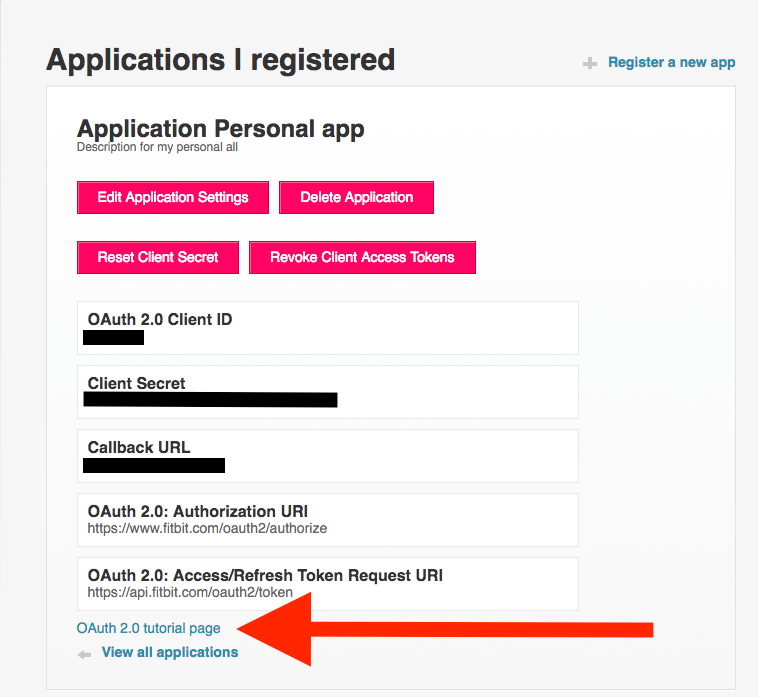
Note: each access token issued by Fitbit is JWT token. Use jwt.io to get insights about what data this token has. Worth noting refresh token is not JWT token.

In the 'Parse Response' section, upon copy-pasting the curl I am getting this error "Token response does not match the expected format; please check that you're using the correct OAuth 2.0 flow.".
Could you please help me here.
 Best Answer
Fitbit Developers oversee the SDK and API forums. We're here to answer questions about Fitbit developer tools, assist with projects, and make sure your voice is heard by the development team.
Best Answer
Fitbit Developers oversee the SDK and API forums. We're here to answer questions about Fitbit developer tools, assist with projects, and make sure your voice is heard by the development team.
@ulsmanikanta, you suppose to paste the result of curl command that you execute in your command line, not the curl itself.
Best Answer
Hi there,
I am looking to develop an application that shows fitbit data using node red and IBM bluemix.
At the moment I am just working using my local server. For me to register my app and with fitbit dev I have to enter a URL would I be able to use my local host address as the URL?
Im sorry if this sounds like a silly question, I am still in the early stages of development and trying to get my head round how I am going to get everything to work.
Thanks in advance
Best Answer
Not working 😕 I'm getting this error in the curl response:
HTTP/1.1 400 Bad Request
Date: Sat, 28 Apr 2018 05:09:31 GMT
Content-Type: application/json;charset=utf-8
Transfer-Encoding: chunked
Connection: keep-alive
Vary: Origin,Accept-Encoding
Cache-control: no-cache, private
Content-Language: en-US
X-Frame-Options: SAMEORIGIN
Expect-CT: max-age=604800, report-uri="https://report-uri.cloudflare.com/cdn-cgi/beacon/expect-ct"
Server: cloudflare
CF-RAY: 41270466182695a4-IAD
{"errors":[{"errorType":"invalid_request","message":"Missing 'grant_type' parameter value. Visit https://dev.fitbit.com/docs/oauth2 for more information on the Fitbit Web API authorization process."}],"success":false}I don't know what I'm doing wrong.
Best Answer
I'm sorry, but is there a tutorials page still available? I am new to fitbit dev community.
Thanks.
Best Answer Fitbit Developers oversee the SDK and API forums. We're here to answer questions about Fitbit developer tools, assist with projects, and make sure your voice is heard by the development team.
Yes, the tutorials are still available. Please check out the "Getting Started" page. After registering your application, you'll see the OAuth 2.0 Tutorial page as described at the beginning of this post.
Senior Technical Solutions Consultant
Fitbit Partner Engineering & Web API Support | Google
Best Answer
Fitbit Developers oversee the SDK and API forums. We're here to answer questions about Fitbit developer tools, assist with projects, and make sure your voice is heard by the development team.
@ShreeTya I moved your question as a new topic in the forums. We will respond there.
Senior Technical Solutions Consultant
Fitbit Partner Engineering & Web API Support | Google
Best Answer
In my app the display is showing "401". It won't work even I'm logged in.
Best Answer
Fitbit Developers oversee the SDK and API forums. We're here to answer questions about Fitbit developer tools, assist with projects, and make sure your voice is heard by the development team.
What information do you need to know about this platform?
Gordon
Senior Technical Solutions Consultant
Fitbit Partner Engineering & Web API Support | Google
Best Answer
Fitbit Developers oversee the SDK and API forums. We're here to answer questions about Fitbit developer tools, assist with projects, and make sure your voice is heard by the development team.
Looks like we missed your problem. Would you please tell us what endpoint you're executing and what error message text you're getting?
Gordon
Senior Technical Solutions Consultant
Fitbit Partner Engineering & Web API Support | Google
Best Answer
Can someone make step-by-step instructions because I've used the OAuth 2.0 Tutorial Page and followed every step, but now I'm lost as to what to do with the access token after receiving it. It's frustrating that it doesn't clearly explain how to implement afterwards.
I've used this https://github.com/Fitbit/sdk-oauth and replaced the client code/secret. Then it doesn't work. I'm sure there's something else I need to do with the access token code-wise but I don't see any clear guides on what to do with it.

Here's another sample app, but I don't think it will help much because it's based on Fitbit's sdk-oauth sample. It also contains code for sending data to a third-party server, which will be distracting.
Gondwana Software
That did help a bit! Now, in companion/index.js I’m seeing both “accessToken” and “access_token” in there. Where were they defined? Or were they obfuscated? And is a refresh token needed generally?
Best Answer
It's been a while since I wrote that, so I'm pretty rusty.
It seems that data.access_token is provided by the Fitbit oauth setting component.
accessToken is a parameter used in my fetchData() function. The value should be the same, since accessToken is initialised from data.access_token.
I probably just changed the capitalisation to be consistent with JS norms.
Gondwana Software
I copied and pasted all the code from https://github.com/Fitbit/sdk-oauth (adjusting for index.view and widget.defs) into Fitbit Studio and registered this app, replaced the Client ID and Client Secret accordingly. Also declared the redirect URI as https://localhost:8080. I even ran it through the OAuth 2.0 Tutorial Page. Running the watchface code, I got an error:
The app you're trying to connect did not provide valid information to Fitbit. Please report this issue to them.

Developer information: invalid_request - Invalid redirect_uri parameter value
Can anyone tell me how to make this code operational?
Best Answer
I’m confused too, which is why I wanted to use someone else’s working code as a foundation to understanding the process. But it seems the code everyone points to as an example isn’t working to begin with?
I’ve never had a successful experience with this process and that would really help me. Are there any watch apps on GitHub that’s simple and current and functional that I can use?
Best Answer