
Join us on the Community Forums!
-
Community Guidelines
The Fitbit Community is a gathering place for real people who wish to exchange ideas, solutions, tips, techniques, and insight about the Fitbit products and services they love. By joining our Community, you agree to uphold these guidelines, so please take a moment to look them over. -
Learn the Basics
Check out our Frequently Asked Questions page for information on Community features, and tips to make the most of your time here. -
Join the Community!
Join an existing conversation, or start a new thread to ask your question. Creating your account is completely free, and takes about a minute.
Not finding your answer on the Community Forums?
- Mark Topic as New
- Mark Topic as Read
- Float this Topic for Current User
- Bookmark
- Subscribe
- Mute
- Printer Friendly Page
Charge 2 not syncing with iPhone 8
- Mark Topic as New
- Mark Topic as Read
- Float this Topic for Current User
- Bookmark
- Subscribe
- Mute
- Printer Friendly Page
10-14-2017
10:12
- last edited on
10-16-2017
07:50
by
MarcoGFitbit


10-14-2017
10:12
- last edited on
10-16-2017
07:50
by
MarcoGFitbit
My Charge2 won’t sync with my iPhone8. I tried deleting the app and reinstalling the Fitbit but that doesn’t work. I saw a fix that said to sync on my old device, which is not an option since it was damaged - any suggestions - right now I have an expensive pedometer masquerading as a charge 2, since that’s about all I can use it for
Moderator Edit: Clarified Subject.

Same thing happened to me. The Fitbit tech on the phone told me that the Charge 2 is not updated to work with the iPhone 8. FitBit needs to update their software!!!! I too should have bought an Apple Watch.
 Best Answer
Bryan King (Please excuse any spelling errors or typos as this was sent from my tiny mobile device that isn't so smart sometimes!)
Best Answer
I have done all the things mentioned in these posts and nothing has worked. It has been synced for t weeks and then yesterday it quit.
Best Answer
This worked for me, too.
Best Answer
Have you figured it out yet? Mine is doing the same thing. I have tried everything listed in here, including reinstalling the app and nothing has worked.
Best Answer

 Community Moderator Alumni are previous members of the Moderation Team, which ensures conversations are friendly, factual, and on-topic. Moderators are here to answer questions, escalate bugs, and make sure your voice is heard by the larger Fitbit team. Learn more
Hello @jlb802, thanks for joining the conversation, it's a pleasure for me to welcome you to the Fitbit Community. 
I appreciate you have brought this back to my attention, would it be possible for your to let me know exactly which troubleshooting steps you have tried in order to resolve this issue? That will help me determine which steps should we take next.
Thanks for your patience and understanding, I'll be waiting for your reply.
 Best Answer
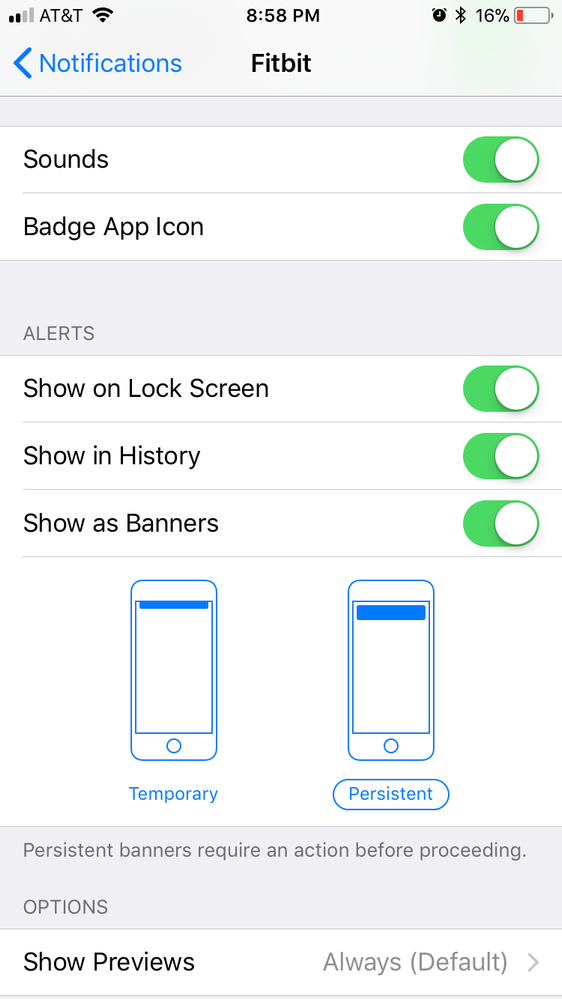
I was able to figure it out earlier this evening. I have an iPhone 8 and several of the settings were turned off. I turned them all on and when I changed the Banner setting from ‘temporary’ to ‘persistent’ I began receiving text messages immediately. I am not sure if all changes needed to be made but I will leave them all on because it is working fine now. I was receiving call notifications but not texts. Thank you for your prompt response.
Best Answer
Community Moderator Alumni are previous members of the Moderation Team, which ensures conversations are friendly, factual, and on-topic. Moderators are here to answer questions, escalate bugs, and make sure your voice is heard by the larger Fitbit team. Learn more
Hello @jlb802, I hope you're having a great day, thanks for taking the time to reply and let me know your issue has now been resolved, I'm very glad.
In case you have some spare time, I would like to invite you to visit our Discussions board where you will find great tips and encouragement from other members and if there's anything else I can do for you, please keep me posted!
Best Answer

I am having the same problem. Fitbit will not sync on iPhone 8. I thought it was just me. 🙂
@Crazychaoswrote:I followed these instructions for the iphone8 and still have not been successful.
Best Answer
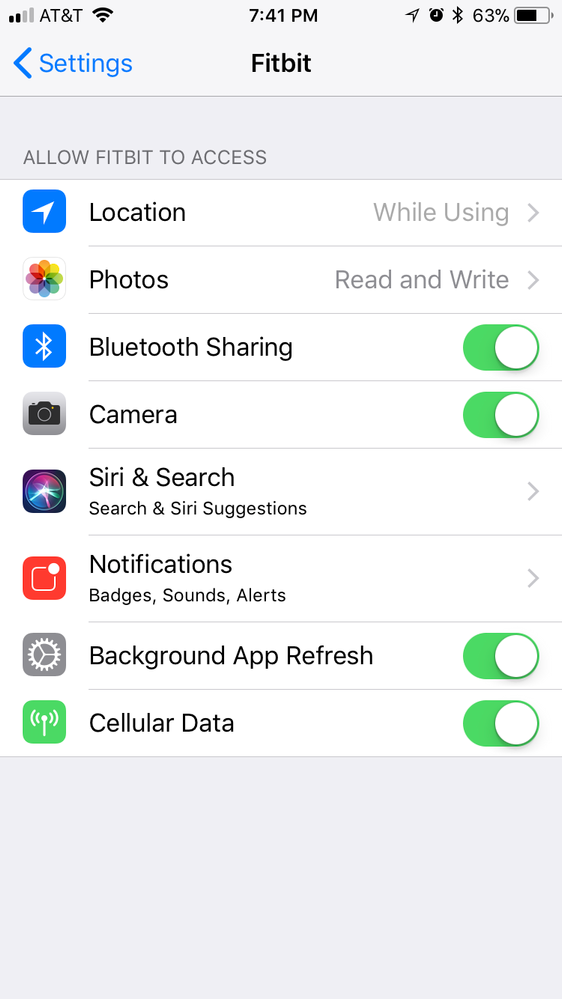
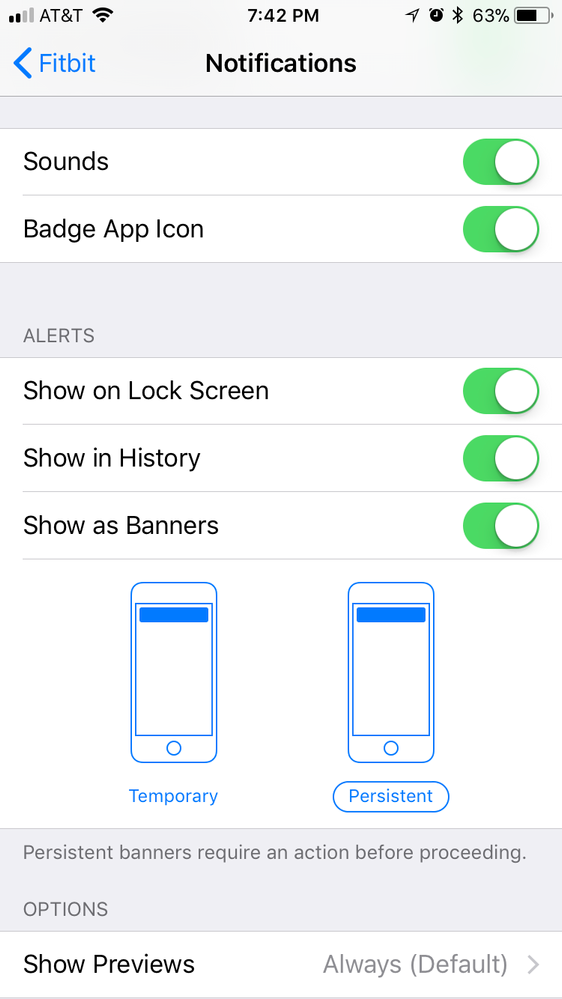
I suppose it is possible that there is another setting that is not allowing syncing on your Fitbit. I posted the changes I made and mine is still working. Is your Fitbit activity ‘on’ in the cellular section of the settings? Are your location services ‘on’ also. Mine is set to ‘while using the app’. I am not sure if any other settings need to be changed on another app to make a difference...
Best Answer
Sent from my iPad
02-25-2018
17:20
- last edited on
02-26-2018
04:21
by
MarcoGFitbit
02-25-2018
17:20
- last edited on
02-26-2018
04:21
by
MarcoGFitbit
I ended up having to delete and then redownload the app. It’s worked fine since doing that.
Cara Putman
Moderator Edit: Removed Personal Information.
Best Answer
Community Moderator Alumni are previous members of the Moderation Team, which ensures conversations are friendly, factual, and on-topic. Moderators are here to answer questions, escalate bugs, and make sure your voice is heard by the larger Fitbit team. Learn more
Hello everyone, I hope you're doing well! Thanks for joining the conversation @mclippe, it's a pleasure for me to welcome you to the Fitbit Community!
I appreciate some of you have come back and let me know your issue has now been resolved, I'm very glad.
@mclippe, if your tracker is not syncing with your iPhone 8 and you have already restarted it and restarted your phone as well, please try the following:
- Turn off the Bluetooth on your phone for 15 seconds, then turn it back on.
- Make sure there are no other Bluetooth devices around.
- Make sure you have a strong WiFi signal.
If after checking these points your tracker is still not syncing, my best recommendation would be setting up your tracker as a new device to reset the connection between your phone and your tracker. Don't worry, none of the information already stored in your account will be deleted.
To set up your tracker as a new device:
- Go to the Bluetooth settings on your phone and check if your tracker is on the list of paired devices. If it is, tap on it and select Forget this Device.
- Open the Fitbit app and tap on the Account symbol at the top right corner of the screen, then tap on "Set up a New Device"
- Choose your tracker and follow the onscreen instructions to continue
- When the app asks you to replace your current tracker, please replace it and continue with the process.
- When a pop-up appears asking you to Pair your tracker to your device, tap on Pair and continue.
I hope this can be helpful, give it a try and keep me posted in case you need anything else.
Best Answer
If it makes you feel better, one day, out of no where after days of doing all the steps recommended with no success, it just started working. Poof!
Best Answer
Community Moderator Alumni are previous members of the Moderation Team, which ensures conversations are friendly, factual, and on-topic. Moderators are here to answer questions, escalate bugs, and make sure your voice is heard by the larger Fitbit team. Learn more
Hello @Crazychaos, I hope you're doing well, thanks for taking the time to reply and let me know your issue has now been resolved, I'm very glad!
In case you have some spare time, I would like to invite you to visit our Discussions board where you will find great tips and encouragement from other members and if there's anything else I can do for you, please keep me posted.
Happy stepping!
Best Answer
Community Moderator Alumni are previous members of the Moderation Team, which ensures conversations are friendly, factual, and on-topic. Moderators are here to answer questions, escalate bugs, and make sure your voice is heard by the larger Fitbit team. Learn more
Hello @LMEber, I hope you're doing well, thanks for taking the time to reply and let me know the steps provided were helpful for you. I'm very glad.
In case there's anything else you need, please don't hesitate to reply, I'll be happy to help.
Happy stepping!
Best Answer