
Join us on the Community Forums!
-
Community Guidelines
The Fitbit Community is a gathering place for real people who wish to exchange ideas, solutions, tips, techniques, and insight about the Fitbit products and services they love. By joining our Community, you agree to uphold these guidelines, so please take a moment to look them over. -
Learn the Basics
Check out our Frequently Asked Questions page for information on Community features, and tips to make the most of your time here. -
Join the Community!
Join an existing conversation, or start a new thread to ask your question. Creating your account is completely free, and takes about a minute.
Not finding your answer on the Community Forums?
- Mark Topic as New
- Mark Topic as Read
- Float this Topic for Current User
- Bookmark
- Subscribe
- Mute
- Printer Friendly Page
FBBluetoothErrorDomain error 18
ANSWERED- Mark Topic as New
- Mark Topic as Read
- Float this Topic for Current User
- Bookmark
- Subscribe
- Mute
- Printer Friendly Page


 Community Moderator Alumni are previous members of the Moderation Team, which ensures conversations are friendly, factual, and on-topic. Moderators are here to answer questions, escalate bugs, and make sure your voice is heard by the larger Fitbit team. Learn more
Update 1/23/2018: Thanks again everyone for your reports on this error message when updating firmware or setting up your tracker. To resolve this issue, please forget your device in Bluetooth settings. For complete instructions, please check out @Dawn126's post here. We are currently working with our team to update the error message to include the solution.
Update 10/31/2017: For those seeing this message while updating your tracker firmware, check out @Dawn126's post here on having Bluetooth forget your device. In addition, please check out this help article on troubleshooting firmware updates if you haven't already.
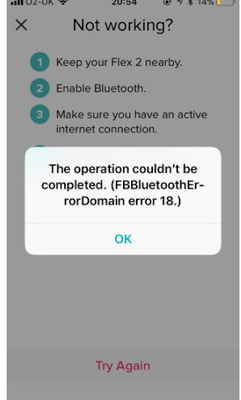
Hi Everyone- We're currently investigating user reports of receiving the following error: FBBluetoothErrorDomain error 18 which prevents them from updating their firmware.
Actively managing your weight? Find accountability buddies on the Manage Weight board
Answered! Go to the Best Answer.


1) First saw error message on 10/17/17
2) Device model = ChargeHR / Phone = iPhone 6
3) iOS version = 11.0.3
4) Phone provider = Verizon
Note. This not only refuses to update, it has completely disabled my fitbit so I can't even check the time.
 Best Answer
I just read a post on here about going to your Bluetooth connection so I told mine to forget my Charge HR and the update completed. I am now able to use mine as normal!

Right..
Thanks for the messages from the community.
I have done the same as I wrote in post 14. Again and again.. 😞
However, after "forgetting" my device in BT the AltaHR now doesn't even come up in the list.
Tried two other i-phones and the same applies it doesn't come up in the list of BT devices. even after re-booting iphone after iphone and turning BT off and on again.
No matter what I do it doesn't even show up a device.
The Alta HR is fully charged as shown on the screen when connecting and disconnecting the USB charger.
Tried the three button click and that does nothing, just sits there with the same stupid info of dots in diamond shape on the screen.
Managed to find out the model number (FB408) by fluke as I pressed the USB button so many times we are getting fed up now.
So frustrating.
Why cant fitbit actually reply and take this up as they are really doing nothing to help it seems as though its the fitbit community doing everything.
So come on fitbit do something about this.
EDIT: 21:45 CET.
Up-date, tried to connect to android, samsung S6, same problems.
Paired on BT and connected OK
Downloaded APP and tried to connect the device. No go
It asks for passcode request, number displays on fitbit.
Entered the passcode in to the APP but sits there connecting then advises that it could not connect.
Any advice? Anyone, especially fitbit.. please? or have you lost the plot a bit like we have when we have invested over £120 on a fitness tracker that doesn't do what it is supposed to do..
EDIT 22:45 CET
If you are wondering what App I have installed.. its 2.41.1 (723) installed

SunsetRunner
Just tried to update Fitbit this morning. Charger HR. Fitbit stopped working at that time- display is stuck on partially filled rectangle similar but smaller than the charging display rectangle. The phone is IPhone 5c . Ios 10.3.3. In settings Bluetooth is on but Fitbit is not connecting. My devices are not connecting to Bluetooth. Charge HR is trying to connect it is not able to.
Best Answer
SunsetRunner
In settings, go to Bluetooth. Click on your device that your Fitbit is usually connected to. You will have an option to disconnect. Do it. I did and then the Fitbit app was able to finish updating. Fitbit now works.
Best Answer
@SunsetRunner please Read post 14.. and 65...been there done that..Many times....Guess what, it still doesn't work..

Dave
Best Answer
Dave
Best Answer
Dave
Best Answer
Yes , that’s what happens with ours , until next time you sync & it has to be done again
Best Answer

SunsetRunner
Error started today when I attempted a firmware update:
Fitbit Charge HR
IOS version 11.0.3
ATT
My HR remains in firmware-update mode (shows about halfway completed).
Best Answer
Same error here: i was trying to update the tracker and now it got stuck. Nothing works right now.
i have an iphone 6, updated. With Sprint
EDIT: solved! Settings - bluetooth - forget the fitbit
Then i added it again from the app
Best Answer
SunsetRunner
Sent from my iPhone
Best Answer
- When did you first see this error message? --- Today 10/17/17 at 750pm
- What device model do you have? --- Iphone 6 and Charge HR
- What iOS version are you currently running?--- 11.0.2
- What phone provider do you have (Verizon, T-Mobile, Sprint, etc)? --- Verizon
Best Answer