
Join us on the Community Forums!
-
Community Guidelines
The Fitbit Community is a gathering place for real people who wish to exchange ideas, solutions, tips, techniques, and insight about the Fitbit products and services they love. By joining our Community, you agree to uphold these guidelines, so please take a moment to look them over. -
Learn the Basics
Check out our Frequently Asked Questions page for information on Community features, and tips to make the most of your time here. -
Join the Community!
Join an existing conversation, or start a new thread to ask your question. Creating your account is completely free, and takes about a minute.
Not finding your answer on the Community Forums?
- Mark Topic as New
- Mark Topic as Read
- Float this Topic for Current User
- Bookmark
- Subscribe
- Mute
- Printer Friendly Page
FBBluetoothErrorDomain error 18
ANSWERED- Mark Topic as New
- Mark Topic as Read
- Float this Topic for Current User
- Bookmark
- Subscribe
- Mute
- Printer Friendly Page


 Community Moderator Alumni are previous members of the Moderation Team, which ensures conversations are friendly, factual, and on-topic. Moderators are here to answer questions, escalate bugs, and make sure your voice is heard by the larger Fitbit team. Learn more
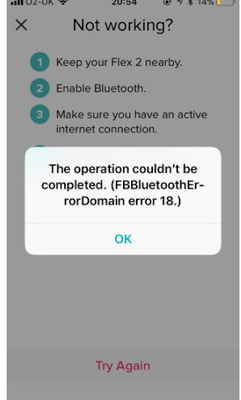
Update 1/23/2018: Thanks again everyone for your reports on this error message when updating firmware or setting up your tracker. To resolve this issue, please forget your device in Bluetooth settings. For complete instructions, please check out @Dawn126's post here. We are currently working with our team to update the error message to include the solution.
Update 10/31/2017: For those seeing this message while updating your tracker firmware, check out @Dawn126's post here on having Bluetooth forget your device. In addition, please check out this help article on troubleshooting firmware updates if you haven't already.
Hi Everyone- We're currently investigating user reports of receiving the following error: FBBluetoothErrorDomain error 18 which prevents them from updating their firmware.
Actively managing your weight? Find accountability buddies on the Manage Weight board
Answered! Go to the Best Answer.

Sent from my iPhone
 Best Answer

between 1- 3 AM EST
iPhone 5c / FitBit Charge
Version10.3.3 (14G60)
Sprint
Once the error message appeared, an exclamation point appeared in the middle of the update bar on my Charge. Despite being fully charged, it will not display anything other than the update bar with an exclamation point in the middle. It can't be synced with the iOS app as the app can't seem to find it.
Best Answer
When did you first see this error message? Last night (Oct 19)
What device model do you have? iPhone 7
What iOS version are you currently running? 11.0.3
What phone provider do you have (Verizon, T-Mobile, Sprint, etc)? ATT
Best Answer
Perfect SilverPop. Worked like a charm.
Best Answer

This is the repnse i have got from support. For which I have had to keep chasing them up for by the way.!
Seems one way traffic.
Reply:
We appreciate you getting back to us and for providing the information we've requested. We apologize for the delay in our response.
Recent updates cascaded on our system implies that this is a collective issue experienced by our Fitbit users.
It is a temporary bug and our engineers are aware of the problem and they're working to resolve it as quickly as possible.
We're sorry for any inconvenience this may have caused. We appreciate your patience and look forward to getting you back on track.
Don't hesitate to inform us if there's anything we may do to assist you in the meantime.
I believe that the above is saying
“put up and shut up, our engineers are over their heads with workload and don’t know what they are doing” 😞
Come on Support team. One week now and still not resolved. 😮
But I suppose in reality the UK market is so small you can’t be too bothered with them and deal with the largest market first eh!
Best Answer
Hi, I’m having the same issue! I’ve been trying for a few weeks without any luck. I have a charge hr. Saw This error message ablut 2.5 weeks ago and it’s getting very frustrating, as I can’t keep track of things! Definitely considering switching from Fitbit to a different kind of tracker. Running the latest ios version. My app is up to date, and I have AT&T.
Best Answer

When did you first see this error message? When trying to update FB Charge
What device model do you have? Charge HR & iPad Air 2
What iOS version are you currently running? 10.3.3
What phone provider do you have (Verizon, T-Mobile, Sprint, etc)? T-mobile
C-HR has (!) in display
a couple of times it seems to update again, but then again Error 18.
This is is poor Service for device, no solution for a few days!
EDIT:
SUCCESS!!!
Put both iPad and FB on power, hit Update a couple of times, did it!
i guess the BT was going into power saveing mode, interrupting the update.
On power, did not go into power save mode.
Best Answer
Hi I have this exact issue Noticed this Morning,I have a Charge HR , Iphone6, IOS11 ( the latest one) Provider is Spark New Zealand, it started when trying to "update Tracker" now I cant do anything, the watch screen is a slim line with what looks like a ! through it. am completely frozen please help with what to do. Thanks Craig
Best Answer
 Community Moderator Alumni are previous members of the Moderation Team, which ensures conversations are friendly, factual, and on-topic. Moderators are here to answer questions, escalate bugs, and make sure your voice is heard by the larger Fitbit team. Learn more
Thanks everyone for your reports. We have the information we need at this time and our team is reviewing. If you haven't already, please check out the syncing tips in this article. I'll continue to update this thread as I learn more.
Actively managing your weight? Find accountability buddies on the Manage Weight board
Best Answer
@KateFitbit We know you now have all the information you need but when is it going to be resolved..?
I have now been off line for over a week.
Can you advise please as the support team that are dealing with my problem aren't doing a very good job currently.
Best Answer
I don't have the error message you are displaying, but after two and a half days of owning my Zip, it won't sync. I just ordered the Charge 2 and I assume I will be returning it when it gets here. The last update shown was eight hours ago. The only message I see is to tap my Zip to wake it up. It's awake…
Last sync was 1:09 am est
iPhone 6 running IOS 11.0.3
Carrier: Verizon
Kelly
Best Answer
Haven’t seen an error message I just keep losing the pairing with my iPhone 6s. Everything is up to date. Wondering if it was the latest software update for my phone. No problems before that. I clicked forget device now it can’t seem to find it at all. Think it’s an iOS problem.
Best Answer