
Join us on the Community Forums!
-
Community Guidelines
The Fitbit Community is a gathering place for real people who wish to exchange ideas, solutions, tips, techniques, and insight about the Fitbit products and services they love. By joining our Community, you agree to uphold these guidelines, so please take a moment to look them over. -
Learn the Basics
Check out our Frequently Asked Questions page for information on Community features, and tips to make the most of your time here. -
Join the Community!
Join an existing conversation, or start a new thread to ask your question. Creating your account is completely free, and takes about a minute.
Not finding your answer on the Community Forums?
- Mark Topic as New
- Mark Topic as Read
- Float this Topic for Current User
- Bookmark
- Subscribe
- Mute
- Printer Friendly Page
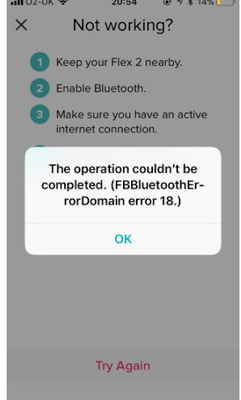
FBBluetoothErrorDomain error 18
ANSWERED- Mark Topic as New
- Mark Topic as Read
- Float this Topic for Current User
- Bookmark
- Subscribe
- Mute
- Printer Friendly Page


 Community Moderator Alumni are previous members of the Moderation Team, which ensures conversations are friendly, factual, and on-topic. Moderators are here to answer questions, escalate bugs, and make sure your voice is heard by the larger Fitbit team. Learn more
Update 1/23/2018: Thanks again everyone for your reports on this error message when updating firmware or setting up your tracker. To resolve this issue, please forget your device in Bluetooth settings. For complete instructions, please check out @Dawn126's post here. We are currently working with our team to update the error message to include the solution.
Update 10/31/2017: For those seeing this message while updating your tracker firmware, check out @Dawn126's post here on having Bluetooth forget your device. In addition, please check out this help article on troubleshooting firmware updates if you haven't already.
Hi Everyone- We're currently investigating user reports of receiving the following error: FBBluetoothErrorDomain error 18 which prevents them from updating their firmware.
Actively managing your weight? Find accountability buddies on the Manage Weight board
Answered! Go to the Best Answer.

1. Go into settings on your iPhone and select Bluetooth
2. Look on the list of devices and see if the Charge HR (or your device type) is listed. If it is, select the device and choose “forget this device”.
3. Turn Bluetooth off on your phone
4. Have your FitBit in hand. Open the FitBit app on your iPhone and as it syncs it should tell you that there is an update. You have to select update now and this should end up downloading the new software as well as sync with your Charge HR. This may take a little while.
*Note*
If the update doesn’t download the first time, definitely try it again as it may be stuck from the previous time.
Also if you get an error that your Bluetooth is off and need to turn it on to sync go ahead and do so. Those that are getting that error after they have deselected their FitBit and turned BlueTooth completely off, has worked.
I hope this is helpful for you. Let me know if it does or doesn’t and if it doesn’t let me know what it says. I am receiving some modifications to what I did that is working for others.
Good luck !🙂
Sent from my iPhone
1. Go into settings on your iPhone and select Bluetooth
2. Look on the list of devices and see if the Charge HR (or whatever your device is) is listed. If it is select the device and choose “forget this device”.
3. Turn Bluetooth off on your phone
4. Have your FitBit in hand. Open the FitBit app on your iPhone and as it syncs it should tell you that there is an update. You have to select update now and this should end up downloading the new software as well as sync with your Charge HR. This may take a little while.
*Note*
If the update doesn’t download the first time, definitely try it again as it may be stuck from the previous time.
Let me know if this does or doesn’t work. If it doesn’t please let me know what error you are getting and I will see if I have received anything as to a solution.
I hope this is helpful for you.
Good luck !🙂
Sent from my iPhone

That is exactly what I told everyone back on page 8 of this thread.
By the way, when you reply to a person it puts it up on the iOS forum each time so you have replied to 5 people but it’s put it up for everyone on here. 😉 have a read.
Most important thing to remember for everyone is;
DO NOT DELETE THE FIT BIT APP OR YOUR DEVICE FROM THE FIT BIT APP.
Reading the replies on this forum it appears to lock the device up and then will not communicate with ANY phone or tablet.
I understand that the support engineer are trying to resolve that problem.
I had the same issue. FitBit says they are working on it but this has been know. For a couple of weeks and still no fix in place. I was tired of waiting and figured out a fix on my own. Here is what I did to get it to work:
1. Go into settings on your iPhone and select Bluetooth
2. Look on the list of devices and see if the Charge HR (or the device that you have) is listed. If it is, select the device and choose “forget this device”.
3. Turn Bluetooth off on your phone
4. Have your FitBit in hand. Open the FitBit app on your iPhone and as it syncs it should tell you that there is an update. You have to select update now and this should end up downloading the new software as well as sync with your Charge HR. This may take a little while.
*Note*
If the update doesn’t download the first time, definitely try it again as it may be stuck from the previous time.
Please let me know if this resolves the issue. If it doesn’t please let me know the error and I can see if I have some information.
I hope this is helpful for you.
Good luck !🙂
Sent from my iPhone

The latest instalment. 😱
After trying iOS, Android and now installed App on Windows 10
it still refuses to connect. ☹️
It gets stuck on “we found your tracker “ and although it’s shows connected via Bluetooth.
And yes done done all the disconnect Bluetooth, reboot PC and restart tracker.
nearly 2 weeks now and counting.
Does anyone else else think that the Fitbit support is failing on this or is it just me ?
Sent from my iPhone
 Best Answer
Sent from my iPhone
Best Answer
Thanks for the info. It was one I hadn’t tried.
however it didn’t work for me. 😭
More information for you or the engineers.
When I can actually get it to try and connect it shows connected but no (i) in the end to select to forget the device.
Any thoughts. ?
Here the is the picture.

Best Answer Community Moderator Alumni are previous members of the Moderation Team, which ensures conversations are friendly, factual, and on-topic. Moderators are here to answer questions, escalate bugs, and make sure your voice is heard by the larger Fitbit team. Learn more
@Dawn126 Thanks for the tips, appreciate your sharing this in the Community. We have to clean up some of the posts because of cross posting, next time feel free to update your original post and @ any user you would like to respond to.
@Goldfish59 Not sure why your iphone won't let you forget the device. Have you tried force quitting the settings and restarting your phone. It also seems like this is a tracker issue if you have experienced this on Android, iOS and Windows. I see there is a support case and will send you a PM.
Actively managing your weight? Find accountability buddies on the Manage Weight board
Best Answer
I started seeing this message today, October 26, 2017, when I went to update my Charge because it was saying there was an update available. I am running iOS 11.0.3, the latest version on an iPhone 7 and I am using AT&T as a carrier. I had no issues with my charge not syncing before I went to do the update this evening.
Best Answer
Surge
iphone 6s
ios 11.03
Rogers Canada
Best Answer

I’ve received this message and my Charge HR is stuck and won’t update. Can you help?
Best Answer
Unpair the Fitbit from the phone
Go to the Fitbit app and click update
It will prompt you to turn bluetooth back on
Pair the watch to your phone as if it was the first time
Sync your Fitbit and then update
Worked for me.
Good luck.
Best Answer
Same here!
Charge HR
happened 10-27-17
IOS 11.0.3
AT&T
Best Answer