
Join us on the Community Forums!
-
Community Guidelines
The Fitbit Community is a gathering place for real people who wish to exchange ideas, solutions, tips, techniques, and insight about the Fitbit products and services they love. By joining our Community, you agree to uphold these guidelines, so please take a moment to look them over. -
Learn the Basics
Check out our Frequently Asked Questions page for information on Community features, and tips to make the most of your time here. -
Join the Community!
Join an existing conversation, or start a new thread to ask your question. Creating your account is completely free, and takes about a minute.
Not finding your answer on the Community Forums?
- Mark Topic as New
- Mark Topic as Read
- Float this Topic for Current User
- Bookmark
- Subscribe
- Mute
- Printer Friendly Page
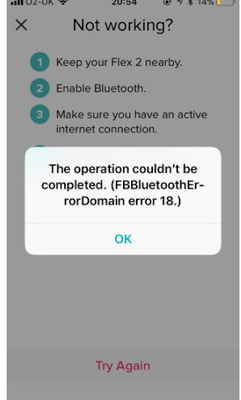
FBBluetoothErrorDomain error 18
ANSWERED- Mark Topic as New
- Mark Topic as Read
- Float this Topic for Current User
- Bookmark
- Subscribe
- Mute
- Printer Friendly Page


 Community Moderator Alumni are previous members of the Moderation Team, which ensures conversations are friendly, factual, and on-topic. Moderators are here to answer questions, escalate bugs, and make sure your voice is heard by the larger Fitbit team. Learn more
Update 1/23/2018: Thanks again everyone for your reports on this error message when updating firmware or setting up your tracker. To resolve this issue, please forget your device in Bluetooth settings. For complete instructions, please check out @Dawn126's post here. We are currently working with our team to update the error message to include the solution.
Update 10/31/2017: For those seeing this message while updating your tracker firmware, check out @Dawn126's post here on having Bluetooth forget your device. In addition, please check out this help article on troubleshooting firmware updates if you haven't already.
Hi Everyone- We're currently investigating user reports of receiving the following error: FBBluetoothErrorDomain error 18 which prevents them from updating their firmware.
Actively managing your weight? Find accountability buddies on the Manage Weight board
Answered! Go to the Best Answer.

I began experiencing the same error message yesterday night (10/29/17) when trying to update to the latest version of the app. I'm currently on Version 12.2. The update proceeded to about 50% and then stopped. My fitbit will only display a 50% completed bar and nothing else on the screen. I have tried restarting the fitbit and it will not work. I have a Charge HR and a IPhone.

I have tried it for several time in iOS application. Then i kept it charged, logged in to some android device and started pairing. This works fine for me. Then sync again in iPhone. Seems fine without issues.
 Best Answer
I went to update my FitBit yesterday. However, I was half-way through the process when I had to disconnect it from the computer and leave WiFi (my phone was still with me and I thought was still working on it, but didn't realize I needed to still have it plugged in/connected). It wasn't until later in the evening when I realized it wasn't working.
Today, I have tried to reconnect it and restart the update and am getting this error message. It won't move on from it and I'm not sure how to reset it to start hte update over. The screen shows the "update bar" halfway full, or it shows nothing, as if it's dead. What do I need to do?
Community Moderator Alumni are previous members of the Moderation Team, which ensures conversations are friendly, factual, and on-topic. Moderators are here to answer questions, escalate bugs, and make sure your voice is heard by the larger Fitbit team. Learn more
Hi Everyone - for those seeing this message while updating your tracker firmware, check out @Dawn126's post here. In addition, please check out this help article if you haven't already.
Thanks Dawn!
Actively managing your weight? Find accountability buddies on the Manage Weight board
Best Answer
This is exactly what happened to me and it won't work and they basically told me they can't do anything to fix it...

Sent from my iPhone
Sent from my iPhone
Best Answer
Thank you Dawn!! This worked for me...
Best Answer
My Fitbit hr 2 stopped trying to update yesterday an hasn't finished... On the fit bit it's self it's still showing half updated since 3pm yesterday! An now Everytime I try to make it go further it give me the error messages on my phone an it shows that my Fitbit isn't completely charged an my Fitbit won't do anything except when I do have it on charge I can hold the button down for like 5 secs an it'll flash the green button the then stop! But other than that I don't get anything out of it! What do I do!
I count on my fitbit
Best Answer
Thank you! Thank you! This suggestion worked perfectly! All it took was one try and I’m back up and running! Appreciate the help!
Best Answer
Sent from my iPhone
Best Answer
SunsetRunner
My Fitbit HR was working fine until I tried to update this morning. It crashed and I tried to reset it, with help from customer support. Now it won't do anything and they basically said "sorry" but since it is out of warranty they won't replace it. It was fine until this and the update caused this crash so i am not happy about how this was "resolved". I don't want to buy a new one, even with a discount, since this was a problem created by the update. If Fitbit knew this was an issue, they should have immediately stopped telling people to update.
Best Answer
Sent from my iPhone
Best Answer
Sent from my iPhone
Best Answer
SunsetRunner
- Louise
Best Answer
Go to your phone's settings, go to bluetooth. Select your FitBit from My Devices and then click on Forget this Device. Go to the FitBit app and try installing again. Then after the install is complete it asks to pair with your device again. Charge HR is now connected again and problem solved
Best Answer