
Join us on the Community Forums!
-
Community Guidelines
The Fitbit Community is a gathering place for real people who wish to exchange ideas, solutions, tips, techniques, and insight about the Fitbit products and services they love. By joining our Community, you agree to uphold these guidelines, so please take a moment to look them over. -
Learn the Basics
Check out our Frequently Asked Questions page for information on Community features, and tips to make the most of your time here. -
Join the Community!
Join an existing conversation, or start a new thread to ask your question. Creating your account is completely free, and takes about a minute.
Not finding your answer on the Community Forums?
- Mark Topic as New
- Mark Topic as Read
- Float this Topic for Current User
- Bookmark
- Subscribe
- Mute
- Printer Friendly Page
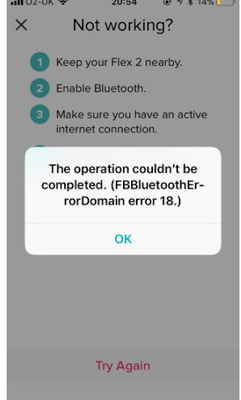
FBBluetoothErrorDomain error 18
ANSWERED- Mark Topic as New
- Mark Topic as Read
- Float this Topic for Current User
- Bookmark
- Subscribe
- Mute
- Printer Friendly Page

 Community Moderator Alumni are previous members of the Moderation Team, which ensures conversations are friendly, factual, and on-topic. Moderators are here to answer questions, escalate bugs, and make sure your voice is heard by the larger Fitbit team. Learn more
Update 1/23/2018: Thanks again everyone for your reports on this error message when updating firmware or setting up your tracker. To resolve this issue, please forget your device in Bluetooth settings. For complete instructions, please check out @Dawn126's post here. We are currently working with our team to update the error message to include the solution.
Update 10/31/2017: For those seeing this message while updating your tracker firmware, check out @Dawn126's post here on having Bluetooth forget your device. In addition, please check out this help article on troubleshooting firmware updates if you haven't already.
Hi Everyone- We're currently investigating user reports of receiving the following error: FBBluetoothErrorDomain error 18 which prevents them from updating their firmware.
Actively managing your weight? Find accountability buddies on the Manage Weight board
Answered! Go to the Best Answer.


The update stalled for at least 20 minutes before an exclamation appeared on the screen of my fitbit, indicating a problem. I followed these instructions and the update not only resumed, it's almost finished!
Thank you!
 Best Answer
 Community Moderator Alumni are previous members of the Moderation Team, which ensures conversations are friendly, factual, and on-topic. Moderators are here to answer questions, escalate bugs, and make sure your voice is heard by the larger Fitbit team. Learn more
Hello @JoyNOLA, @amdolan, @AnitaC1 and @melaine713, have a warm welcome to the Fitbit Community, it's great to have you on board! 
I appreciate you've taken the time to let me know your issue has now been resolved, I'm very glad. In case you have some spare time, I would like to invite you to visit our Discussions board where you will find great tips and encouragement from other members and if there's anything else I can do for you, please keep me posted!
 Community Moderator Alumni are previous members of the Moderation Team, which ensures conversations are friendly, factual, and on-topic. Moderators are here to answer questions, escalate bugs, and make sure your voice is heard by the larger Fitbit team. Learn more
Hello @JoyNOLA, I hope you're doing well, thanks for taking the time to reply.
You're very welcome, I'm very glad your issue has been resolved. In case you have some spare time, I would like to invite you to visit our Discussions board where you will find great tips and encouragement from other members and if there's anything else I can do for you, please keep me posted!

We tried all solutions on our iPad from forgetting the device in Bluetooth, turning it off to restarting the Fitbit and even factory resetting. Nothing worked and there was still that obnoxious half-way full line on my non-responsive Fitbit. I had to call Customer Support and talked to Christina. She was wonderful and very helpful. She walked me through the process again, with an added action of logging out from my account in the app. This time it worked! You actually have to LOG OUT of your account in the app to make all of the suggestions here work.
Best Answer
Hi on my Bluetooth it won’t let me forget the device so I can’t do it
Best Answer
Good luck
Sent from my iPhone
Best Answer
Hey now, Ive got the same problem. I have just now turned off "Bluetooth", and the only difference between the two of us is that I use Verizon.
Best Answer
Community Moderator Alumni are previous members of the Moderation Team, which ensures conversations are friendly, factual, and on-topic. Moderators are here to answer questions, escalate bugs, and make sure your voice is heard by the larger Fitbit team. Learn more
Hello @MichelleHelen @dohasj and @jimthemovieguy, thanks for joining the Fitbit Community, it's great to have you on board. It's nice to see you too @Joy56, thanks for your insight.
@dohasj, I appreciate you have taken the time to let us know you've contacted our Support Team and described the troubleshooting steps they recommended you, I'm very glad your issue has now been resolved.
@jimthemovieguy and @MichelleHelen, when you mention the Bluetooth on your phone doesn't let you forget your Fitbit device, are you receiving an error message? Have you restarted your phone and tried to remove the tracker again? If so, please let me know and reply to me with a screenshot of any error message you're getting, that will be very helpful for me.
Thanks for your patience and understanding, if there's anything else I can do for you, please feel free to reply.

It works, thanks.
Best Answer
Community Moderator Alumni are previous members of the Moderation Team, which ensures conversations are friendly, factual, and on-topic. Moderators are here to answer questions, escalate bugs, and make sure your voice is heard by the larger Fitbit team. Learn more
Hello @RobinRambarin, thanks for joining the Fitbit Community. I appreciate you have taken the time to share your experience and let me know your issue has now been resolved, I'm really glad.
In case you have some spare time, I would like to invite you to visit our Discussions board where you will find great tips and encouragement from other members and if there's anything else I can do for you, please keep me posted! 
Best Answer
Me as well. Please figure this out Fitbit.
Best Answer Community Moderator Alumni are previous members of the Moderation Team, which ensures conversations are friendly, factual, and on-topic. Moderators are here to answer questions, escalate bugs, and make sure your voice is heard by the larger Fitbit team. Learn more
Hello @jimthemovieguy and @Maleka58, I hope you're doing well, thanks for taking the time to reply. It's nice to see you around @MissiMel, I hope you're doing well.
@Maleka58, would it be possible for you to let me know the exact error you're getting when trying to perform a GPS run? A screenshot will be very helpful for me to check this situation further.
@jimthemovieguy, are you having trouble with GPS as @Maleka58 or are you still experiencing the Errro 18? Would you be so kind to let me know exactly which troubleshooting steps have you tried so far? That will be very helpful for me to determine which troubleshooting steps we should take next.
@MissiMel, Are you still experiencing this issue? For what I've seen in others replies from you, this issue has now been resolved on your side, if not, please let me know, I'll be happy to help.
Thanks for your patience and understanding, if there's anything else you might want to add, feel free to do so!
Best Answer Best Answer
06-07-2018
10:46
- last edited on
06-11-2018
11:15
by
MarcoGFitbit

06-07-2018
10:46
- last edited on
06-11-2018
11:15
by
MarcoGFitbit
Thanks for the “Follow Through”. Yes I still have the error 18 notice. The small scale, half and half with the hour glass in the middle. What steps to rectify the issue. Charge, attempt sync, on iTunes with Mac Book Pro., that’s it.
Jim
Sent from my iPhone
UPDATE:
Dear Phyllis,
Thanks for the follow through! I just stopped wearing my Fitbit because I just could not get it to work. I must say however I was a few pounds lighter than I am now. If I don’t get credit for the hour long walk, see it, journal it,
I don’t do it,
Jim
Sent from my iPhone
Best Answer
did an update recently and it does make me wonder if it was anything to do
with it. I am just a little frustrated as when using the GPS to track me,
and although I could see on a tiny little screen on the dashboard page I
cannot open it it just says error. I have tried just about everything
everybody has suggested on these pages resetting etc. etc. but nothing
seems to work! Very frustrating! If you do hear of any other ideas also
for problem I would really appreciate you letting me know. :jersey:
Best Answer