
Join us on the Community Forums!
-
Community Guidelines
The Fitbit Community is a gathering place for real people who wish to exchange ideas, solutions, tips, techniques, and insight about the Fitbit products and services they love. By joining our Community, you agree to uphold these guidelines, so please take a moment to look them over. -
Learn the Basics
Check out our Frequently Asked Questions page for information on Community features, and tips to make the most of your time here. -
Join the Community!
Join an existing conversation, or start a new thread to ask your question. Creating your account is completely free, and takes about a minute.
Not finding your answer on the Community Forums?
- Mark Topic as New
- Mark Topic as Read
- Float this Topic for Current User
- Bookmark
- Subscribe
- Mute
- Printer Friendly Page
Hourly activity not showing correctly in the app.
- Mark Topic as New
- Mark Topic as Read
- Float this Topic for Current User
- Bookmark
- Subscribe
- Mute
- Printer Friendly Page
01-31-2018
16:54
- last edited on
02-01-2018
03:40
by
MarcoGFitbit


01-31-2018
16:54
- last edited on
02-01-2018
03:40
by
MarcoGFitbit
My Blaze is showing that I had 9/10 hours where I met at least 250 steps per hour but the app is only showing 2 hours.
help?
Moderator Edit: Clarified Subject.


 Community Moderator Alumni are previous members of the Moderation Team, which ensures conversations are friendly, factual, and on-topic. Moderators are here to answer questions, escalate bugs, and make sure your voice is heard by the larger Fitbit team. Learn more
Hello @Bora406, thanks for joining the Fitbit Community, it's always a pleasure to greet new members! 
Thanks for bringing this to my attention. Since when have you experienced this issue? Have you restarted your phone already? Have you updated the Fitbit app recently? If so, it's possible that the Fitbit app has not updated correctly the information coming from the tracker in which case I would like to suggest you to force-quit the app by double tapping the home button on your phone and swiping the app up, then open the app and check if the tile is showing the correct information. If this doesn't seem to work, please log out from the app and log back in, then check again.
I hope this can be helpful. give it a try and keep me posted in case you need anything else. 

I’ve updated the app, updated my phone, turned phone on and off, and tried logging out and logging back in. Tile is still not updating to match what the Fitbit shows.
Community Moderator Alumni are previous members of the Moderation Team, which ensures conversations are friendly, factual, and on-topic. Moderators are here to answer questions, escalate bugs, and make sure your voice is heard by the larger Fitbit team. Learn more
Hello @Bora406, I hope you're doing well, thanks for taking the time to reply.
I appreciate you have already tried the troubleshooting steps I've provided above. At this moment I would like to ask you for a photo of your tracker next to the Fitbit app after syncing, where the Hourly Activity can be appreciated on both so I can check this further.
Thanks for your patience and understanding, I'll be waiting for your reply.

SunsetRunner
I'm having the same issue with my Ionic... photos attached... doesn't happen everyday but I lose the odd hour here and there every week or two. But today 3 hours aren't showing which isn't great.
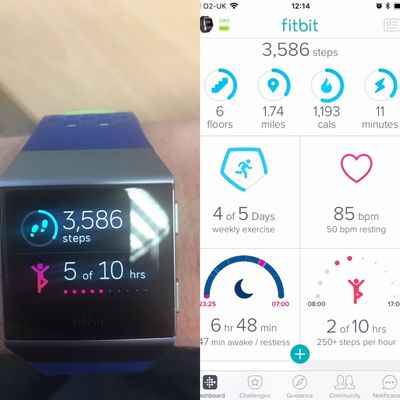
Thanks,
Shaun
Community Moderator Alumni are previous members of the Moderation Team, which ensures conversations are friendly, factual, and on-topic. Moderators are here to answer questions, escalate bugs, and make sure your voice is heard by the larger Fitbit team. Learn more
Hello @SunsetRunner, thanks for joining the conversation, it's a pleasure for me to welcome you to the Fitbit Community.
I appreciate you have shared with me some screenshots related to this issue, have you tried to log out from the app and then log in to check if the information updates itself correctly? If so, please reply to me with the following information so I can check this further:
- iPhone model you're currently using.
- OS version currently running on your phone.
- App version currently installed in your phone (go to Account > Help to get it)
Thanks for your patience and understanding, I'll be waiting for your reply.
SunsetRunner
Hi Marco
Yes I tried to resolve it by logging out & back in & all doing a hard reset too which didn’t do anything.
My phone model is the 6S using firmware 11.2.5 & my Fitbit apps firmware is 2.45.
🙂
 Best Answer
Community Moderator Alumni are previous members of the Moderation Team, which ensures conversations are friendly, factual, and on-topic. Moderators are here to answer questions, escalate bugs, and make sure your voice is heard by the larger Fitbit team. Learn more
Best Answer
Community Moderator Alumni are previous members of the Moderation Team, which ensures conversations are friendly, factual, and on-topic. Moderators are here to answer questions, escalate bugs, and make sure your voice is heard by the larger Fitbit team. Learn more
Hello @SunsetRunner, I hope you're doing well, thanks for taking the time to reply.
I appreciate you have tried the troubleshooting steps I've provided earlier. At this moment, it seems the hourly activity is being affected by a glitch preventing the correct information to display properly and our engineers are aware of the problem and are working to resolve it as quickly as possible.
I'm sorry for all the inconveniences this situation has caused. I appreciate your patience and look forward to getting you back on track. In the meantime, if there's anything else I can do for you, please feel free to reply.
 Community Moderator Alumni are previous members of the Moderation Team, which ensures conversations are friendly, factual, and on-topic. Moderators are here to answer questions, escalate bugs, and make sure your voice is heard by the larger Fitbit team. Learn more
Hello @Helgak, thanks for joining the conversation, it's a pleasure for me to welcome you to the Fitbit Community.
I appreciate your participation in the forums, however at this moment I don't have a specific timeframe for when this issue will be resolved. Please note that our team is constantly working towards resolve this kind of issues, but unfortunately some of them take longer than others.
Thanks for your patience and understanding, once I have more information to share about this situation, I'll make sure to update this thread accordingly. In the meantime, if there's anything else I can do for you, please feel free to reply.

My Fitbit Versa is doing the same thing. It always seems to be off by 2. Is there a resolution?

I have the same problem on the new Versa I just setup. Never saw this problem on the Surge though from what you say the problem is on the server software.
Best Answer
Community Moderator Alumni are previous members of the Moderation Team, which ensures conversations are friendly, factual, and on-topic. Moderators are here to answer questions, escalate bugs, and make sure your voice is heard by the larger Fitbit team. Learn more
Hello @Caroltbird, thanks for joining the conversation, it's a pleasure for me to welcome you to the Fitbit Community. It's nice to see you around too @Helgak, thanks for replying. I appreciate your participation as well @Ze1, I hope you're doing well.
I understand your concern about this issue and that it's very important for you to get it resolved. As mentioned earlier, I don't have a specific timeframe for when this issue will be resolved, but be sure that once we have more information to share with you, we'll make sure to post it here in the official Forums.
Thanks again for your patience and understanding, I hope you have a great day and a great weekend!

I been having this problem for months now. And the problem still isn’t resolved. Here I am missing 2 hours of my 14 because yet again it doesn’t want to sync properly. When will this be resolved?
Community Moderator Alumni are previous members of the Moderation Team, which ensures conversations are friendly, factual, and on-topic. Moderators are here to answer questions, escalate bugs, and make sure your voice is heard by the larger Fitbit team. Learn more
Hello @DGUCWA, have a warm welcome to the Fitbit Community, it's great to have you on board.
I appreciate your participation in the Forums. I understand your concern about this situation and the progress our development team has made so far. Please be assured that our team is actively working towards a prompt resolution for this issue and once we have more information to share, I'll make sure to update this thread.
Thanks again for your patience and understanding, if there's anything else you might want to add, please feel free to reply.
Best Answer
SunsetRunner
So I am having the same problem except I have a charge2. Just wanted to make sure you were aware that this problem is occurring for the fit bit charge2 as well. I have a picture, but can’t get it to upload to this message.
 Community Moderator Alumni are previous members of the Moderation Team, which ensures conversations are friendly, factual, and on-topic. Moderators are here to answer questions, escalate bugs, and make sure your voice is heard by the larger Fitbit team. Learn more
Hello @latifkhan and @SunsetRunner, thanks for joining the conversation, it's great to have you both on board the Fitbit Community.
I appreciate you have shared your experience with us. We have received reports of this issue affecting several models and our team is currently aware of this. As mentioned above, once I have more to share with you about this situation, I'll make sure to let you know in the official Forums.
Thanks for your patience and understanding, I hope you have a great day.
Best Answer
Same issue here. Every other day or so. Showing 5 of 9 not 7 of 9
Best Answer