
Join us on the Community Forums!
-
Community Guidelines
The Fitbit Community is a gathering place for real people who wish to exchange ideas, solutions, tips, techniques, and insight about the Fitbit products and services they love. By joining our Community, you agree to uphold these guidelines, so please take a moment to look them over. -
Learn the Basics
Check out our Frequently Asked Questions page for information on Community features, and tips to make the most of your time here. -
Join the Community!
Join an existing conversation, or start a new thread to ask your question. Creating your account is completely free, and takes about a minute.
Not finding your answer on the Community Forums?
- Mark Topic as New
- Mark Topic as Read
- Float this Topic for Current User
- Bookmark
- Subscribe
- Mute
- Printer Friendly Page
Resolved 4/18/2018: Sleep Time Shows 0 minutes asleep
ANSWERED- Mark Topic as New
- Mark Topic as Read
- Float this Topic for Current User
- Bookmark
- Subscribe
- Mute
- Printer Friendly Page


 Community Moderator Alumni are previous members of the Moderation Team, which ensures conversations are friendly, factual, and on-topic. Moderators are here to answer questions, escalate bugs, and make sure your voice is heard by the larger Fitbit team. Learn more
Fitbit Update 04/18/2018: Hey everyone -- Our team has resolved this issue, which means you should be able to sync your sleep logs from last night and the app will display your actual hours slept as opposed to 0 time asleep. Thanks for your patience as we worked to the get this resolved as quickly as possible. I will be closing this thread as the issue is resolved.
Fitbit Update 04/17/2018: We're aware of an issue where users who logged sleep may see their time asleep as 0 minutes.
We're working on getting this resolved as quickly as possible. In the meantime, we have a workaround:
Workaround:
- Manually edit your sleep log (hit the "edit" button at the top right of the app and change your start OR end time by 1 minute.
- Save the change
- This will recalculate your sleep and should resolve the issue.
Please note I have merged several threads with this issue. I will have more information for you once this has been fully resolved. Thanks for your reports and continued patience as we work on a fix.
Actively managing your weight? Find accountability buddies on the Manage Weight board
Answered! Go to the Best Answer.


I’m having the same issue as of this morning. It was working fine up until then.
Restarting phone, restarting Fitbit and relaunching app don’t work.
Using the Fitbit Charge 2.

Yes, me too. Charge and IOS 11.3. Today and yesterday showing zero. And yesterday has gone down too zero too. Banner for week zero. However go to full screen weeks stats and it gives 5hr 35min average. I go with server side problem theory.


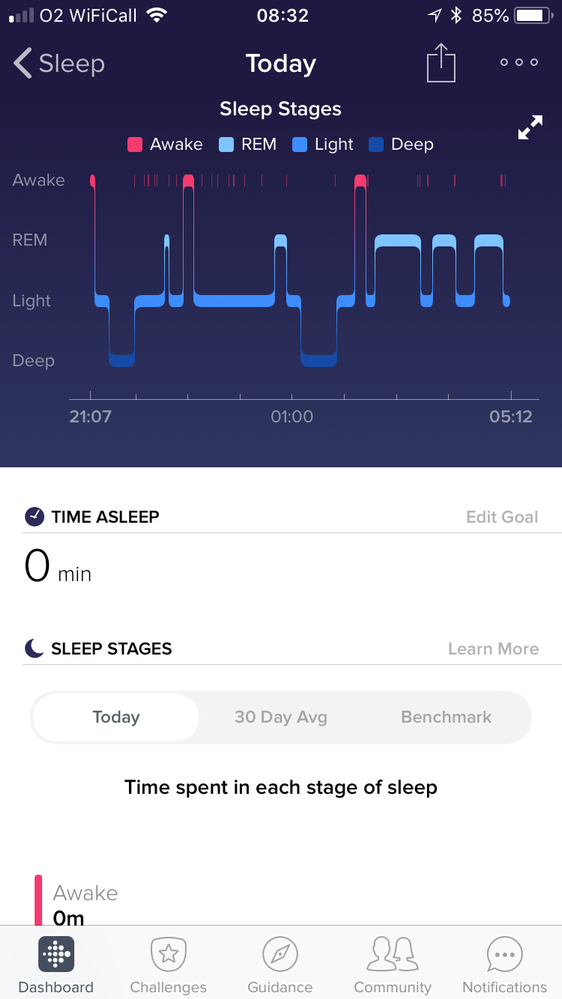
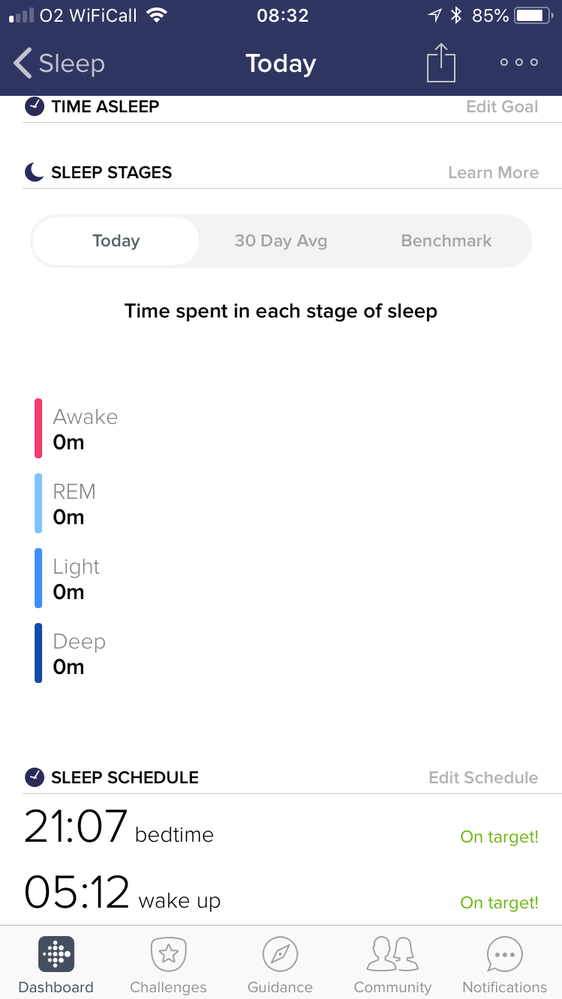
Both my partner and I woke with the same issue. Not happened before this morning. No updates recorded on HR Charge 2 or iOS devices. Graph is fine. Shows times of going to sleep & waking up but dash for categories & totals read 0.
 Best Answer
I faced this problem too this morning and found 5 or more fitbit users in my community with this issue.
My solution is to tap to 'edit' sleep log and then 'cancel' out, the app will recalculate. idk it is just work for me.


Having same issue on my wifes Versa. Simple way to get around until they fix is to click on the option tab in the right corner and add in the time you went to sleep and the time you woke up. It shows the time on there so just add it in and vola. Works.
Best Answer
I have this problem too. It's recorded sleep stages but says I've had no sleep...
 Best Answer
Anita Mitchell
0414451659
5 Scott St, Canterbury, Vic, 3126
Sent from my iPhone
Best Answer
I am having the same problem this morning. Any response from Fitbit?
FitBit say to edit the sleep hours and it'll fix it but I did that already - I deleted the log and re-entered the info, logged out, rebooted my phone, logged back in. Nothing changes it.
Best Answer
I saw this thread on product help forums.
Quoted : The way i got it fixed was to edit the times manually (changed the gone to sleep time with 1minute and the same for the wake up). Then I saved the "new" times and it did calculate the sleep stages after that.
I followed and it works for me 😄
I just changed the times too and it's worked
Best Answer
Change the time by one minute and it fixes it. FB are aware and working on it.

Me too; this happens with the Windows app as well as iPhone and android phone. I wore my Fitbit Ionic for the first time while sleeping last night to see what my sleep cycles was like. I see the coloured plot of steep stages but, like everyone else posting here, the total time for each stage is showing as zero minutes.
Best Answer