
Join us on the Community Forums!
-
Community Guidelines
The Fitbit Community is a gathering place for real people who wish to exchange ideas, solutions, tips, techniques, and insight about the Fitbit products and services they love. By joining our Community, you agree to uphold these guidelines, so please take a moment to look them over. -
Learn the Basics
Check out our Frequently Asked Questions page for information on Community features, and tips to make the most of your time here. -
Join the Community!
Join an existing conversation, or start a new thread to ask your question. Creating your account is completely free, and takes about a minute.
Not finding your answer on the Community Forums?
- Mark Topic as New
- Mark Topic as Read
- Float this Topic for Current User
- Bookmark
- Subscribe
- Mute
- Printer Friendly Page
Set up Fitbit Charge 3 without mobile device
- Mark Topic as New
- Mark Topic as Read
- Float this Topic for Current User
- Bookmark
- Subscribe
- Mute
- Printer Friendly Page

Hi @Newsgirl7
You don't need a mobile device. Here is the article on how to set up - click to go there
Let us know if you have any questions or need further assistance.
 Best Answer
This artic was not helpfull. Within the Fitbit Connect for Mac, the Fitbit Charge 3 is not an option to choose from to par with the computer.
Best Answer
Your post will be moved to the iOS area, @Newsgirl7 so you can get more relevant responses.
When you go to set up, Charge 3 isn't an option to select? What option are you given?
Best Answer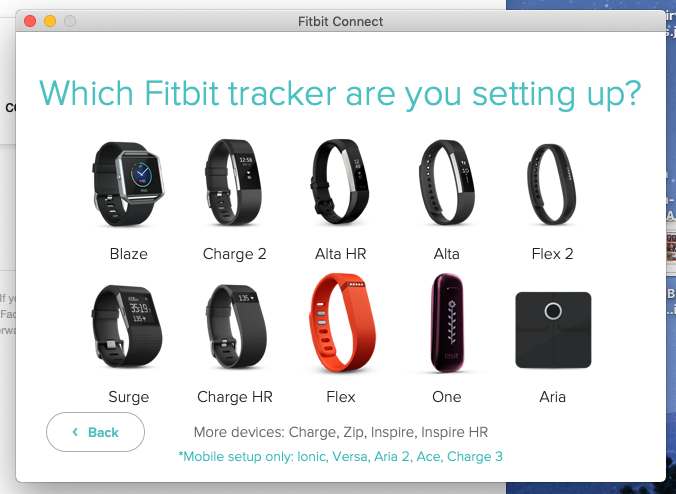
Thanks for the picture. Let's see if a moderator is able to help you with this.
Is there someone with a mobile device who might let you set up that way?
If I set up the Charge 3 with a friends mobile device would I be able to use my computer to sync after?
Best Answer


 Community Moderators ensure that conversations are friendly, factual, and on-topic. We're here to answer questions, escalate bugs, and make sure your voice is heard by the larger Fitbit team. Learn more
Welcome on board @Newsgirl7, it's nice to see you here! Thanks for the screenshot and for already troubleshooting this set up inconvenience. I'm glad to hear you were able to set up your tracker with a friend's mobile device.
Fitbit Charge 3 syncs automatically and wirelessly to computers and 200+ leading iOS, Android & Windows devices using Bluetooth LE wireless technology. Windows compatibility coming soon.
- Syncing range: Approx. 20 ft
- Certain features like smartphone notifications may require Android 5.0+. Check your device compatibility.
Syncing requires Bluetooth LE and Internet connection. Windows 10 computers that do not have Bluetooth LE will need a wireless sync donglein order to sync.
- Syncs with iOS 10 and later, Android 5.0 and later and Windows 10 devices. Check yours here.Windows compatibility coming soon.
Thanks for all your help @Odyssey13!
Hope this helps, let me know if there's anything else we can assist you with.
Was my post helpful? Give it a thumbs up to show your appreciation! Of course, if this was the answer you were looking for, don't forget to make it the Best Answer! Als...

why when I download the fitbit connect program on mac does it automatically come in spanish? Downloading in the US and can't translate without assistance.
Best Answer
I have the same setup issue as @Newsgirl7, so apparently I will have to get help using a smartphone. Disappointing. It's also quite frustrating that the few models which apparently can only be set up with a smartphone are mentioned in small print at the bottom of the window with the device images--very easy to miss.
