
Join us on the Community Forums!
-
Community Guidelines
The Fitbit Community is a gathering place for real people who wish to exchange ideas, solutions, tips, techniques, and insight about the Fitbit products and services they love. By joining our Community, you agree to uphold these guidelines, so please take a moment to look them over. -
Learn the Basics
Check out our Frequently Asked Questions page for information on Community features, and tips to make the most of your time here. -
Join the Community!
Join an existing conversation, or start a new thread to ask your question. Creating your account is completely free, and takes about a minute.
Not finding your answer on the Community Forums?
- Mark Topic as New
- Mark Topic as Read
- Float this Topic for Current User
- Bookmark
- Subscribe
- Mute
- Printer Friendly Page
The redesigned iOS Fitbit app is rolling out!
- Mark Topic as New
- Mark Topic as Read
- Float this Topic for Current User
- Bookmark
- Subscribe
- Mute
- Printer Friendly Page


 Community Moderators ensure that conversations are friendly, factual, and on-topic. We're here to answer questions, escalate bugs, and make sure your voice is heard by the larger Fitbit team. Learn more
Hello everyone!
I would like to announce that the redesigned Fitbit app starts rolling out today! This new app will help you reach your goals, and bring the health and wellness information right on hand.
Check out our latest blog for how to get the most out of the new app.
Note: Please be patient if you don't see the update right away, as it will take some time to roll out completely.
Happy stepping!
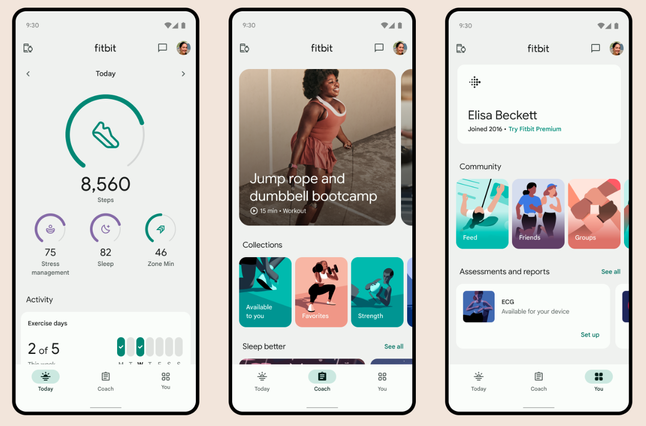


I agree. The colors need to be brighter. I like to use the increased contrast on my iPhone 13 because I find it easier to read. But with the increased contrast, all of the data on the app appears black, and with the white background, it just looks like newsprint.
I also miss the temperature and symptoms tile. I know this was introduced during the pandemic but I still used it.
Also if it would allow you to move the tiles up and/or down within the focus boxes that would be nice.

09-23-2023
17:03
- last edited on
10-14-2023
14:46
by
RodrigoMFitbit

09-23-2023
17:03
- last edited on
10-14-2023
14:46
by
RodrigoMFitbit
I’m jealous!
I’m looking at distance. No year tab. It’s the same with strips. All I see is:

Two problems with reporting of goals.
1) Not getting the oh-so-satisfying notification on my device when your primary goal is met
2) My goal is 5 miles a day. How can 5.13 miles per day average not be considered meeting my goal?

09-23-2023
17:26
- last edited on
09-25-2023
08:05
by
LizzyFitbit

09-23-2023
17:26
- last edited on
09-25-2023
08:05
by
LizzyFitbit
Is it possible to back up one screen? I can see near the top or 1/4 from the top, day, week, month and year. Pressing on year you can scroll all the way back to the year you started, the you can in pack by month and even week and specific day.
From the dashboard look for the pencil in top right corner.
next page starts with Change Focus. Swipe right to the end. There you can place them in the priority you want.
I am editing the above response. The history is intact. You can delete you history but still looking to see if it is downloadable.
Moderator Edit: Merged replies
 Best Answer
Hey I have been perusing the different places in the new app.
try this.
1. On the Dashboard go to upper right icon of your Headshot. Click on it you will find the export data option.

Best Answer
09-23-2023
17:56
- last edited on
09-27-2023
14:59
by
ManuFitbit

09-23-2023
17:56
- last edited on
09-27-2023
14:59
by
ManuFitbit
You are correct. We're all different. My tracker is small, and I'm not able to see the % without using a magnifying glass. So I relied on the app for that.
----
mrssupr, On the home page, beside the word Today, is a pencil icen. Click on that to bring up Choose focus. You can not change the order within each group, BUT, if you go to the very last focus, you'll find a custom preset. You can pick whichever 4 items you want. Whatever you choose for #1 will be the top one. For example, I have steps on top and then heart rate, hourly movement and water intake. Once you pick what you like, remember to save it, and then you'll have your top picks showing.
Heads up on the Export. This invokes a Google Takeout function. By default this function exports everything from your Google user. Once you customize the Takeout request selecting only the Fitbit data, what gets exported is worthless at best. There is no option to specify a time frame to export. What you get is a .zip file with lots folders with odd “user lifetime” summary data.
What is missing is the capability we had in the past that exported to a .CSV file your daily steps, sleep, activity, weight, and food data within a specified time frame.
I know there is no comparison but is it possible to use the weekly stats letter to garner info into an excel file? I know it is manual work but…..
Best Answer
Curly8327 , I’m not sure what you’re asking. The screenshot I posted shows the top of the screen when I select the Distance icon on the Home Screen. I have the Day, Week, and Month tabs but no Year tab to select. Backing up a screen just goes back to the dashboard.
09-23-2023
18:31
- last edited on
10-14-2023
14:49
by
RodrigoMFitbit
09-23-2023
18:31
- last edited on
10-14-2023
14:49
by
RodrigoMFitbit
Unfortunately I do not see a pick from you. But. Here is what I see on mine


Best Answer
I used the old export once a month to extract daily stats into a spreadsheet. My spreadsheet has one tab for each month and a summary tab to get the year to date info.
Manually gathering and inputting data into a spreadsheet would be possible I guess. Very time consuming to transcribe all the data.
This is a resend of what I see on mine. I have the Day, Week, and Month tabs but no Year tab to select.

Best Answer
Curly8327, From your lips…
I reported this in June when I first migrated to the Google logon. I was (eventually) told they were aware of the problem.
Best Answer
09-23-2023
18:43
- last edited on
10-04-2023
10:44
by
ManuFitbit
09-23-2023
18:43
- last edited on
10-04-2023
10:44
by
ManuFitbit
Okay let’s compare our tech.
I have app version 4.0.
iOS system. Version 17.0.1.
iPhone 12 mini.
I also pay for Premium
my husband has all the same things I do but our apps do have differences to mine.
----
Okay, I did not go too far into the options but have you been on your Dashboard with the Computer/Internet Fitbit website. There is an option to data export there. You might want to see if your data collection can come from this setting. You settings icon is on the right top corner.
 Best Answer
Curly8327, good idea. I have:
App version 4.0
iOS system version 16.7
iPhone 14+
Fitbit Charge 5
Fitbit Premium
Best Answer
09-23-2023
19:43
- last edited on
09-25-2023
08:06
by
LizzyFitbit
09-23-2023
19:43
- last edited on
09-25-2023
08:06
by
LizzyFitbit
Sorry for that. I no when the trackers go rid of the actual press button for the sleeker look, I really never got used to this. I hope you can find a work around.
I have found when I had hiccups on any app on my iphone it was because I had not updated the iOS system. I hope that will make a difference.
Moderator Edit: Merged replies
Best Answer