
Join us on the Community Forums!
-
Community Guidelines
The Fitbit Community is a gathering place for real people who wish to exchange ideas, solutions, tips, techniques, and insight about the Fitbit products and services they love. By joining our Community, you agree to uphold these guidelines, so please take a moment to look them over. -
Learn the Basics
Check out our Frequently Asked Questions page for information on Community features, and tips to make the most of your time here. -
Join the Community!
Join an existing conversation, or start a new thread to ask your question. Creating your account is completely free, and takes about a minute.
Not finding your answer on the Community Forums?
- Mark Topic as New
- Mark Topic as Read
- Float this Topic for Current User
- Bookmark
- Subscribe
- Mute
- Printer Friendly Page
iPhone X and Charge 2 notifications/texts/calls
- Mark Topic as New
- Mark Topic as Read
- Float this Topic for Current User
- Bookmark
- Subscribe
- Mute
- Printer Friendly Page
- « Previous
-
- 1
- 2
- Next »


I can sign in to the Fitbit app on my husband’s phone and receive call and text notifications. He signs in to my app and receives only calls, not texts. I have uninstalled, reinstalled, disconnected, restarted numerous times. But the above scenario leads me to believe it’s a phone issue. We have the same model phone and I have compared every setting I can think of and find. Hopefully, like some of the other bloggers, it magically just starts working, because I am totally out of ideas.
 Best Answer
Don’t think that’s my problem... my phone before I upgraded to the x was traded in. Not anywhere in my house anymore.
Best Answer
Yup, same here. Old phone was factory resetted. And so was husband’s old phone. I just can’t get why his Fitbit gets calls and texts and mine only calls.
Best Answer

 Community Moderator Alumni are previous members of the Moderation Team, which ensures conversations are friendly, factual, and on-topic. Moderators are here to answer questions, escalate bugs, and make sure your voice is heard by the larger Fitbit team. Learn more
Hello everyone, I hope you're doing well. 
I understand some of you are having trouble receiving notifications on your Charge 2. If you have already checked that your tracker is not on the Do Not Disturb mode by pressing down the button for 2 seconds, I would like to suggest you to reset Notifications from the Fitbit app following these steps:
- Go to the Bluetooth settings on your phone and tap on tracker. Then tap on Forget this Device.
- Force-close the Fitbit app by double tapping the home button on your phone and swiping up the app.
- Open the app again and tap on Account > Your Tracker > Notifications. You will receive the following Pop-up:
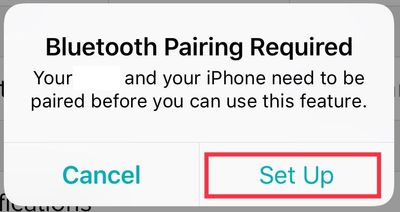
- Then, once you tap on Set Up, the app will begin setting up your tracker with the Bluetooth on your phone, which will prompt the next pop-up:
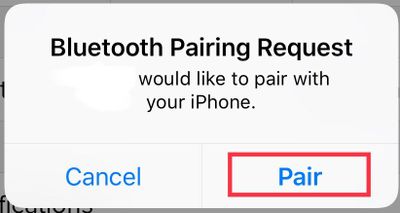
- Tap Pair
Once you get back to the tracker options, tap on Notifications an enable the ones you'd like to receive. Additionally, please go to your phone Settings > Notifications > Fitbit and make sure the following is enabled:
- Allow Notificacions
- Show in History
- Show on Lock Screen.
I hope this can be helpful, give it a try and keep me posted in case you need anything else. 
 Best Answer
Community Moderator Alumni are previous members of the Moderation Team, which ensures conversations are friendly, factual, and on-topic. Moderators are here to answer questions, escalate bugs, and make sure your voice is heard by the larger Fitbit team. Learn more
Best Answer
Best Answer
Community Moderator Alumni are previous members of the Moderation Team, which ensures conversations are friendly, factual, and on-topic. Moderators are here to answer questions, escalate bugs, and make sure your voice is heard by the larger Fitbit team. Learn more
Hello @Jamie423, I hope you're doing well, thanks for taking the time to reply.
I appreciate you have let me know you've already tried the troubleshooting steps provided earlier. At this moment our engineers are aware of the problem and are working to resolve it as quickly as possible.
I'm sorry for any inconvenience this situation has caused. I appreciate your patience and look forward to getting you back on track. In the meantime, if there's anything else I can do for you, please feel free to reply.
Best Answer
Not sure if this will work for you, but through process of elimination I became convinced this issue was a phone problem and not a Fitbit problem. I finally decided to do an entire factory reset on my phone (which isn’t TOO big of a deal if u save everything to the cloud). Guess what?! I got my text notifcations back! So, the few hours hassle was worth it in my book!
Best Answer
Through process of elimination I became convinced this issue was a phone problem and not a Fitbit problem. I finally decided to do an entire factory reset on my phone and text notifcations are finally working! So, the few hours hassle was worth it in my book!
Best Answer
Community Moderator Alumni are previous members of the Moderation Team, which ensures conversations are friendly, factual, and on-topic. Moderators are here to answer questions, escalate bugs, and make sure your voice is heard by the larger Fitbit team. Learn more
Hello @Jamie423, I hope you're doing well, thanks for taking the time to reply and let me know the steps you've performed in order to resolve this issue, I really appreciate it and I think they will be very helpful for members of the Community facing the same situation.
In case you have some spare time, I would like to invite you to visit our Discussions board where you will find great tips and encouragement from other members and if there's anything else I can do for you, please keep me posted!
Best Answer
I just did a hard reset on mine, uninstalled and re paired my ionic and am now receiving notifications for texts. haven't had any calls yet so don't know if that notification is working. daughter did the same thing and she too is receiving text notifications.
Best Answer
I also had this problem. I read from a fitbit site (shown in a message farther down on this site) to go to blutooth connection and forget this device. This devise never showed up. So, I went to fitbit app and told it to Remove This Charge 2. This a reset it up and now I get text messages. They don't automatically turn on the screen. It vibrates and I hit the button and poof!! There is my text message. I hope this helps!!
Best Answer
My entire family has Charge 2 and iPhone 6's and their devices work perfectly.
I have the iPhone X and my notifications do not work and I've tried all of the tricks and nothing will resolve it. When will this be fixed?
@Slambro wrote:Frustrated that calls and texts will not appear on my Charge 2 despite all day sync being turned on and bluetooth connection appearing to be fine.
Best Answer
But only after following those instructions.
I’m not really happy with my iPhoneX. Had to go in and get the software totally reloaded on it once and have sound notification with text issues. But I did finally get this to work
Sent from my iPhone
Best Answer
What did you do to get text messages? or Phone calls? (as notifications on
Charge 2)
Thank you.
--
~Barry J Sullivan
Wag more, Bark less...
Best Answer
01-17-2019
02:10
- last edited on
01-17-2019
06:49
by
MarcoGFitbit


01-17-2019
02:10
- last edited on
01-17-2019
06:49
by
MarcoGFitbit
My Charge2 worked perfectly with my iPhone5s. When I upgraded to iPhone8 a few months back, the text notifications stopped working. Have done all the troubleshooting - Nothing has helped.
I can see this is a problem for many users. Seems time for Fitbit to do something...
UPDATE:
Managed to get it working after reading through all of the similar posts and finding one more setting to change for messages on my phone. Hope everyone else manages to get theirs working too.
Best Answer
Best Answer
Community Moderator Alumni are previous members of the Moderation Team, which ensures conversations are friendly, factual, and on-topic. Moderators are here to answer questions, escalate bugs, and make sure your voice is heard by the larger Fitbit team. Learn more
Hello @Barrysu, @urur710 and @Jamie423 , I hope you're doing well, it's nice to see you around. It's great to welcome you to the Fitbit Community @SwampyMarsh, thanks for letting us know your issue has now been resolved, I'm very glad.
I appreciate you have taken the time to express your feedback about this situation. If you have already contacted our Support Team and you need further assistance, please reply to them as they will be able to provide you more options. Now, if you have already tried some troubleshooting steps without success, I would like you to check this thread with more information about this issue.
At this moment, I will close this thread as I've noticed several people posting on both threads. I will leave the other one open and you are welcome to reply there so we can keep the board organized.
Thanks for your patience and understanding, have a great day.
Best Answer
- « Previous
-
- 1
- 2
- Next »