
Join us on the Community Forums!
-
Community Guidelines
The Fitbit Community is a gathering place for real people who wish to exchange ideas, solutions, tips, techniques, and insight about the Fitbit products and services they love. By joining our Community, you agree to uphold these guidelines, so please take a moment to look them over. -
Learn the Basics
Check out our Frequently Asked Questions page for information on Community features, and tips to make the most of your time here. -
Join the Community!
Join an existing conversation, or start a new thread to ask your question. Creating your account is completely free, and takes about a minute.
Not finding your answer on the Community Forums?
- Community
- Product Help Forums
- Alta & Alta HR
- Re: Alta Notifications
- Mark Topic as New
- Mark Topic as Read
- Float this Topic for Current User
- Bookmark
- Subscribe
- Mute
- Printer Friendly Page
- Community
- Product Help Forums
- Alta & Alta HR
- Re: Alta Notifications
Alta Notifications
ANSWERED- Mark Topic as New
- Mark Topic as Read
- Float this Topic for Current User
- Bookmark
- Subscribe
- Mute
- Printer Friendly Page
03-10-2016
10:22
- last edited on
08-20-2020
18:43
by
MatthewFitbit


 Community Moderator Alumni are previous members of the Moderation Team, which ensures conversations are friendly, factual, and on-topic. Moderators are here to answer questions, escalate bugs, and make sure your voice is heard by the larger Fitbit team. Learn more
03-10-2016
10:22
- last edited on
08-20-2020
18:43
by
MatthewFitbit
Alta comes with the ability to set up and receive call, text, and calendar notifications on iOS and Android.
This post will provide instructions on how to setup your alerts so that you can see who's texting you, the 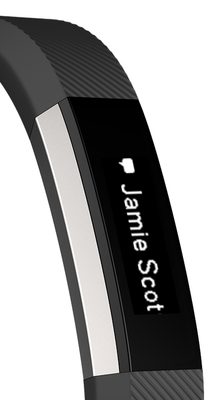
- How do I set up call/text/calendar notifications on Alta?
- Make sure that your mobile device is compatible with our notifications feature by visiting http://www.fitbit.com/devices.
- On your mobile device, make sure Bluetooth is enabled, and make sure your device is nearby!
- Open the Fitbit app on your mobile device and tap your tracker tile at the top of your mobile Dashboard.
- Tap your tracker tile a second time, tap "Notifications" (iOS) or "Call and Text Notifications (Android) and then turn on call/text/calendar notifications.
- To verify that set up was successful, check out the list of Bluetooth connected devices on your mobile device. Your Alta should appear.
- How do I view call/text/calendar notifications on Alta?
You can view your notifications when they come in by using Quick View or by double-tapping the Alta where the band and tracker meet.
Notes:
- For Android users, please ensure that you've turned notification access on in your settings and enabled each notification in the Fitbit App.
- Calendar notifications use the native calendar app in iOS, and the native or selected 3rd party app on Android.
- Windows Phones do not support alerts at this time.
Answered! Go to the Best Answer.
 Community Moderator Alumni are previous members of the Moderation Team, which ensures conversations are friendly, factual, and on-topic. Moderators are here to answer questions, escalate bugs, and make sure your voice is heard by the larger Fitbit team. Learn more
@TQuilla I haven't experienced issues with my Alta and receiving notifications but thanks for the feedback. I will pass it along to the appropriate team.
@DrPhilene Thanks for taking the time to try the troubleshooting tips I provided. As that hasn't worked for you, I recommend reaching out to our Support Team and letting them know what you've tried already. I am confident they will be able to provide you with further options to help get you on track.
@Thump Have you tested it by sending yourself several text messages? Odd that it isn't vibrating for text notifications but it is for an alarm. Let's try restarting the Alta and then trying it again.
 Best Answer
Tracy
Best Answer
@ErickFitbit I have all of my notifications shut off and for some reason I am still receiving them. Is there some sort of update I need to complete? It has been a while since I used my fitbit - can that be having some effect? Thanks!
Best Answer
Community Moderator Alumni are previous members of the Moderation Team, which ensures conversations are friendly, factual, and on-topic. Moderators are here to answer questions, escalate bugs, and make sure your voice is heard by the larger Fitbit team. Learn more
@Thump Thanks for testing out the notifications. At this point, I recommend reaching out to our Support Team and letting them know the details of your troubleshooting efforts and the results. I am fully confident that they will be able to provide you with some options to get back on track. Again, thank you for trying the suggested testing.
@MrsRis So you're trying to turn the notifications OFF instead of ON? You should be able to toggle the settings to OFF and also log out and log back into the app. If that doesn't resolve it, try uninstalling the app and reinstalling it. Keep me in the loop.
Best Answer
thank you!
Best Answer
SunsetRunner
I'm just going to use mine as a tracker. Too bad the marketing pitched these other features as a selling perk, when it in fact it is buggy. Maybe someday an update will get them working but I'm not holding my breath!
Community Moderator Alumni are previous members of the Moderation Team, which ensures conversations are friendly, factual, and on-topic. Moderators are here to answer questions, escalate bugs, and make sure your voice is heard by the larger Fitbit team. Learn more
@Kristan125 Have you tried toggling the calendar notification OFF and then ON? I recommend giving that a try and letting me know if that helps.
@SunsetRunner Have you tried the troubleshooting suggestions listed here for call/text notifications? Those tips should help get you back to receiving your notifications.
Best Answer
Sent from my iPhone
 Community Moderator Alumni are previous members of the Moderation Team, which ensures conversations are friendly, factual, and on-topic. Moderators are here to answer questions, escalate bugs, and make sure your voice is heard by the larger Fitbit team. Learn more




I just got an alta after having a Charge HR (which I loved, but got unglued). The alta looks great, but I HATE the way the notifications work on alta.
Why do I have to double tap on the alta to see the notification? What if I'm doing something else at the time or my other hand is occupied?
I also don't use the quick view. I don't use the alta (or the Charge I had previously) as a watch.
I just want to see the notifications as they appear.
I'm afraid I'll have to return my alta if this is not fixed. It seems that many alta users are complaining about the same thing. Can you guys implement this small but absolutely necessary feature?
Thanks!
 Best Answer
Alta connected but it is still saying set up pairing - how do you do this please?
Best Answer
Still waiting on Fitbit to to sort it out!!!!!
Best Answer
