
Join us on the Community Forums!
-
Community Guidelines
The Fitbit Community is a gathering place for real people who wish to exchange ideas, solutions, tips, techniques, and insight about the Fitbit products and services they love. By joining our Community, you agree to uphold these guidelines, so please take a moment to look them over. -
Learn the Basics
Check out our Frequently Asked Questions page for information on Community features, and tips to make the most of your time here. -
Join the Community!
Join an existing conversation, or start a new thread to ask your question. Creating your account is completely free, and takes about a minute.
Not finding your answer on the Community Forums?
- Community
- Platform
- Android App
- Re: Android Dashboard Redesign Feedback
- Mark Topic as New
- Mark Topic as Read
- Float this Topic for Current User
- Bookmark
- Subscribe
- Mute
- Printer Friendly Page
- Community
- Platform
- Android App
- Re: Android Dashboard Redesign Feedback
Android Dashboard Redesign Feedback
- Mark Topic as New
- Mark Topic as Read
- Float this Topic for Current User
- Bookmark
- Subscribe
- Mute
- Printer Friendly Page

 Community Moderator Alumni are previous members of the Moderation Team, which ensures conversations are friendly, factual, and on-topic. Moderators are here to answer questions, escalate bugs, and make sure your voice is heard by the larger Fitbit team. Learn more
Fitbit Update 04/24/2017: Hi everyone -- Our Android team appreciates everyone's feedback in this thread and are working to fully implement the new Android Dashboard in the upcoming 2.48 release.
I am closing this thread as all feedback has been captured and reviewed by our team. Thanks again for all of your constructive feedback as we continue to improve Fitbit products and services.
Fitbit Update 10/04/2016: Hello Android Community! Some of you may have took notice that your Fitbit app has updated and you now have the option to view the new Android Dashboard (see screenshot below).
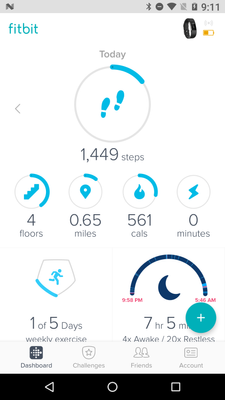
For those of you in the beta, feel free to share your feedback so I can pass it along. I will have a more concrete timeline of official release to share with everyone when I get a confirmed date. We're taking our time to make sure the features are all working up-to-par. Thank you in advance for the feedback!

I've actually enjoyed the look and feel of the new dashboard. The only problems I see is that i would like it to give is data like it did in the old dashboard where Sleep and the sorts would actually show for that day not the most current reading it had when you go look at previous day. I don't want to have to hit a tile to just look at the correct data for a previous day when I move between days to look at the data for that day.

 Fitbit Product Experts Alumni are retired members of the Fitbit Product Expert Program. Learn more
@Wlogue wrote:
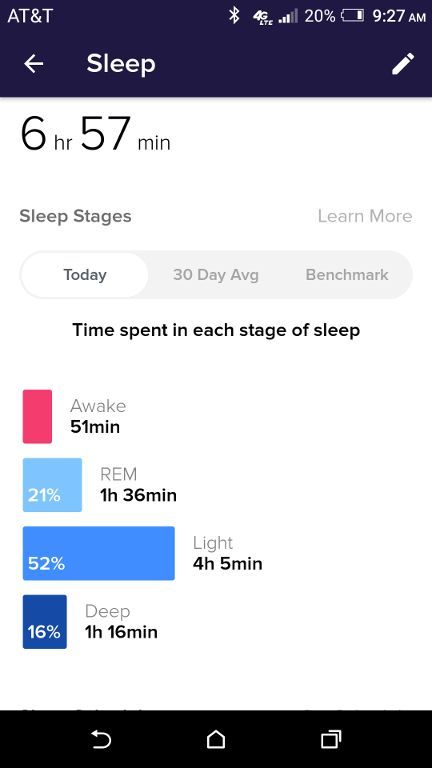
It also used to give exact time awake or restless which it no longer does when you click on the graph.
I am not sure exactly what you are saying, @Wlogue. The sleep graph on my Android app gives both the minutes and the percentage of time for each stage. What do you mean by "exact time"?
Sent from my Verizon 4G LTE smartphone

Thanks @MariamV 
 Best Answer
I have had the new dashboard for several weeks and all was well the the other day I lost half my tiles and nothing supports has instructed me to do will bring them back the tiles that are left only have a-in circle no +.Please what can I didn't have rebooted and log out and back in help

I just got the update and like the new look. However, once I go through the What's New tutorial and click Done all of the tiles disappear. I have to clear all the app data to reset and get the tiles back. It seems like every update makes the app less stable.

I currently have the new dashboard and when I opted to use it, the icon on my phone home screen was changed to the feet enclosed in the circle, and continuously updated. The icon was removed accidentally and I am trying to get it back. Any ideas?
Best Answer

SunsetRunner
Yes I notice that too and I don't like it. It was useful to know the time so I could reference back to what might have caused me to wake or be restless
SunsetRunner
I had the same issue and posted a request for advice. A fellow user advised me to log off of fitbit, power off my phone for thirty seconds and turn phone back on. I logged back into fitbit and all my tiles appeared once again. Hope this helps??
I tried these things all that works is I take my alta out and reregester it back in,but I have to leave the Alta 101 guide banner at the top cause if I click on it I loose my tiles. I always have the round tiles but loose the square tiles
Best Answer
I would like to see a notes section, maybe connected with the workout log. That way we can enter random data that is important to the user, like weather and any notes on injuries and such. You can then use it like a running log.
Thanks!
Fitbit Product Experts Alumni are retired members of the Fitbit Product Expert Program. Learn more
@RobinTD, you should go to the Feature Suggestions Forum and search for a suggestion there that most closely matches your suggestion, and vote for it. Here is one such suggestion:
https://community.fitbit.com/t5/Feature-Suggestions/Notes-on-online-and-app-dashboard/idi-p/905512
04-11-2017
10:01
- last edited on
04-12-2017
14:32
by
MariamV

04-11-2017
10:01
- last edited on
04-12-2017
14:32
by
MariamV
Thanks USAF-Larry!
Apparently I am not the only one with that idea. I wasn't sure where to put
it.
Have a good fitness day!
--
Moderator edit: removed personal info


from Fitbit ever reads or responds.