
Join us on the Community Forums!
-
Community Guidelines
The Fitbit Community is a gathering place for real people who wish to exchange ideas, solutions, tips, techniques, and insight about the Fitbit products and services they love. By joining our Community, you agree to uphold these guidelines, so please take a moment to look them over. -
Learn the Basics
Check out our Frequently Asked Questions page for information on Community features, and tips to make the most of your time here. -
Join the Community!
Join an existing conversation, or start a new thread to ask your question. Creating your account is completely free, and takes about a minute.
Not finding your answer on the Community Forums?
- Community
- Platform
- Android App
- Re: Device not syncing to phone
- Mark Topic as New
- Mark Topic as Read
- Float this Topic for Current User
- Bookmark
- Subscribe
- Mute
- Printer Friendly Page
- Community
- Platform
- Android App
- Re: Device not syncing to phone
Failing to sync after Android 13 update Samsung Flip/Fold
ANSWERED- Mark Topic as New
- Mark Topic as Read
- Float this Topic for Current User
- Bookmark
- Subscribe
- Mute
- Printer Friendly Page
11-23-2022
11:06
- last edited on
12-14-2022
15:00
by
YojanaFitbit


11-23-2022
11:06
- last edited on
12-14-2022
15:00
by
YojanaFitbit
I updated to Android 13 today.
From then on, no sync possible anymore.
I already:
- Restarted my phone
- Shut down the phone completly
- Force quit Fitbit
- Deleted and reinstalled Fitbit (should be the newest version)
- Reset the Charge 5
- Shut down Google Assistant (apparently that's a problem with the Sense and Android 13)
- Restarted Bluetooth several times
- Hard Reset the Charge 5
Now I'm stuck with a watch that can't be connected anymore and is stuck in install mode.
Edit: To clarify. The Charge 5 is being seen via bluetooth, i get's found by the app, but it doesn't complete the connection.
Answered! Go to the Best Answer.

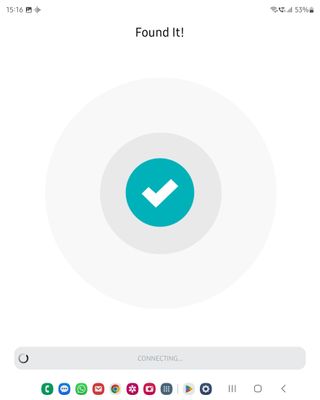
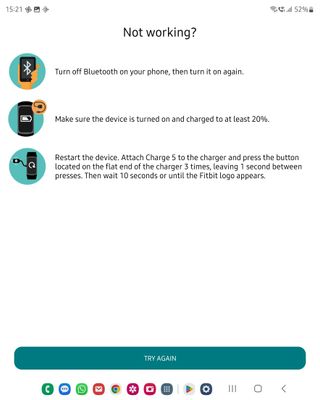
My phone is also a Samsung flip 3, and after a recent Android update, my fitbit Charge 5 stopped connecting. I tried everything for the last week with no success. I disconnected my old Charge 5 from my Fitbit app and tried to connect a new Charge 5 that I got for Christmas, and it will not connect either. My blue tooth on my phone finds them just fine, but when I try to do the setup, the Fitbit app says "found it" and then just sits and sits until it asks if I want to try again.
Looking forward to getting the fix, but how will I get the update when neither of my Charge 5 has been set up? I wish I had never disconnected my old Charge 5, but there you are.

The Charge 5 is recognised and the phone offers to open the Fitbit app to set up. It is found, but then when connecting it fails. I've tried every suggestion more than once. I'm using a Samsung Galaxy Fold3 with Android 13. It offered to replace my Charge 4 and then failed during set up and now it can't find my Charge 4 any more and will not set it up either.
 Best Answer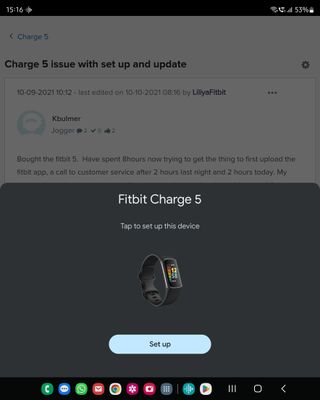
12-27-2022
08:38
- last edited on
01-21-2023
09:06
by
DavideFitbit

The update is on the phone (as was the one that broke everything!), once you get it you should be able to pair the device again.
Best Answer
My device will no longer sync with my phone. Apparently fitbit are aware of this but offer no support or answers for this. I have tried to contact them but they offer nothing. I have been trying to cancel my premium subscription they can't even do this. Will not be renewing a subscription I can't even use.
Best Answer
Hi @BeckyBoo60 which Fitbit and what phone and phone operating system do you have?
Best Answer
top option. It installed the new update. I added a post that after some
maneuvering, my phone and fitbit finally synced. I have a Z-flip 4 and a
Luxe.
Best Answer
In the US and see no update yet. But I have another workaround. Was syncing with an old TCL phone and it worked but was inconvenient. Got an Amazon Fire HD10 for Christmas. I side-loaded the Google Play Store and installed the Fitbit App, once everything loaded, I turned on Bluetooth. I am now syncing with my Fire Tablet and since I use the tablet all the time it is great.
Best Answer
Best Answer
@txteva Charge 5 is working for me after installing the new Android firmware on my phone. 👍👍👍 Enjoy your New Year everyone! 🏃:female_sign:🚴:female_sign:
Best Answer
Hi, as described in the topic. Here is some additional info:
- At some point around 10 days after not sycing at all I disconnected the device to reconnect it
- When I connect the Charge 5 to the charger and search for it in the app, it says "Found!" instantly, but the times out and wants me to retry
- I tried turning Bluetooth off/on and all the basic stuff like having the latest app version, etc.
- My phone is a Galaxy Z Flip4
- Fitbit Version is 57.20001.171.50
Best Answer
Just an FYI: when they had the same problem when the versa was first released, it took just about a year the fix the issue. Fitbit is not known for fixing issues with any great "speed". Good luck.
Best Answer
@BeckyBoo60 it's an issue with Fitbit and Android 13 flip phones. I'll move this to the Android area.
Best Answer
Hi @smidge0r it's an issue with Fitbit and Android 13 flip phones. I'll move this to the Android area.
Best Answer
SunsetRunner
The update will be through Samsung for the phone. Once it's there, you're looking for DVKB, you should be able to set up your Fitbit.
Fitbit know full well that you can't sync with the Samsung Z flip/fold phones. There are threads going back at least six months. Like you I spent hours trying to set up my charge 5. Fitbit replaced the device but the problem remains. Neither Fitbit nor Samsung seem inclined to resolve this even though we are a large group of people who are affected. We have two choices - dump Fitbit and get a refund or find an alternative device for the app. My Samsung galaxy tab works but not the Z flip 3. Whatever the issue it is a software problem as your Fitbit device is probably fine. Sorry to be the bearer of bad news but so far not one single Samsung galaxy Z flip/phones has to my knowledge successfully synced with Fitbit. Charge 4 users lost access following a software update.