
Join us on the Community Forums!
-
Community Guidelines
The Fitbit Community is a gathering place for real people who wish to exchange ideas, solutions, tips, techniques, and insight about the Fitbit products and services they love. By joining our Community, you agree to uphold these guidelines, so please take a moment to look them over. -
Learn the Basics
Check out our Frequently Asked Questions page for information on Community features, and tips to make the most of your time here. -
Join the Community!
Join an existing conversation, or start a new thread to ask your question. Creating your account is completely free, and takes about a minute.
Not finding your answer on the Community Forums?
- Community
- Platform
- Android App
- Re: Send notifications regardless of DND
- Mark Topic as New
- Mark Topic as Read
- Float this Topic for Current User
- Bookmark
- Subscribe
- Mute
- Printer Friendly Page
- Community
- Platform
- Android App
- Re: Send notifications regardless of DND
Notifications: not working on Silent mode (RESOLVED - 5/3)
ANSWERED- Mark Topic as New
- Mark Topic as Read
- Float this Topic for Current User
- Bookmark
- Subscribe
- Mute
- Printer Friendly Page


 Community Moderator Alumni are previous members of the Moderation Team, which ensures conversations are friendly, factual, and on-topic. Moderators are here to answer questions, escalate bugs, and make sure your voice is heard by the larger Fitbit team. Learn more
Fitbit Update: 5/3/18
Hi, everyone!
We released to 100% the next Fitbit for Android app update: 2.71. In this app version, we released the fix for this notifications issue. Please update your app!
You will see a new option in your Notifications Settings that reads "Vibration Settings," which is where you can toggle on/off if you want to receive notifications when your phone is set to Do not disturb or Silent mode.
I'm glad we could get this resolved for you all! Your patience was really appreciated.
Fitbit Update: 4/23
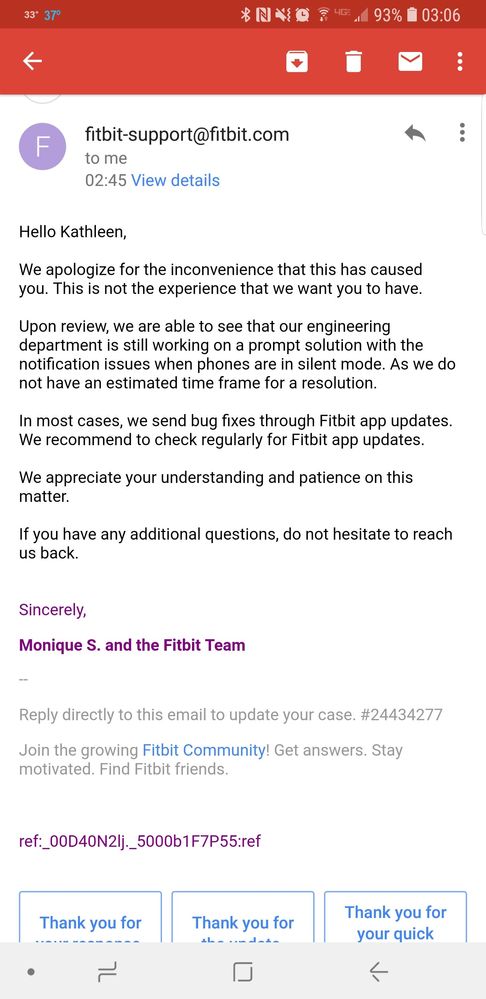
Hi all - Our team is currently working on a fix so you all can get your notifications back whenever in "Silent mode."
I don't know when the fix will be released but I will let you know once I have that information available. Thanks for your patience! Sounds like many of you are using the workaround to just put your phone on vibrate to the lowest setting. I appreciate everyone helping each other out and making suggestions for the time being.
Updated: 4/20
Hi, everyone!
Our team is aware of this Notification issue when you put your Android device in Silent mode. This began with the last app version 2.70.
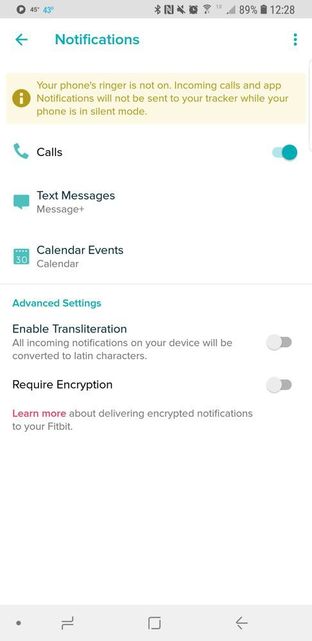
If your phone is on Silent mode, notifications will not reach your watch/tracker. If you have silent mode off, your notifications will be received.
I will provide updates on this problem here. Please stay tuned! Thanks so much for your patience.
Want to get more steps? Visit Get Moving in the Health & Wellness Discussion Forum.
Answered! Go to the Best Answer.


If you find the APK for 2.69 or whatever the exact app version was before 2.7, it goes back to normal. I had to sideload the app for now but I still have notifications. It'll do until there's a fix.


The warning message sounds like this was a deliberate design choice. Is that really the case? Because if so there is a clear lack of understanding for how users actually use their devices. If not, I hope you guys fix it asap!

 Community Moderator Alumni are previous members of the Moderation Team, which ensures conversations are friendly, factual, and on-topic. Moderators are here to answer questions, escalate bugs, and make sure your voice is heard by the larger Fitbit team. Learn more
Hi there everyone, thank you all for your feedback and patience and for bringing this issue to our attention. As @AlessFitbit mentioned earlier, this was an issue found in the latest version of the Fitbit app in Android platforms, it was not implemented by design.
I know many of you including my self prefer to have in silent mode our phones. So rest assure we are working to find a solution.
So far, we haven't heard new updates, as soon there are more news we will let you know.
"Great things are done by a series of small things brought together.” What's Cooking?




This really doesn't work for me. I can't have my phone out at work. I need to be able to get notifications when my phone is on silent. I can't be disconnected from my kids daycare and school. This is a terrible update. Please correct it soon.
 Best Answer
Thanks Fitbit your software developers are just the best and lets not forget about the team that tests the product before issuing to the loyal fitbit users 😞
Just out of interest what were the amazing new benefits on the last two updates that I could experience while basic functionality was removed or broken, just curious.
Ultimately add me to the ever growing list of unhappy fitbit users.
Best Answer
If I put my S8 on mute it will not allow any fitbit notifications through. Note that DND is not on. This defeats the way I have been using it too. I normally keep my phone on mute, and can turn on occassionally when needed.
I now have to mess around with all the settings to get every single app to stop notifying me and vibrating, and put call on silent. I now have no easy way to turn them back on occassionally either.
Best Answer
I highly agree! I just got my fitbit Ionic yesterday and when I saw the reason I was not getting my notifications I was furious! I will be returning this and going back to my Garmin if fitbit does not fix this feature, which is very disappointing to me.
issue. He said it was because I have a Samsung s9 and it is a newer phone
that they don't have the programming just right (I don't remember the exact
phrase he used).
They don't have an ETA for the fix but some people are able to override it
by going into your phone application settings for fitbit and overriding the
DND notifications. Didn't work for me but might for ya'll.
Still frustrated that it was a feature we had and came to love, to no
longer be available.
Best Answer
it didn't work. Hopefully fitbit fixes this soon!
Best Answer
 Best Answer
I have this same issue and reported it in another posting of a similar nature, "Notifications: not working on Silent Mode". That topic is more specific to a recent app update which, coincidentally, forces all Android users to the same issue that we have.
Android phones like the Google Pixel, Pixel XL, Pixel 2, Pixel 2 XL that use Google's standard operating system no longer have a silent, non-do-not-disturb mode starting from Android 5.0. The current operating system used is Android 8.1.
If I wanted a Do Not Disturb function to reflect what was on my phone, I would turn off notifications directly on the phone. The option to turn off notifications on Fitbit in addition to the Do Not Disturb not sending notifications from the phone is redundant. I came from a Pebble Time and a Pebble 2, both of which allowed for notifications to send in Do Not Disturb mode AND a "Quiet Time" shortcut by holding down the left button, which continued notifications, but turned off vibrations.
I have taken all the steps possible on my side to figure out a workaround (3rd party apps, system settings), but there is absolutely nothing that I can do other than to get a phone like the Samsung Galaxy series, which offers a silent, non-do-not-disturb mode, or an iPhone.
Please make notifications arrive in Do Not Disturb mode a toggle, an option, or just the default behavior.
Best Answer