
Join us on the Community Forums!
-
Community Guidelines
The Fitbit Community is a gathering place for real people who wish to exchange ideas, solutions, tips, techniques, and insight about the Fitbit products and services they love. By joining our Community, you agree to uphold these guidelines, so please take a moment to look them over. -
Learn the Basics
Check out our Frequently Asked Questions page for information on Community features, and tips to make the most of your time here. -
Join the Community!
Join an existing conversation, or start a new thread to ask your question. Creating your account is completely free, and takes about a minute.
Not finding your answer on the Community Forums?
- Community
- Platform
- Android App
- Re: Notifications: not working on Silent mode
- Mark Topic as New
- Mark Topic as Read
- Float this Topic for Current User
- Bookmark
- Subscribe
- Mute
- Printer Friendly Page
- Community
- Platform
- Android App
- Re: Notifications: not working on Silent mode
Notifications: not working on Silent mode (RESOLVED - 5/3)
ANSWERED- Mark Topic as New
- Mark Topic as Read
- Float this Topic for Current User
- Bookmark
- Subscribe
- Mute
- Printer Friendly Page


 Community Moderator Alumni are previous members of the Moderation Team, which ensures conversations are friendly, factual, and on-topic. Moderators are here to answer questions, escalate bugs, and make sure your voice is heard by the larger Fitbit team. Learn more
Fitbit Update: 5/3/18
Hi, everyone!
We released to 100% the next Fitbit for Android app update: 2.71. In this app version, we released the fix for this notifications issue. Please update your app!
You will see a new option in your Notifications Settings that reads "Vibration Settings," which is where you can toggle on/off if you want to receive notifications when your phone is set to Do not disturb or Silent mode.
I'm glad we could get this resolved for you all! Your patience was really appreciated.
Fitbit Update: 4/23
Hi all - Our team is currently working on a fix so you all can get your notifications back whenever in "Silent mode."
I don't know when the fix will be released but I will let you know once I have that information available. Thanks for your patience! Sounds like many of you are using the workaround to just put your phone on vibrate to the lowest setting. I appreciate everyone helping each other out and making suggestions for the time being.
Updated: 4/20
Hi, everyone!
Our team is aware of this Notification issue when you put your Android device in Silent mode. This began with the last app version 2.70.
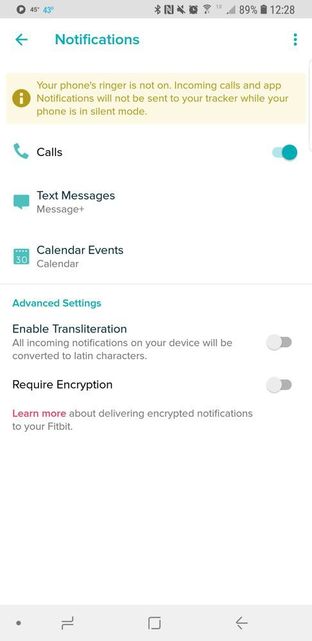
If your phone is on Silent mode, notifications will not reach your watch/tracker. If you have silent mode off, your notifications will be received.
I will provide updates on this problem here. Please stay tuned! Thanks so much for your patience.
Want to get more steps? Visit Get Moving in the Health & Wellness Discussion Forum.
Answered! Go to the Best Answer.

Does anyone know if fitbit is authorizing refunds yet? I don't want to wait any longer. When I can just run to Best Buys or Target to buy a new brand.
 Best Answer
10 days later... Still nothing...
When I actually contacted support, they told me the issue was that my phone, Galaxy S9+, was not listed as supported yet. Wow. Really? Then why was v2.70 made available as an upgrade in the Google Play store for my device? I also have a Galaxy S7 edge. Same issue is present there.
Why hide behind the, your device is not supported, excuse? We all know it was from the latest update.
I was able to restore the previous version of the apk from a backup to restore functionally with no workaround needed and no loss of vibration when/if I want it by having to set the vibration intensity to 0.
Why couldn't fitbit at least provide this roll back to users while they work on 'fixing' the issue?
Extremely disappointed with the service and lack of urgency to correct this issue properly. I definitely will be purchasing something else when upgrade time comes.
Sent from Samsung Galaxy smartphone.

Samsung Note 8 running Oreo was processing Notifications before the end of March, no problems. Now I have to fake out the app.
Samsung S8+ is running fine, but my daughter won't let the app update. Smart Girl.
Best Answer





What's truly shocking is the amount of time it takes to fix this issue! Surely this was just an afternoon project for a software engineer?! Even rolling back to the previous version of the app would have been a good interim solution.

Remember when the "Developers" made the CSV output of your monthly log fail (Never did find out what magic new feature they were trying to put into the software) and how long that took to repair, cause if this epic fail by the developers is the same amount of time prepare for a long wait.
Best Answer

I have found a solution. It may not work for everyone, but the Galaxy S9+ at least has the option to set your ringtone and notification sounds to silent. It has the same effect as putting your phone in silent mode, though it may allow other sounds I haven't encountered yet. Go to your ringtone and notification sound settings and scroll to the top of the list of sounds, silent is listed there. Then turn off silent mode and let the silence overwhelm you, as your Fitbit notifications flow in!


It didn't work I have the lg v20 and I have the silent option but the fit bit recognizes and blocks it. Thanks anyway.
Best Answer
@JonH611 wrote:I have found a solution. It may not work for everyone, but the Galaxy S9+ at least has the option to set your ringtone and notification sounds to silent. It has the same effect as putting your phone in silent mode, though it may allow other sounds I haven't encountered yet. Go to your ringtone and notification sound settings and scroll to the top of the list of sounds, silent is listed there. Then turn off silent mode and let the silence overwhelm you, as your Fitbit notifications flow in!
The only bad thing about this is that it requires me to put all my apps to the default ringtone. But I'll give you credit that's the best workaround so far. We are doing better than Fitbit is at coming up with at least work arounds.
Best Answer
@septlefty wrote:It didn't work I have the lg v20 and I have the silent option but the fit bit recognizes and blocks it. Thanks anyway.
If that doesn't work, get an audio file with no sound in it. I have the soundprofile app and it gives you a no volume ringtone as a part of having the app. After you do that, you have to also turn your volume up. Which has no effect because the ring tone has no sound.
Best Answer