
Join us on the Community Forums!
-
Community Guidelines
The Fitbit Community is a gathering place for real people who wish to exchange ideas, solutions, tips, techniques, and insight about the Fitbit products and services they love. By joining our Community, you agree to uphold these guidelines, so please take a moment to look them over. -
Learn the Basics
Check out our Frequently Asked Questions page for information on Community features, and tips to make the most of your time here. -
Join the Community!
Join an existing conversation, or start a new thread to ask your question. Creating your account is completely free, and takes about a minute.
Not finding your answer on the Community Forums?
- Community
- Platform
- Android App
- Sleep tile displaying incorrect sleep summary
- Mark Topic as New
- Mark Topic as Read
- Float this Topic for Current User
- Bookmark
- Subscribe
- Mute
- Printer Friendly Page
- Community
- Platform
- Android App
- Sleep tile displaying incorrect sleep summary
RESOLVED: Sleep tile on dashboard showing 0 mins awake
- Mark Topic as New
- Mark Topic as Read
- Float this Topic for Current User
- Bookmark
- Subscribe
- Mute
- Printer Friendly Page


 Community Moderator Alumni are previous members of the Moderation Team, which ensures conversations are friendly, factual, and on-topic. Moderators are here to answer questions, escalate bugs, and make sure your voice is heard by the larger Fitbit team. Learn more
Fitbit Update: 9/10
Hey, everyone!
Thanks for confirming that this bug has been fixed and you're no longer seeing "0" minutes for your awake time on the sleep tile. There were some improvements that were made that in the process also fixed this bug.
Since we've confirmed the issue has been resolved since 8/31, I'm now going to close this thread. If you encounter any new issues with sleep logs, please start a new discussion.
Fitbit Update: 7/31
Hi, everybody!
I wanted to check in with you all that had previously reported this bug with the sleep tile. There were some recent improvements made, and I was wondering if you were all still experiencing this with the sleep tile. To sum up the issue, the sleep time in the dashboard was reflecting "0 mins awake" and would later refresh and change it to another number. Basically, the sleep tile was showing a different number from the actual sleep log.
If anyone could please let me know if they are still experiencing this, it would be super helpful!
Fitbit Update: 7/24
Hi, Android users!
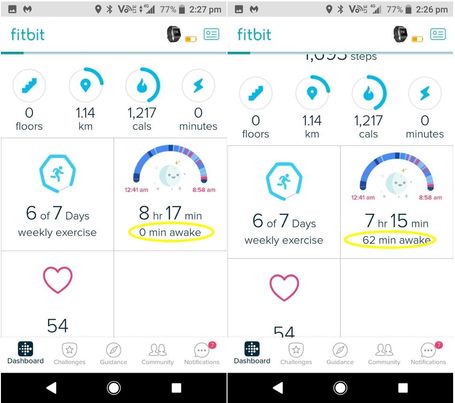
Many of you are reporting since the last Fitbit for Android app release, version 2.74.2 that your sleep tile is reflecting "0 min awake" on the dashboard after syncing your watch/tracker. After it refreshes or your tracker syncs again, you will see the actual time you were awake for. In the sleep details, your sleep reflects correctly, it is only the sleep tile on the dashboard that is showing discrepancies for the sleep log.
We have reported this issue to our team for investigation. When I hear of any new information, this thread will be updated. Thanks for all your help and cooperation!
Want to get more steps? Visit Get Moving in the Health & Wellness Discussion Forum.

Sleep tile has stopped displaying the "awake" time and reports total duration of overall sleep period without the breaks in sleep.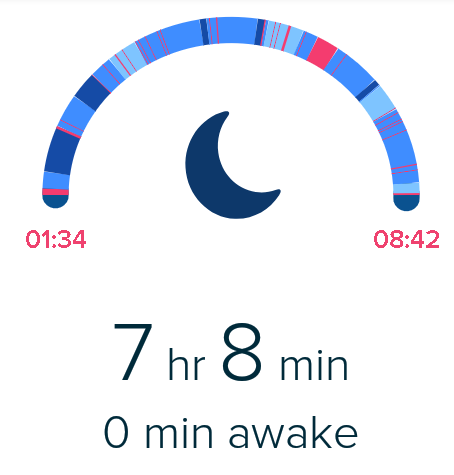
Google pixel, android 8.1 with latest security patches applied, Fitbit app updated as at 12/07/2018

So when I log on to my Fitbit app it shows my asleep time with no awake time but when I click on the sleep to see the graph it breaks it down. And when I back out it shows it correctly. But then changes a few seconds later back to just all sleep time and no awake time.

- Dashboard's Sleep Tile fluctuating between: "time in bed" with 0 minutes awake; and the correct Asleep/Awake times.
- Sleep/Hours Slept screen displaying Thursday night's sleep as Friday's
Logging out of app and relogging failed to resolve either issue.

I've had a charge 2 fitbit for nearly a year and the sleep recordings and dashboard summary have been working ok until about a week ago. On the dashboard it used to show a summary of the total time for all sleep stages (I.e rem , light and deep sleep) as time asleep with a separate figure for time awake. Now it keeps randomly flipping between that and showing zero time awake and including the awake time in the sleep total. Drilling down to the detailed sleep analysis screen seems ok with all the distinct sleep stages and totals correct. Any ideas?
- Tags:
- issue

I don't think it's your tracker, I've seen it happen on my app.
Kristen | USA Cruising through the Lifestyle Forums
one cruise ship at a time!Pixel Watches 1-4 I Charges 3-6 I Versas 1, 2, and Lite I Inspires 1 & 2 I Ionic I Alta HR I Flex 1 I Aria 2 & Air I Senses 1 & 2

This started happening about a week or two ago. My tile on the dashboard shows (for ex.) 7 hrs 36 min of sleep. I then click on the detail and after refreshing now shows 6 hrs and 46 min. I go back to the dashboard and it has updated.
However, the next time I log into Fitbit on the app, it reverts back to the incorrect hours of sleep.
What is happening here?
Anyone experience similar issues?
Is there a fix?
Thanks!!

Getting something similar in the last couple of days on the Android app.
In my case at least, the issue is that the tile initially says "0 mins awake", so shows too much sleep - eg today the tile says 8h 16m asleep, 0 mins awake. After tapping into the details, they show the actual awake time - 55min, and when I back out to the tile it updates to show 7h 21m alseep, 55m awake. In fact I've just noticed that if I even just wait a few extra seconds on the main screen of the app, the tile updates without me having to tap into the details screen.
If I close the app and later open it again, the tile is again wrong initially but then updates itself.

I am also having this issue. The moment I open the app, the sleep tile always shows as if there were 0 mins awake. It updates itself afterwards.
 Best Answer

 Community Moderators ensure that conversations are friendly, factual, and on-topic. We're here to answer questions, escalate bugs, and make sure your voice is heard by the larger Fitbit team. Learn more
Hello @Dunc999.
Thanks for bringing this up. I'd like to take a closer look at the situation to better understand what is going on. Could you share another screen shot showing the specific sleep graph for that day? I'd like to see how much information is missing from the tile.
Also, has this continued to happen since then? If so, please let me know.
Feel free to reach out with any further questions.
Best Answer
I have had this for 2 days now. But I found when I tapped on the tile after a delay the info corrected itself.
The tile however was switching from the display with the zero to the normal one each time you returned to the 'front page'.
It's not as twitchy today as yesterday comes across now as more like a lag in sorting itself out.
Still got the problem with the 7 day summary saying sleep goals met when they're not.
Cheers guys.
Best Answer
Sorry, apparently I hit the post button.
I have a similar problemen, but it corrects itself. Right after syncing, the time of sleep that is shown is the total time (e.g. 8h18). I get the 'you've caught alle the zz's ' message (set at 8h). Then the time is recalculated and it shows the actual time I was asleep (e.g. 7h12 because I was 1h6min awake)
Community Moderators ensure that conversations are friendly, factual, and on-topic. We're here to answer questions, escalate bugs, and make sure your voice is heard by the larger Fitbit team. Learn more
Welcome to the Forums @Kimberlyanzar!
Thanks for bringing this up. I'd like to take a closer look on this. Please answer the following questions:
- What phone are you using?
- What app version are you on? You should be able to check on this be checking on the settings of your phone.
- Has this continued to happen since? If so, is it everyday or only certain days?
Look forward to your reply.
Best Answer
Community Moderators ensure that conversations are friendly, factual, and on-topic. We're here to answer questions, escalate bugs, and make sure your voice is heard by the larger Fitbit team. Learn more
Glad to see new users joining the Community @JaiaB.
Thanks for bringing this up. I'd like to take a closer look on this. Please answer the following questions:
- What phone are you using?
- What app version are you on? You should be able to check on this be checking on the settings of your phone.
- Has this continued to happen since? If so, is it everyday or only certain days?
Look forward to your reply.
Best Answer
 Community Moderators ensure that conversations are friendly, factual, and on-topic. We're here to answer questions, escalate bugs, and make sure your voice is heard by the larger Fitbit team. Learn more
Hi @FancyFreya @Janamaus @Victoria7500, it's great to see you in the Fitbit Community.
I'm sorry to hear about the inconveniences you are experiencing with sleep stages. In order to escalate this issue to our engineering team I would appreciate if you provide me with the following information:
- Phone you're using (Ex. Samsung Galaxy S8)
- The OS your phone is running (Ex. 4.4.4)
- Fitbit app version you have
- For how long or since when have you experienced this problem
Thank you for your patience while our team investigate further. I will keep you updated on the progress.
Have you received the answer you were looking for? Choose the post as the best answer!
Hai ricevuto la risposta che stavi cercando? Accetta il post come soluzione!
¿Has recibido la respuesta que estabas buscando? ¡Acepta el post como solución!
Community Moderators ensure that conversations are friendly, factual, and on-topic. We're here to answer questions, escalate bugs, and make sure your voice is heard by the larger Fitbit team. Learn more
Hi @DramaQueenDiva @TrevorDavies, it's great to see you in the Fitbit Community.
I'm sorry to hear about the inconveniences you are experiencing with sleep stages. This is definitely not an expected behavior. In order to escalate this issue to our engineering team I would appreciate if you provide me with the following information:
- Phone you're using (Ex. Samsung Galaxy S8)
- The OS your phone is running (Ex. 4.4.4)
- Fitbit app version you have
- For how long or since when have you experienced this problem
Thank you for your patience while our team investigate further. I will keep you updated on the progress.
Have you received the answer you were looking for? Choose the post as the best answer!
Hai ricevuto la risposta che stavi cercando? Accetta il post come soluzione!
¿Has recibido la respuesta que estabas buscando? ¡Acepta el post como solución!

 Fitbit Product Experts Alumni are retired members of the Fitbit Product Expert Program. Learn more
@EdsonFitbitJust since the last App update, the Sleep starts as the first image and then settles down a few seconds later, the second image. It's OK on the PC Dashboard.. Everything else I use works on my 2 year old non-listed phone..
Sony Xperia XP
Android 8.0.0
App 2.74.2
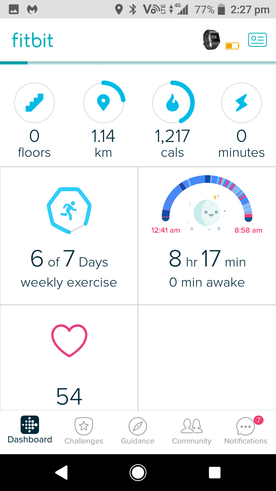
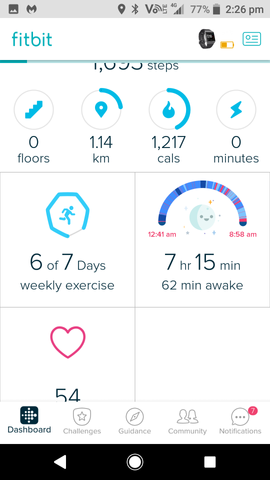
Ionic (OS 4.2.1, 27.72.1.15), Android App 3.45.1, Premium, Phone Sony Xperia XA2, Android 9.0
