
Join us on the Community Forums!
-
Community Guidelines
The Fitbit Community is a gathering place for real people who wish to exchange ideas, solutions, tips, techniques, and insight about the Fitbit products and services they love. By joining our Community, you agree to uphold these guidelines, so please take a moment to look them over. -
Learn the Basics
Check out our Frequently Asked Questions page for information on Community features, and tips to make the most of your time here. -
Join the Community!
Join an existing conversation, or start a new thread to ask your question. Creating your account is completely free, and takes about a minute.
Not finding your answer on the Community Forums?
- Community
- Product Help Forums
- Blaze
- Re: Blaze temp sensor
- Mark Topic as New
- Mark Topic as Read
- Float this Topic for Current User
- Bookmark
- Subscribe
- Mute
- Printer Friendly Page
- Community
- Product Help Forums
- Blaze
- Re: Blaze temp sensor
Blaze temp sensor
- Mark Topic as New
- Mark Topic as Read
- Float this Topic for Current User
- Bookmark
- Subscribe
- Mute
- Printer Friendly Page

Hello and welcome to the forums @bvfdchief
You can learn more about your Blaze here - click
There is no temp sensor, that is your heart rate monitor.
Check out the articles at that link to learn how to charge or sync.
Let us know how things go for you.

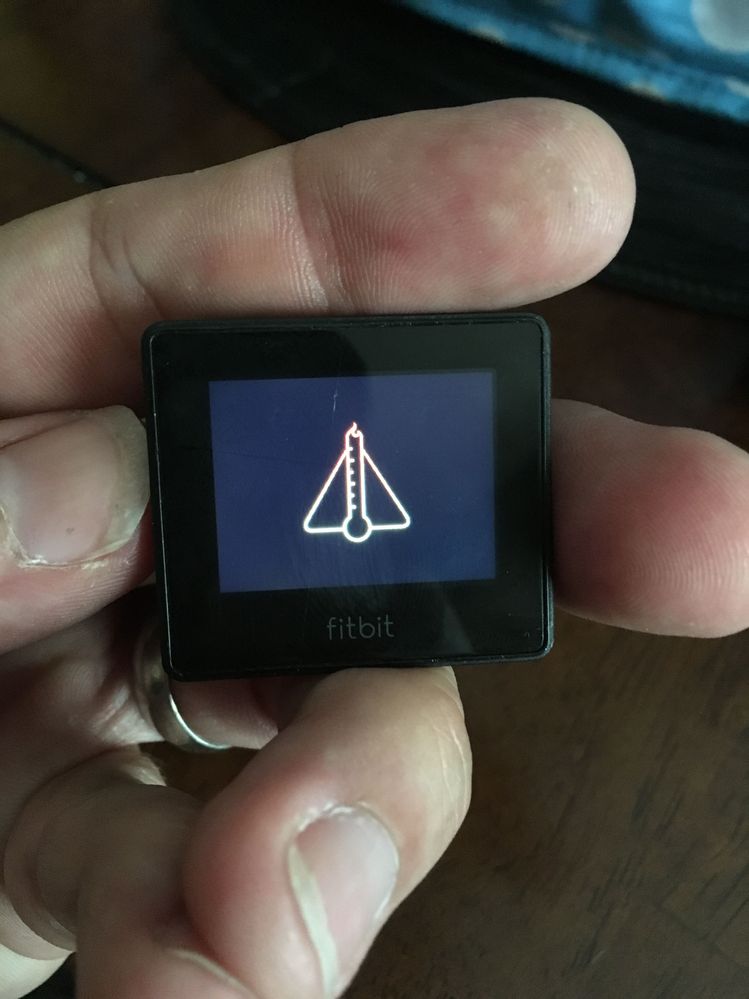
Its orange and looks like a temp gauge overlaying a triangle. the pic option apparently does not work in this reply
 Best Answer
Its orange and looks like a temp gauge overlaying a triangle. the pic option apparently does not work in this reply. I pretty familiar with my fitbit and know what the hear rate is as I have done BETA testing and pretty knowledgeable beyond basics.
Best Answer

 Community Moderator Alumni are previous members of the Moderation Team, which ensures conversations are friendly, factual, and on-topic. Moderators are here to answer questions, escalate bugs, and make sure your voice is heard by the larger Fitbit team. Learn more
Welcome to the Community @bvfdchief, @Odyssey13 and @Rich_Laue thanks for stopping by.
Can you please provide me with a picture of your tracker's display? Is the temperature in the room you are fine? It's too hot outside or inside of where you are? Since I recommend keeping in the tracker in a normal temperature, also you can restart it.
Hope to hear from you soon. 
06-05-2017
04:39
- last edited on
06-07-2025
09:46
by
MarreFitbit

Community Moderator Alumni are previous members of the Moderation Team, which ensures conversations are friendly, factual, and on-topic. Moderators are here to answer questions, escalate bugs, and make sure your voice is heard by the larger Fitbit team. Learn more
06-05-2017
04:39
- last edited on
06-07-2025
09:46
by
MarreFitbit
Thanks for the information and the attachment @bvfdchief. At this point, I recommend keeping an eye on your inbox for further instructions.
See you around. 
08-03-2017
04:06
- last edited on
06-07-2025
09:46
by
MarreFitbit
Community Moderator Alumni are previous members of the Moderation Team, which ensures conversations are friendly, factual, and on-topic. Moderators are here to answer questions, escalate bugs, and make sure your voice is heard by the larger Fitbit team. Learn more
08-03-2017
04:06
- last edited on
06-07-2025
09:46
by
MarreFitbit
Hey @tr1staN it's great to welcome you!
Have you tried any type of troubleshoot? If you have, can you tell me the steps you have already tried? In the meantime, if you haven't tried the restart process, I recommend restarting your Blaze.
Hope to hear from you soon.

I tried restarting, placing it in front of an airconditioning unit, inside
the fridge, and connecting it to a PC and still has the same overheating
icon.
Best Answer
08-03-2017
04:44
- last edited on
06-07-2025
09:46
by
MarreFitbit
Community Moderator Alumni are previous members of the Moderation Team, which ensures conversations are friendly, factual, and on-topic. Moderators are here to answer questions, escalate bugs, and make sure your voice is heard by the larger Fitbit team. Learn more

08-06-2017
05:08
- last edited on
06-07-2025
09:46
by
MarreFitbit
Community Moderator Alumni are previous members of the Moderation Team, which ensures conversations are friendly, factual, and on-topic. Moderators are here to answer questions, escalate bugs, and make sure your voice is heard by the larger Fitbit team. Learn more
08-06-2017
05:08
- last edited on
06-07-2025
09:46
by
MarreFitbit
It's great to welcome you @Naadee1. Have you take a look at previous posts? If you haven't, I recommend restarting your Blaze.
I hope this helps, let me know the outcome.
08-07-2017
04:29
- last edited on
06-07-2025
09:46
by
MarreFitbit
Community Moderator Alumni are previous members of the Moderation Team, which ensures conversations are friendly, factual, and on-topic. Moderators are here to answer questions, escalate bugs, and make sure your voice is heard by the larger Fitbit team. Learn more
08-07-2017
04:29
- last edited on
06-07-2025
09:46
by
MarreFitbit
Thanks for the information @Naadee1. I just would like to know if you have already get in touch with our support team? Have you received a solution for this?
See you around.

SunsetRunner
What is the solution for this? It seems many have this same issue Temp sensor icon stuck. Cannot restart. Clearly Blaze item is controlled temp indoor environmemt. Please post solution instead of sending it privately so we all can learn.

@SunsetRunner by giving instructions on how to contact Fitbit @AlejandraFitbit gave you the solution.

@AlejandraFitbit...like the others, I am having the same issue. Can't restart, can't sync. Could you please send me instructions on how to resolve this?
Best Answer
10-11-2017
04:08
- last edited on
06-07-2025
09:47
by
MarreFitbit
Community Moderator Alumni are previous members of the Moderation Team, which ensures conversations are friendly, factual, and on-topic. Moderators are here to answer questions, escalate bugs, and make sure your voice is heard by the larger Fitbit team. Learn more
10-11-2017
04:08
- last edited on
06-07-2025
09:47
by
MarreFitbit
Hey there @RVAPanthersFan, great to see new faces, welcome!
Thanks for troubleshooting this by yourself, since the troubleshoot you tried didn't work, I recommend keeping an eye on your inbox for further assistance.
See you around.