
Join us on the Community Forums!
-
Community Guidelines
The Fitbit Community is a gathering place for real people who wish to exchange ideas, solutions, tips, techniques, and insight about the Fitbit products and services they love. By joining our Community, you agree to uphold these guidelines, so please take a moment to look them over. -
Learn the Basics
Check out our Frequently Asked Questions page for information on Community features, and tips to make the most of your time here. -
Join the Community!
Join an existing conversation, or start a new thread to ask your question. Creating your account is completely free, and takes about a minute.
Not finding your answer on the Community Forums?
- Community
- Product Help Forums
- Blaze
- Extended Notifications for Blaze
- Mark Topic as New
- Mark Topic as Read
- Float this Topic for Current User
- Bookmark
- Subscribe
- Mute
- Printer Friendly Page
- Community
- Product Help Forums
- Blaze
- Extended Notifications for Blaze
Extended Notifications for Blaze
- Mark Topic as New
- Mark Topic as Read
- Float this Topic for Current User
- Bookmark
- Subscribe
- Mute
- Printer Friendly Page
- « Previous
- Next »


 Community Moderator Alumni are previous members of the Moderation Team, which ensures conversations are friendly, factual, and on-topic. Moderators are here to answer questions, escalate bugs, and make sure your voice is heard by the larger Fitbit team. Learn more
More notifications are here!
You can now receive notifications from email and other apps on your Blaze! Common emojis are also supported. Please keep in mind that you will need to have the latest Fitbit app version as well as the latest Blaze firmware update (17.8.301.7).
Using Notifications:
When you receive a notification, your Fitbit Blaze vibrates. Depending on the type of notification and your mobile device's operating system, the following information may appear on your screen:
- Phone call—Caller's name, if in the contacts list on your mobile device, or phone number.
- Text message—Sender's name (if in your phone's contacts) or phone number, and the contents of the text message.
- Calendar event—Name, location, and time of the event.
- Email—Sender’s name, subject, and contents of the message.
- App notification—App name and contents of the message. App-specific icons may also be displayed.
Keep in mind your tracker can only display notifications from third-party apps if you already receive notifications from these apps on your paired iOS or Android mobile device. Make sure notifications are turned on for these apps in your mobile device's settings, and in your Blaze's device settings.
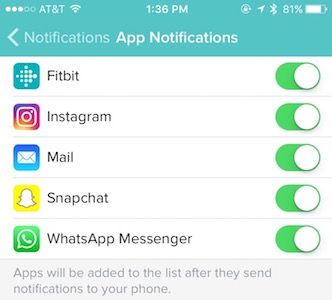
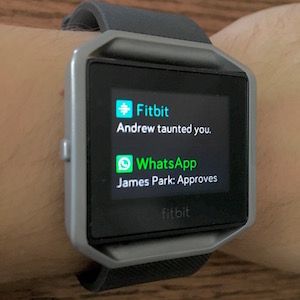
You can see all your notifications by swiping up from the home screen. You'll see previous calls, texts, calendar, email, and app notifications as well. You may delete these notifications either individually by swiping right, or all at once by scrolling down and tapping "Clear All" on the display.
For detailed information and setup instructions, check out our help page about notifications.


What phone do you have @Adambauer2468 this feature has been on my Android since or shortly after the release of the Blaze.

In the app under 'general settings' you should find 'reminders to move' ...you can choose the start & stop times, and the days of the week that you'd like to be reminded. 😊
 Best Answer
Hi,
I am receiving any approval notification but cant approve anything from my blaze, like a approval popup from Microsoft authenticatior or popup from yahoo mail to approve the login, i am receiving the pop up but can not approve from my watch
Best Answer
- « Previous
- Next »