
Join us on the Community Forums!
-
Community Guidelines
The Fitbit Community is a gathering place for real people who wish to exchange ideas, solutions, tips, techniques, and insight about the Fitbit products and services they love. By joining our Community, you agree to uphold these guidelines, so please take a moment to look them over. -
Learn the Basics
Check out our Frequently Asked Questions page for information on Community features, and tips to make the most of your time here. -
Join the Community!
Join an existing conversation, or start a new thread to ask your question. Creating your account is completely free, and takes about a minute.
Not finding your answer on the Community Forums?
- Community
- Features
- Fitbit App Gallery
- Re: Barcode App for Ionic
- Mark Topic as New
- Mark Topic as Read
- Float this Topic for Current User
- Bookmark
- Subscribe
- Mute
- Printer Friendly Page
- Community
- Features
- Fitbit App Gallery
- Re: Barcode App for Ionic
Adding bar-codes to the Barcodes app
- Mark Topic as New
- Mark Topic as Read
- Float this Topic for Current User
- Bookmark
- Subscribe
- Mute
- Printer Friendly Page
06-08-2018
00:14
- last edited on
08-19-2018
11:50
by
SantiR


06-08-2018
00:14
- last edited on
08-19-2018
11:50
by
SantiR
This step-by-step guide will tell you how to add bar-codes to the third-party Barcodes app for the Ionic and Versa.
Step 1:
First, manually sync your watch to the phone app. Syncing should clear the communication buffers to accept new data.
Step 2:
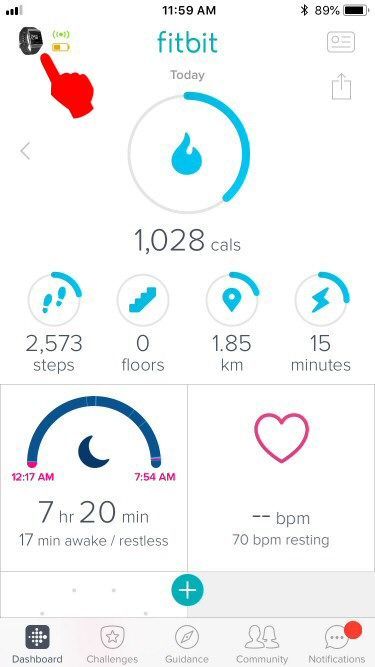
Tap on the device icon located in the top left of the Fitbit phone app.
Step 3:
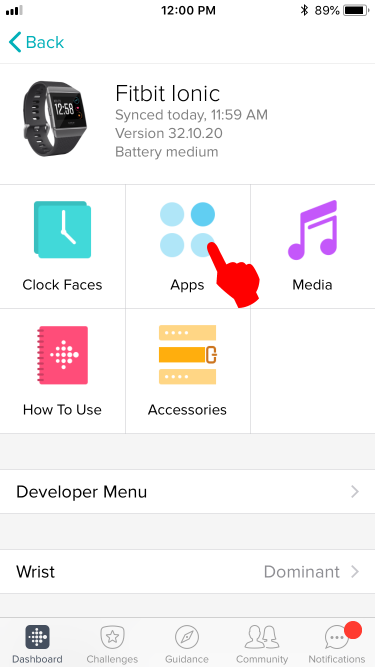
Tap on the Apps icon.
Step 4:
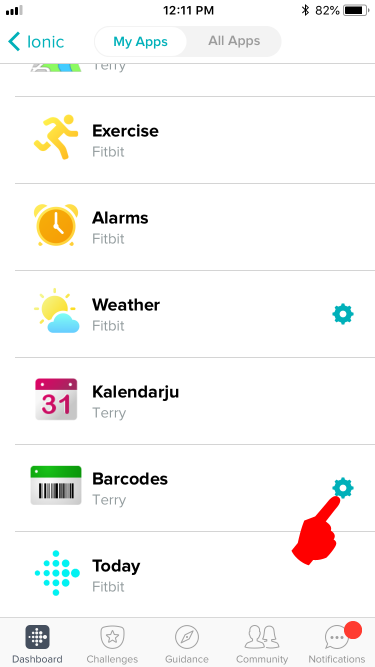
Tap on the Gear icon located on the right side of the Barcodes menu.
Step 5:
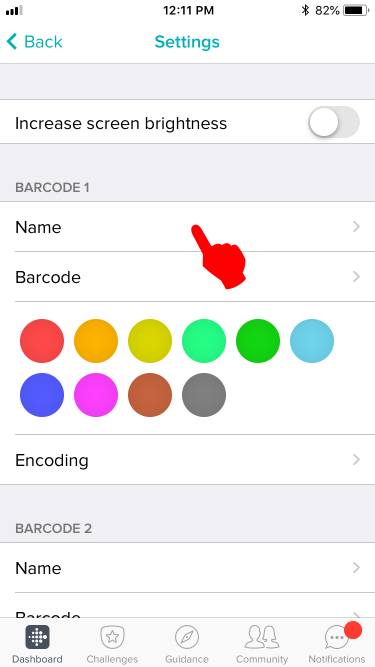
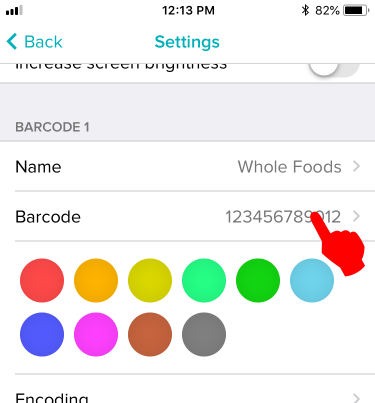
Fill out the name of your barcode. You can use the name of the store.
Step 6:
Fill out the barcode number. Leave out spaces and dash marks.
Step 7:
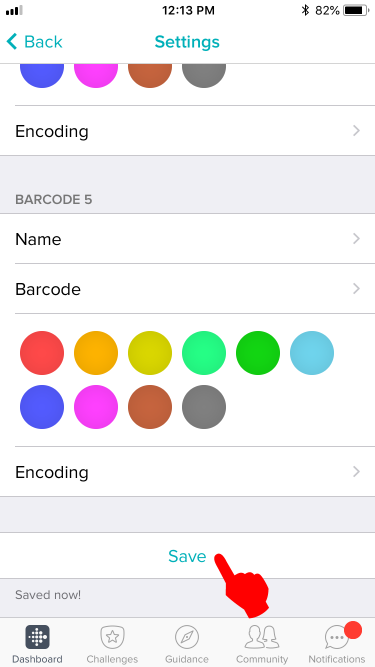
Scroll down and tap on the Save button. Your watch should vibrate immediately to show it has received the data.
Step 8:
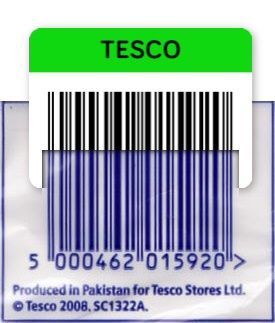
Compare the barcode on your watch with the barcode you are copying. The order of the thick and thin bars should be the same. If they don't, tap "Encoding" and choose another option and see if the resulting barcode looks closer.
Troubleshooting:
If you get a "Code too long" error, it means your barcode has too many characters and the app cannot generate a barcode that can fit on the screen. You will need a device with a larger screen (let's hope the next Versa will have a 4.5 inch screen  ) to fit the whole barcode in it.
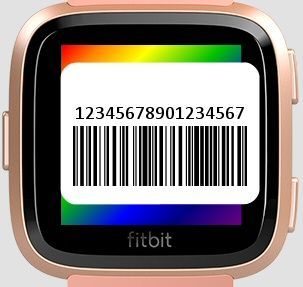
Conceptually when a "Code too long" error occurs, the barcode runs off the edge of the display therefore rendering it useless (unreadable). Conceptually it looks something like this for a 17 digit code:
It is worse for barcodes containing letters, because each letter takes twice the amount of space than numbers. Conceptually it looks like this for a 10 letter code:
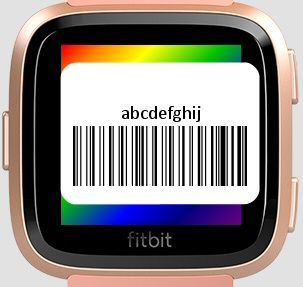
End of Guide
Moderator Edit: Updated Subject for Clarity/Format
 Best Answer
- Labels:
-
App Gallery - App


Hello @AndieJ I did a quick search and found a request to add gym membership through NFC.
I also found a request to have the ionic store shopping and membership cards. This would be an ideal choice that a third party could easily write. I added my vote.
The board we are in is where Fitbit users help each other out The feature suggestion board is where users let the developers know their thoughts.
Try this one and let us know if it works:
https://fbgallery.cpfx.ca/#/app/20ba8b5a-f3f9-4f8c-a5a3-10d9eacbd846
Loaded it. It synced floulessly. But the real test was when I got to the gym. It scanned perfectly and shocked the attendant because they thought it was too small of a barcode. Thanks so much for setting me up.
Best Answer
Andie
Sent from my Verizon, Samsung Galaxy smartphone
Best Answer
SunsetRunner
@EmTe wrote:Try this one and let us know if it works:
https://fbgallery.cpfx.ca/#/app/20ba8b5a-f3f9-4f8c-a5a3-10d9eacbd846
I can’t see that listed in the Fitbit App Gallery.
Best Answer
True that's why a link was posted., of which you quoted. Simply click on the link then tap install. This is a private link.
Best Answer
SunsetRunner
Ah saw the link but ever the sceptical, I chose not to click on it but rather look direct. 😉
Best Answer
Hmmm, does not work for me.
After clicking Install, i get:
Directing you to Gallery in Fitbit mobile application
And then nothing happens????
Watch: Ionic
Previous watches:Pebble, Pebble Time, Samsung Gear Fit2
Best Answer
Here's a direct link https://gam.fitbit.com/gallery/app/20ba8b5a-f3f9-4f8c-a5a3-10d9eacbd846
The difference with this link is that it doesn't give you a preview of the thumbnails, unlike the aforementioned one.
Best Answer
Nope, same message: Directing you......
I'll have to wait untill it is in the real app list.
Thanks for the try.
Watch: Ionic
Previous watches:Pebble, Pebble Time, Samsung Gear Fit2
Best Answer
Elot, I got the same response until i used the link in the original post, not the quoted one.
Best Answer
Best Answer
@Rich_Laue wrote:@EmTe that is because it has been loaded into your tracker
No, it's now available in the app gallery, I was able to install it this way without using any links.
 Best Answer
@Gunnerp245 wrote:Elot, I got the same response until i used the link in the original post, not the quoted one.
Thanks, that worked, although i had to install the app on my Windows laptop first.
But i got it.
I missed that one since a few months, since i switched from Pebble to Samsung (temporary) and now Ionic.
Hope it works as good as the Pebble version i had.
Watch: Ionic
Previous watches:Pebble, Pebble Time, Samsung Gear Fit2

This app doesn't work for me . The ionic app says " go into app settings on your phone to add barcodes " So I add the barcode number in the phone I hit save, but it doesn't transfer to the watch. I tried also to sync and a new install of the App but nothing. Any ideas out there? I use iPhone 6.
@MassiP wrote:This app doesn't work for me . The ionic app says " go into app settings on your phone to add barcodes " So I add the barcode number in the phone I hit save, but it doesn't transfer to the watch. I tried also to sync and a new install of the App but nothing. Any ideas out there? I use iPhone 6.
I initially had an issue, but I force stopped the fitbit app and then reopened it and the Ionic vibrated and the barcode had loaded on to it.
Thanks, but still nothing . I also tried with an Ionic reset and to switch off and on the Iphone....
Well, it is not that important. Maybe there will be an update of the App, someday.
Best Answer