
Join us on the Community Forums!
-
Community Guidelines
The Fitbit Community is a gathering place for real people who wish to exchange ideas, solutions, tips, techniques, and insight about the Fitbit products and services they love. By joining our Community, you agree to uphold these guidelines, so please take a moment to look them over. -
Learn the Basics
Check out our Frequently Asked Questions page for information on Community features, and tips to make the most of your time here. -
Join the Community!
Join an existing conversation, or start a new thread to ask your question. Creating your account is completely free, and takes about a minute.
Not finding your answer on the Community Forums?
- Community
- Features
- Fitbit App Gallery
- Re: Enlighten Clock Face
- Mark Topic as New
- Mark Topic as Read
- Float this Topic for Current User
- Bookmark
- Subscribe
- Mute
- Printer Friendly Page
- Community
- Features
- Fitbit App Gallery
- Re: Enlighten Clock Face
Enlighten Clock Face
- Mark Topic as New
- Mark Topic as Read
- Float this Topic for Current User
- Bookmark
- Subscribe
- Mute
- Printer Friendly Page

Enlighten Clock Face
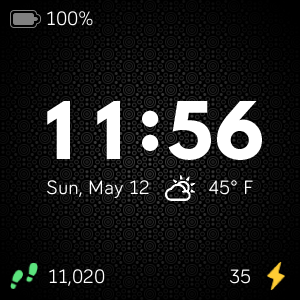
Minimalist clock face with weather and basic activity stats. Icons for activity stats will change colors as you progress toward your goals. Customize the theme by changing the background pattern and color. Weather module provided by Grégoire Sage.
I developed this clock face in my free time to learn more about the platform and chose to provide it to the community at no cost. Please feel free to comment if you run into any issues, have feature suggestions, or simply would like to provide feedback. I cannot guarantee that I will be able to respond to everything, but I will do my best to address reasonable requests as time allows.
I hope some of you find it useful.
Available now in the Fitbit App Gallery
 Best Answer
- Labels:
-
App Gallery - Clock



 Community Moderators ensure that conversations are friendly, factual, and on-topic. We're here to answer questions, escalate bugs, and make sure your voice is heard by the larger Fitbit team. Learn more
Welcome to the Community Forums @RubenInfante! Thanks a lot for making and sharing this awesome clock face. 
I will try it on my Fitbit and see how it goes! I'm sure other users are going to love it.
Happy stepping!
Was my post helpful? Give it a thumbs up to show your appreciation! Of course, if this was the answer you were looking for, don't forget to make it the Best Answer! Als...
Thanks @MarreFitbit! I hope you find it enjoyable.
I have received feedback from a few individuals now that the temperature units are always in Fahrenheit. My intent was that this would change based on the temperature units from the user settings API. Unfortunately, it seems that this may not be working as anticipated.
I plan to add a dedicated temperature units option to the clock face settings in the next release to address this issue.
Best Answer
Community Moderators ensure that conversations are friendly, factual, and on-topic. We're here to answer questions, escalate bugs, and make sure your voice is heard by the larger Fitbit team. Learn more
Thanks for notifying this here @RubenInfante! I'll share my feedback if I have one. 
If you have more updates or something you have added to your clock face, please share it in this thread. All of us can see the thread and be updated with the implementations or changes.
See you around!
Was my post helpful? Give it a thumbs up to show your appreciation! Of course, if this was the answer you were looking for, don't forget to make it the Best Answer! Als...

Hi Ruben,
Love the Clock Face. As others have noted already, temperature unit should be configurable. Otherwise very sleek and stylish.
Thank you
Best Answer
Thanks for the feedback @AbdulMueid.
I have submitted an update to Fitbit for review that includes a new option for temperature unit and a few minor visual updates to the settings menu.
Assuming no issues are discovered, it should show up in the gallery soon.
Community Moderators ensure that conversations are friendly, factual, and on-topic. We're here to answer questions, escalate bugs, and make sure your voice is heard by the larger Fitbit team. Learn more
This is so exciting @RubenInfante, thanks for keeping us in the loop.
I'm happy you liked it as well @AbdulMueid!
See you around guys!
Was my post helpful? Give it a thumbs up to show your appreciation! Of course, if this was the answer you were looking for, don't forget to make it the Best Answer! Als...
Best Answer Community Moderators ensure that conversations are friendly, factual, and on-topic. We're here to answer questions, escalate bugs, and make sure your voice is heard by the larger Fitbit team. Learn more
Welcome on board @LondoC! If I'm not mistaken, It seems that this clock face is for Versa and Versa Lite devices only.
Can you please let us know my friend @RubenInfante? and if so, do you plan to implement this on Ionic? My sister has an Ionic so that would be great if she can also use this clock face.
We're looking forward to your reply.
Was my post helpful? Give it a thumbs up to show your appreciation! Of course, if this was the answer you were looking for, don't forget to make it the Best Answer! Als...
Best Answer
Thanks @MarreFitbit.
Hello, @LondoC. The clock face is supposed to be published for all devices. I use the Fitbit OS Simulator to test it and it seemed to be working there. Unfortunately, I do not have a physical Fitbit Ionic to test with.
Version 1.0.8 has been published, which adds the option to select temperature units (°F or °C). I have also submitted version 1.1.0 to Fitbit for review. This latest version is a rewrite of how settings are persisted that should help with some visual inconsistencies regarding default settings popping back in. In addition, the latest version will let you toggle the activity goal progress colors.
Unfortunately, I received a notification from the weather API provider that the number of calls per minute was exceeded for their free account. This will start to break the weather update functionality. I will have to consider other options to maintain weather functionality in the clock face moving forward.
Best Answer

 Fitbit Product Experts Alumni are retired members of the Fitbit Product Expert Program. Learn more
You could introduce an advance setting where the user can input his own API key
Fitbit Product Experts Alumni are retired members of the Fitbit Product Expert Program. Learn more
Thanks @Giampi71.
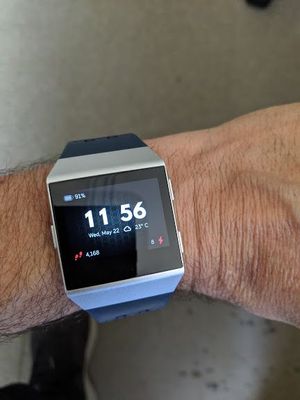
I appreciate the suggestion regarding the API key and for showing us Enlighten running successfully on your Ionic. I'll be looking into the service agreements with the weather API service providers and will have an update about it in the future.
Hello Ruben. Your Enlighten watch face is both aesthetically beautiful and functionally perfect -- almost. Can you please add heart rate in the upper right corner? This would complete the design and functionality. Thank you!
Hello @Merkava. I'm so glad you are enjoying Enlighten!
Thanks for the feedback about adding heat rate. I'm happy to let you know that it is on my list of upcoming features. It will be a part of a future update that allows you to choose if you want the activity components visible on the clock face through settings.
I'll continue to post on this thread when new releases become available.
I'm happy to announce that Enlighten v1.1.0 is now available.
This update contains improvements to the clock face settings management. This should reduce instances where default settings would pop back in temporarily when switching to other applications.
In addition, there is a new setting option to toggle activity goal progress colors. You may need to turn this on after updating as it may default to being off. When off, the activity icons will always be white for those who prefer a bit more minimalism.

I really like this click face, the only thing I think would make it a bit nicer would be to have the heart rate information show in the upper right corner, but other then that, I really like what you've done and thanks for making it free!
