
Join us on the Community Forums!
-
Community Guidelines
The Fitbit Community is a gathering place for real people who wish to exchange ideas, solutions, tips, techniques, and insight about the Fitbit products and services they love. By joining our Community, you agree to uphold these guidelines, so please take a moment to look them over. -
Learn the Basics
Check out our Frequently Asked Questions page for information on Community features, and tips to make the most of your time here. -
Join the Community!
Join an existing conversation, or start a new thread to ask your question. Creating your account is completely free, and takes about a minute.
Not finding your answer on the Community Forums?
- Community
- Features
- Fitbit App Gallery
- Re: Enlighten Clock Face
- Mark Topic as New
- Mark Topic as Read
- Float this Topic for Current User
- Bookmark
- Subscribe
- Mute
- Printer Friendly Page
- Community
- Features
- Fitbit App Gallery
- Re: Enlighten Clock Face
Enlighten Clock Face
- Mark Topic as New
- Mark Topic as Read
- Float this Topic for Current User
- Bookmark
- Subscribe
- Mute
- Printer Friendly Page

Enlighten Clock Face
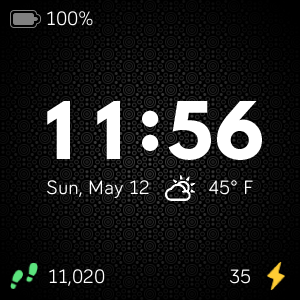
Minimalist clock face with weather and basic activity stats. Icons for activity stats will change colors as you progress toward your goals. Customize the theme by changing the background pattern and color. Weather module provided by Grégoire Sage.
I developed this clock face in my free time to learn more about the platform and chose to provide it to the community at no cost. Please feel free to comment if you run into any issues, have feature suggestions, or simply would like to provide feedback. I cannot guarantee that I will be able to respond to everything, but I will do my best to address reasonable requests as time allows.
I hope some of you find it useful.
Available now in the Fitbit App Gallery
 Best Answer
- Labels:
-
App Gallery - Clock
@BBQduke : It sounds like you have Low Light Mode enabled in settings. If you disable that, you should be able to see the theme colors you chose.
Best Answer

I appreciate this simple, clean and free clock face. After adjusting my settings, I have exactly what I want and need on the face. One question...what does the personal API in the weather section mean? My weather seems to be on point and syncing with my area's weather. Thanks so much for your time and efforts!
Best Answer
@BBQduke : Glad you got it resolved. As you discovered, it is simply manual override at the moment.
@DenisePsc : Good to hear that you are enjoying Enlighten, and that it works well for you. The Personal API key is an optional, advanced feature. The watch face uses a built-in API key to gather weather information from OpenWeatherMap. This API key is a free account and is shared by everyone who does not set a personal API key. If enough people use the watch and have weather enabled, overall usage may exceed the limits imposed by the service provider. When this happens, you might start to see "--" for the temperature for extended periods of time. When you create your own account with OpenWeatherMap and put that API key in settings, you would only be limited by your individual usage. That all being said, the watch face is designed to reduce excessive calls to the weather API, so it hasn't been much of an issue more recently.
Best Answer
It is set for °C it works but I can't change it anymore even i try something to change
So not sure how I can do it
Mario
Best Answer
@Mariothehades : As MissV25 mentioned, it sounds like you have low light mode enabled. If you disable it in the settings, you should see the theme colors you chose.
@SunsetRunner : Weather should work in most cases without needing to put in a personal API key. Keep in mind it requires your phone to have location enabled and for you to be near your phone. The watch itself does not track that data directly; it receives it from your phone.

SunsetRunner
Sent from mobile mail
Best Answer
Thanks again
Mario
Best Answer
SunsetRunner
Oh thank you! That’s where my issue was. Location services needs to be set to “always” for Fitbit instead of “when using app”. Thanks so much!
Best Answer
@Mariothehades : Glad you were able to get it looking the way you wanted.
@SunsetRunner : Glad to hear the location settings on your phone resolved the issue. Thanks for writing back to confirm the steps you took. I hope you continue to enjoy the watch face.
Best Answer
SunsetRunner

SunsetRunner
Check your “low light mode” setting in clock face. It will only show red font with no background pattern or colour if you have low light mode enabled. Just slide the toggle to off and resync and it should fix it.
@Ralphtop : Were you able to resolve your issue with MissV25's suggestion? I agree that is the most likely issue based on your comment.
@SunsetRunner : Thanks for jumping in to help others in the community!
@SunsetRunner : Thanks for the suggestion. When I initially set out to make this watch face, I did not plan for localization efforts. Nevertheless, I will keep this in mind for the future.
Best Answer
Hi
I just got a Fitbit Versa 2 for Christmas. Yay!! My first smart watch.
I was wanting a waterproof and swim proof watch to monitor my heart rate and sleep because my chronic migraine triggers my heart rate to spike and even small amounts of exertion like cleaning.
Anyways...... I came across the Enlighten face clock for it last night and am loving it so far💜💜. I saw by some of the other comments you've already added or fixed things on the face which I light having. Finding a weather one was difficult...Like I can change the font size, the temp and heartrate. My question though is I saw in the fitbit app I'm supposed to be able to change to the 24hr format and can't figure out how to switch it to military time.
Can you help with that or did you remove that feature already?
Thanks!... 😊
Best Answer
I tried adding a pic but couldnt figure out how..🤦:female_sign:
Best Answer