
Join us on the Community Forums!
-
Community Guidelines
The Fitbit Community is a gathering place for real people who wish to exchange ideas, solutions, tips, techniques, and insight about the Fitbit products and services they love. By joining our Community, you agree to uphold these guidelines, so please take a moment to look them over. -
Learn the Basics
Check out our Frequently Asked Questions page for information on Community features, and tips to make the most of your time here. -
Join the Community!
Join an existing conversation, or start a new thread to ask your question. Creating your account is completely free, and takes about a minute.
Not finding your answer on the Community Forums?
- Community
- Fitbit Community Basics
- this does not work for me the spinning wheel spins...
- Mark Topic as New
- Mark Topic as Read
- Float this Topic for Current User
- Bookmark
- Subscribe
- Mute
- Printer Friendly Page
- Community
- Fitbit Community Basics
- this does not work for me the spinning wheel spins...
How To: Add a photo to your community profile
- Mark Topic as New
- Mark Topic as Read
- Float this Topic for Current User
- Bookmark
- Subscribe
- Mute
- Printer Friendly Page



Adding a custom profile photo to your account is a great way to share a little bit of yourself with the community. This photo will appear beside all of your posts, and will help other users recognize you in conversation.
Your Fitbit Community profile photo is the same one used for your Fitbit.com profile photo, and can be updated within your Fitbit Dashboard. If you have not set a Fitbit profile image, follow these steps do so:
- Click the Dashboard link at the top of this page to visit your Fitbit.com dashboard.
- Click the profile icon on the top right side of your dashboard.
- On the left side of your profile page, under your default profile photo, you will see links to "change profile pic" and "upload pictures." Click Upload pictures to do so.
- Once you've successfully uploaded an image, click the small grey gear icon to set your chosen photo as a profile image.


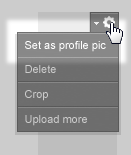
At this point you should see your Fitbit.com profile image change to reflect your selection. To ensure that image is able to be displayed on the community, you'll also want to check the Privacy Settings in your account.
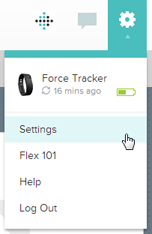
- Still on your Fitbit.com Dashboard, click the gear icon in the top-right corner.
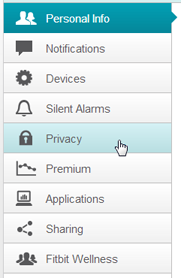
- Click Settings, and then choose Privacy from the list on the left.
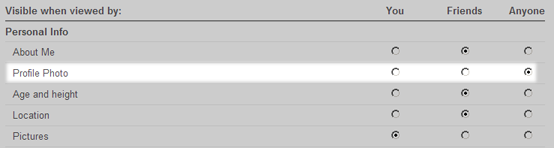
- Make sure your Profile Photo is set to be visible to Anyone.
- Save your changes.
Once you've taken care of all these steps, you should see your profile image appear beside all your posts in the Fitbit Community. If you don't see the change immediately, you can click the Sign Out link at the top-right to log out of your account and then sign back in.
If you have any trouble with this process, please respond in this thread so the community can assist. You can also refer to the relevant FAQ Section for help.
We look forward to seeing your photo on the forum!


 Community Moderators ensure that conversations are friendly, factual, and on-topic. We're here to answer questions, escalate bugs, and make sure your voice is heard by the larger Fitbit team. Learn more
If you are having trouble customizing your profile photo here on the forum, you might check out this post, which is floated at the top of the forum.
Let me know if you continue to have trouble - I'll be happy to help if you let me know where you got stuck.

I've been trying to upload a Profile pic for two days now. I've tried different pictures (all of them WAY under 3MB, usually only 104-220 Kb) I've tried both JPGs and PNGs. After I locate the file on my computer, and have the file name in the Upload Picture box, then I hit the Upload button and the little animated "circle" that is supposed to show that it is uploading goes around and around. I've tried waiting for 20 mintes, 2 hours, and 24 hours (and many times I've tried for just a few minutes because that small of a file should upload in seconds).
I can't find any way to do it on my phone, and it won't work on my computer.
Very frustrating! Anyone have any suggestions?
Community Moderators ensure that conversations are friendly, factual, and on-topic. We're here to answer questions, escalate bugs, and make sure your voice is heard by the larger Fitbit team. Learn more
@HpyGma I've seen a couple users on this forum mentioning the same problem as you, but I'm not able to reproduce it - everything seems to work just fine for me.
Can you tell me what operating system and web browser you are using? I have relayed this issue to our site developers, and any additional details I can provide them should be useful in troubleshooting.
You might try the process again using a different web browser, to see if that solves the problem.
 Best Answer
I'm using Windows 7, and Internet Explorer Version 10.0.12.
Is there a way to upload from the iPhone mobile app?
Thanks.
Best Answer
Community Moderators ensure that conversations are friendly, factual, and on-topic. We're here to answer questions, escalate bugs, and make sure your voice is heard by the larger Fitbit team. Learn more
The iOS app does not have the ability to upload images.
If you have Google Chrome or Mozilla Firefox handy, you might give it a shot with one of those browsers.
Best Answer
this is exactly what happens to me. i am not technologly saavy and am quite frustrated. This is windows right. shouldnt it work with the microsoft product?
Best Answer
Community Moderators ensure that conversations are friendly, factual, and on-topic. We're here to answer questions, escalate bugs, and make sure your voice is heard by the larger Fitbit team. Learn more

 Community Moderator Alumni are previous members of the Moderation Team, which ensures conversations are friendly, factual, and on-topic. Moderators are here to answer questions, escalate bugs, and make sure your voice is heard by the larger Fitbit team. Learn more
You can download Chrome here: https://www.google.com/intl/en/chrome/browser/ or try Firefox here: http://www.mozilla.org/en-US/firefox/new/
Best Answer
I did finally give up with Microsoft Explorer and went to a laptop we have with Firefox on it. I signed in to Fitbit, and the first time I tried to upload my pic it zoomed right through. No problem.
Thanks for the suggestions and follow up.
 Community Moderators ensure that conversations are friendly, factual, and on-topic. We're here to answer questions, escalate bugs, and make sure your voice is heard by the larger Fitbit team. Learn more
@Gabrielle A common cause of this is Internet Explorer. I recommend using a different browser, such as Chrome or Firefox. Let me know where you run into trouble if you keep having difficulty.
Best Answer
get google chrome browser up , then do the steps , then dump the chrome from your control panel. it sucks but it will work. Fred
Best Answer Community Moderators ensure that conversations are friendly, factual, and on-topic. We're here to answer questions, escalate bugs, and make sure your voice is heard by the larger Fitbit team. Learn more
