
Join us on the Community Forums!
-
Community Guidelines
The Fitbit Community is a gathering place for real people who wish to exchange ideas, solutions, tips, techniques, and insight about the Fitbit products and services they love. By joining our Community, you agree to uphold these guidelines, so please take a moment to look them over. -
Learn the Basics
Check out our Frequently Asked Questions page for information on Community features, and tips to make the most of your time here. -
Join the Community!
Join an existing conversation, or start a new thread to ask your question. Creating your account is completely free, and takes about a minute.
Not finding your answer on the Community Forums?
- Community
- Product Help Forums
- Flex & Flex 2
- changing daily step goal
- Mark Topic as New
- Mark Topic as Read
- Float this Topic for Current User
- Bookmark
- Subscribe
- Mute
- Printer Friendly Page
- Community
- Product Help Forums
- Flex & Flex 2
- changing daily step goal
changing daily step goal
ANSWERED- Mark Topic as New
- Mark Topic as Read
- Float this Topic for Current User
- Bookmark
- Subscribe
- Mute
- Printer Friendly Page
01-06-2016
21:55
- last edited on
08-20-2020
16:59
by
MatthewFitbit


01-06-2016
21:55
- last edited on
08-20-2020
16:59
by
MatthewFitbit
I use to be able to change but since the update I don't seem to have that option. It is stuck at 5,000 and I want to change it to 10,000 steps a day. I have checked and it is still at 5,000. I am running Windows 10.
Answered! Go to the Best Answer.
Accepted Solutions


 Community Moderator Alumni are previous members of the Moderation Team, which ensures conversations are friendly, factual, and on-topic. Moderators are here to answer questions, escalate bugs, and make sure your voice is heard by the larger Fitbit team. Learn more
Great to see you around @Daubernut. If you want to change your goal, you just need to do the following:
1. Click the gear icon in the lower left corner of the tile you wish to edit a goal for.
2. Write your preferred goal amount in the outlined box.
3. Click the “Save” button.
Let me know the outcome! 
Community Moderator Alumni are previous members of the Moderation Team, which ensures conversations are friendly, factual, and on-topic. Moderators are here to answer questions, escalate bugs, and make sure your voice is heard by the larger Fitbit team. Learn more
Great to see you around @Daubernut. If you want to change your goal, you just need to do the following:
1. Click the gear icon in the lower left corner of the tile you wish to edit a goal for.
2. Write your preferred goal amount in the outlined box.
3. Click the “Save” button.
Let me know the outcome!
Community Moderator Alumni are previous members of the Moderation Team, which ensures conversations are friendly, factual, and on-topic. Moderators are here to answer questions, escalate bugs, and make sure your voice is heard by the larger Fitbit team. Learn more
You are welcome @Daubernut. It is great to see that your inquiry has been resolved. If you need anything else do not hesitate in letting us know.
Happy stepping and good luck reaching your new goal. 

I started a discussion thread here: https://community.fitbit.com/t5/Get-Fit/Measuring-up-goal-setting-and-motivation/m-p/1121776#U112177...


What gear? What icon? Still unable to change my step goal.
 Best Answer
Community Moderator Alumni are previous members of the Moderation Team, which ensures conversations are friendly, factual, and on-topic. Moderators are here to answer questions, escalate bugs, and make sure your voice is heard by the larger Fitbit team. Learn more
Best Answer
Community Moderator Alumni are previous members of the Moderation Team, which ensures conversations are friendly, factual, and on-topic. Moderators are here to answer questions, escalate bugs, and make sure your voice is heard by the larger Fitbit team. Learn more
Great to see you around @unknown100 and @waddinpd. The gear icon will appear at the moment of taking the arrow at the bottom of the tile (see attached image).
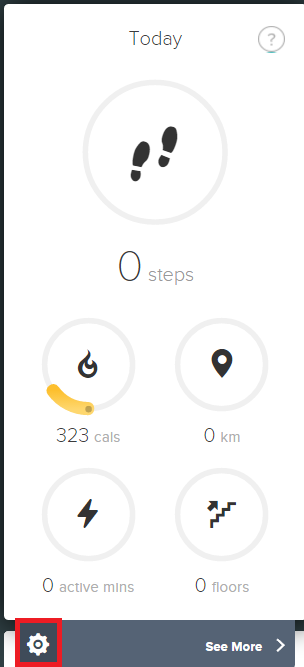
If you sync your trackers with a phone, tell me which phone you have so I can provide you the instructions to change your goal directly from it.
Hope to hear from you soon.
Best Answer

This isn't working for me. When I click on the gear I'm given an option of deleting the tile. That's it.
Best Answer