
Join us on the Community Forums!
-
Community Guidelines
The Fitbit Community is a gathering place for real people who wish to exchange ideas, solutions, tips, techniques, and insight about the Fitbit products and services they love. By joining our Community, you agree to uphold these guidelines, so please take a moment to look them over. -
Learn the Basics
Check out our Frequently Asked Questions page for information on Community features, and tips to make the most of your time here. -
Join the Community!
Join an existing conversation, or start a new thread to ask your question. Creating your account is completely free, and takes about a minute.
Not finding your answer on the Community Forums?
- Community
- Product Help Forums
- Other Charge Trackers
- Re: Factory reset Charge 2
- Mark Topic as New
- Mark Topic as Read
- Float this Topic for Current User
- Bookmark
- Subscribe
- Mute
- Printer Friendly Page
- Community
- Product Help Forums
- Other Charge Trackers
- Re: Factory reset Charge 2
Factory reset Charge 2
ANSWERED- Mark Topic as New
- Mark Topic as Read
- Float this Topic for Current User
- Bookmark
- Subscribe
- Mute
- Printer Friendly Page
09-30-2016
09:11
- last edited on
09-09-2020
10:26
by
MatthewFitbit


09-30-2016
09:11
- last edited on
09-09-2020
10:26
by
MatthewFitbit
Greetings,
my wife wants a different Fitbit and I am taking her brand new Charge 2. How do I reset to factory settings so that I can use it?
Thanks\
Tor
Answered! Go to the Best Answer.

 Fitbit Product Experts Alumni are retired members of the Fitbit Product Expert Program. Learn more
Hello @Hana2012,
Welcome to the community!
If you remove the tracker from your account, it will revert back to factory mode, like this:
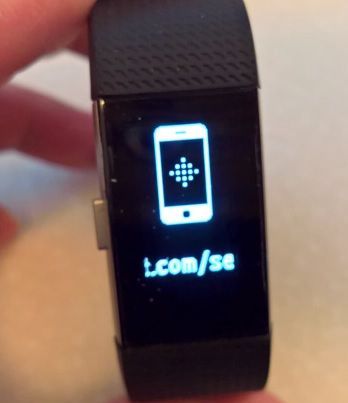
I hope this helps.
Frank | Washington, USA
Fitbit One, Ionic, Charge 2, Alta HR, Blaze, Surge, Flex, Flex 2, Zip, Ultra, Flyer, Aria, Aria 2 - Windows 10, Windows Phone
Take a look at the Fitbit help site for further assistance and information.

Hi sorry forgot to say it is a second hand one from eBay so do the original owners need to remove it from there account? X
 Best Answer
I have removed the Charge 2 device from my account and then also completely removed the Fitbit app but mine is still showing the clock and steps, not the original setup screen.
Help!
Think I'm going to return mine tomorrow.. only 2 days old and notifications not working. HR is a joke and steps and distance are wrong as well.
Best Answer
How can I factory reset my fitbit Charge 2, I cannot unpair it from my old device because that device was stolen. I tried a normal reset (hold button for 4 secs whilst on charge) but that didn't help with pairing/setting up to my new phone. I can not connect my fitbit to my new phone because it is still paired with my stolen phone.


@Hazza90 the previous owner needn't do anything, when you attach the tracker to your accounting it will automatically be removed from theirs.
@indapepolly it doesn't matter, simply use the app to set the tracker up to your account.
@Maria-65 have you done the setup process from your new account?
Best Answer
OK thanks. I think my device isn't supporting the fitbit app I have on my Android. Are you saying that my fitbit and phone should pair fine even without a fresh factory reset fitbit device (which is still showing the continuation of unsynced data because the last phone isn't available to remove and unpair properly.. In theory the fitbit doesn't need to show the 'fitbit.com/setup' screen to pair with another device?
Best Answer
@Hazza90 i reread your last post, pgone stolen, as long as it is more thsn 30 feet away it is out of the picture. If your tracker is still connected to your account, the only thing you need to do is download the fitbit app then log into your Fitbit account. The app then gets your settings from fitbit and ahoyls procede to sync your tracker, which should slso be showing on the apos dashboard.
@doc37k lets go to the ditbit help doc at http://help.fitbit.com/?q=restart
Best Answer
SunsetRunner
"I would appreciate some kind of reply besides totally ignoring users' plight which now seems the norm for Charge 2" - carolcarre
Thank you!!! I find the fitbit to be useless (horrible at tracking steps, HR, and runs) so I am wanting to return it. I ALWAYS reset any device that leaves my possession. The fact that moderators and other community members blatantly avoid answering the questions about how to factory reset a device is giving me even more reason to return it. I will be happily supporting another brand rather than trying out a different fitbit device.
Fitbit Product Experts Alumni are retired members of the Fitbit Product Expert Program. Learn more
@SunsetRunner,
Welcome to the community!
I had posted about a month ago that if you remove it to your account the Charge 2 will (eventually) go back to factory mode (sometimes it takes a few minutes, sometimes it takes a couple of hours), and have the pictures to prove it:
Does that not count as answering the question?
Frank | Washington, USA
Fitbit One, Ionic, Charge 2, Alta HR, Blaze, Surge, Flex, Flex 2, Zip, Ultra, Flyer, Aria, Aria 2 - Windows 10, Windows Phone
Take a look at the Fitbit help site for further assistance and information.
I think the clue here is to wait a bit.
I originally paired my Charge 2 with my Android phone, but wanted to move it (the syncing) to my laptop. I purchased a Fitbit Bluetooth dongle then realised that I couldn't sync with two devices at the same time. So...
Unpaired it from Android.
Deleted it from Fitbit account via Windows app.
Tried to add device on Windows, it found it, but failed during pairing, no pair code appeared on the Fitbit.
On the third/fourth/fifth attempt the Windows app finally said 'updating dongle firmware'.
Went to grab a coffee.
Followed restart/setup instructions (again) as above and.... new pair code came up on Fitbit.
Completed setup on Windows app, no problems.
All data intact in Windows and on Fitbit.
Patience is the answer.
Best Answer
least Bluetooth 4.1+ as i have tried to pair the FitBit with an older
android device before and it gets so far in the app connectivity suite but
always fails to connect. Recently i did manage to upgrade from the old
android device and all FitBit services work perfectly with the device
although it isn't listed in the compatible devices on the FitBit website.
Best Answer

Actually many folks here are asking for a factory reset and no where and no one is able to tell them how to do that. Could you possibly tell us how to do a factory reset, the kind you say is out of the box straight from the factory kind of thing for the Charge 2.
TY