
Join us on the Community Forums!
-
Community Guidelines
The Fitbit Community is a gathering place for real people who wish to exchange ideas, solutions, tips, techniques, and insight about the Fitbit products and services they love. By joining our Community, you agree to uphold these guidelines, so please take a moment to look them over. -
Learn the Basics
Check out our Frequently Asked Questions page for information on Community features, and tips to make the most of your time here. -
Join the Community!
Join an existing conversation, or start a new thread to ask your question. Creating your account is completely free, and takes about a minute.
Not finding your answer on the Community Forums?
- Community
- Product Help Forums
- Other Charge Trackers
- Re: Mapping a walk
- Mark Topic as New
- Mark Topic as Read
- Float this Topic for Current User
- Bookmark
- Subscribe
- Mute
- Printer Friendly Page
- Community
- Product Help Forums
- Other Charge Trackers
- Re: Mapping a walk
Mapping a walk
ANSWERED- Mark Topic as New
- Mark Topic as Read
- Float this Topic for Current User
- Bookmark
- Subscribe
- Mute
- Printer Friendly Page
09-10-2016
08:50
- last edited on
09-09-2020
10:26
by
MatthewFitbit


09-10-2016
08:50
- last edited on
09-09-2020
10:26
by
MatthewFitbit
New Charge 2
How do I view a map of a walk or run? I do not see the option to view a map on the app dashboard or on the website. I checked the log section on the website as well. I'm so lost.
Thank you
Answered! Go to the Best Answer.
Accepted Solutions

 Fitbit Product Experts Alumni are retired members of the Fitbit Product Expert Program. Learn more
You have to have your phone with you and use the connected GPS from your phone. Then after you sync, you should be able to see a map.
Here is a link on GPS http://help.fitbit.com/articles/en_US/Help_article/1874#GPSavail
Hope that helps!
Kelly | Oklahoma
Alta HR, Blaze, Flex 2, Charge 2, Charge, and Aria * IPhone 7+

To track my walks:
I "start" the exercise by selecting the walk, making sure the Charge 2 recognizes and links with my phone GPS
Then walk
Finish the exercise by "turning off" the walk
Make sure the Charge 2 syncs with the mother data base and the phone
Go into Dashboard
Select the exercise
It displays the exercise with a little map
I've another app "Simply Walking" which does a great job of displaying GPS tracks on maps and satellite
imagery. It also tracks steps, but doesn't do heart rate.
/edit -
This should work with any activity linked to GPS.
Fitbit Product Experts Alumni are retired members of the Fitbit Product Expert Program. Learn more
You have to have your phone with you and use the connected GPS from your phone. Then after you sync, you should be able to see a map.
Here is a link on GPS http://help.fitbit.com/articles/en_US/Help_article/1874#GPSavail
Hope that helps!
Kelly | Oklahoma
Alta HR, Blaze, Flex 2, Charge 2, Charge, and Aria * IPhone 7+
To track my walks:
I "start" the exercise by selecting the walk, making sure the Charge 2 recognizes and links with my phone GPS
Then walk
Finish the exercise by "turning off" the walk
Make sure the Charge 2 syncs with the mother data base and the phone
Go into Dashboard
Select the exercise
It displays the exercise with a little map
I've another app "Simply Walking" which does a great job of displaying GPS tracks on maps and satellite
imagery. It also tracks steps, but doesn't do heart rate.
/edit -
This should work with any activity linked to GPS.

09-11-2016
10:35
- last edited on
10-28-2021
05:15
by
JuanJoFitbit
09-11-2016
10:35
- last edited on
10-28-2021
05:15
by
JuanJoFitbit
I will search a little more but so far I don't see the WALK option on my Charge 2
Thank you
Found it! Almost embarrassingly simple lol.
I clicked on the exercise section on the app (little running person icon) and there was a little drop down menu where I could select the activity.
Thank you all so much for the help!
Moderator edit: merged reply
Day 2 of my Charge 2 and I didn't have the walk option either.
Found it on the iphone app ...
Account > Charge 2 > Exercise shortcuts > delete one you don't use > + Exercise Shortcut > add walk.
Go back to Dashboard and check for, or add the 'weekly exercise' tile, then open that.

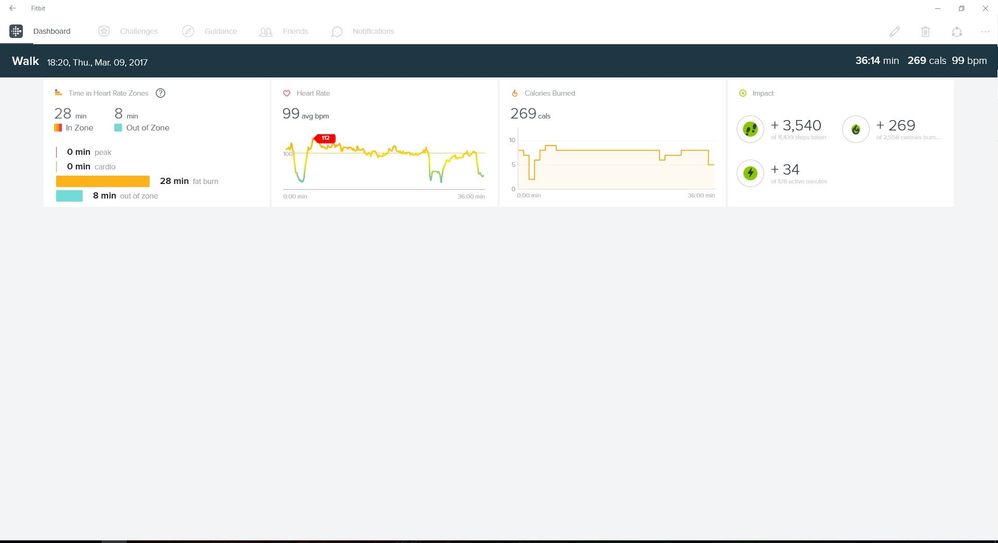
This doesn't work for me. I came home and finished my walk. A map of my walk appeared but I got a few adventure messages so I opened those. After checking the status of my adventure I can't find the map anywhere. Not under my weekly activities and also not under my dashboard. Fitbit has synced and my location is active.
What do I forget here?
Jan
03-18-2017
13:57
- last edited on
10-28-2021
05:16
by
JuanJoFitbit

03-18-2017
13:57
- last edited on
10-28-2021
05:16
by
JuanJoFitbit
Same with me!
I am using Flex 2, and same happened to me! Any suggestions?
I have the info as you show here, as well... map came up briefly and disappeared. Nowhere to be found!
Moderator edit: merged reply

My Charge 2 on Android says All Shortcuts In Use. Walking is NOT one of them. 😞
No maps. Very disappointed.
 Best Answer
The Android app doesn't show all the possible exercise shortcuts, you have to go to the Fitbit website. Here's what I did:
Go to wwwfitbit.com and log in.
Select the settings icon
Select your Charge 2
Select exercise shortcuts
Select edit
(I counted 19 possible activities, but you can only have 7 active at one time)
Select Walking
Select save
Syn your charge 2
GPS should now work on your walk!
I just discovered this and have not tested it. But, I have used the gps feature while running and it works great including showing a map of my runs.
Good luck!
Sent via the Samsung Galaxy Express 3, an AT&T 4G LTE smartphone
Best Answer