
Join us on the Community Forums!
-
Community Guidelines
The Fitbit Community is a gathering place for real people who wish to exchange ideas, solutions, tips, techniques, and insight about the Fitbit products and services they love. By joining our Community, you agree to uphold these guidelines, so please take a moment to look them over. -
Learn the Basics
Check out our Frequently Asked Questions page for information on Community features, and tips to make the most of your time here. -
Join the Community!
Join an existing conversation, or start a new thread to ask your question. Creating your account is completely free, and takes about a minute.
Not finding your answer on the Community Forums?
- Community
- Product Help Forums
- Other Charge Trackers
- Re: Track Yoga classes
- Mark Topic as New
- Mark Topic as Read
- Float this Topic for Current User
- Bookmark
- Subscribe
- Mute
- Printer Friendly Page
- Community
- Product Help Forums
- Other Charge Trackers
- Re: Track Yoga classes
Track Yoga classes
ANSWERED- Mark Topic as New
- Mark Topic as Read
- Float this Topic for Current User
- Bookmark
- Subscribe
- Mute
- Printer Friendly Page
01-01-2017
07:04
- last edited on
09-09-2020
10:13
by
MatthewFitbit


01-01-2017
07:04
- last edited on
09-09-2020
10:13
by
MatthewFitbit
Hello!
How can I track my Yoga classes? In the menu I dont have this point (Run, Weights, Treadmill, Workout, Elliptical, Bike, Internal Workout, but no Yoga)
Answered! Go to the Best Answer.
Accepted Solutions

 Fitbit Product Experts Alumni are retired members of the Fitbit Product Expert Program. Learn more
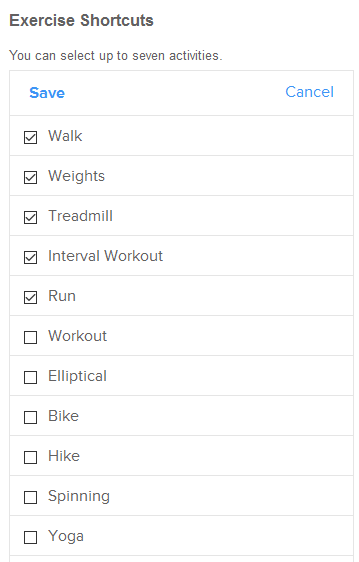
On the dashboard go to settings scroll down to exercise shortcuts and put a check mark in Yoga. It will need to sync before it takes place

Wendy | CA | Moto G6 Android
Want to discuss ways to increase your activity? Visit the Lifestyle Forum
Fitbit Product Experts Alumni are retired members of the Fitbit Product Expert Program. Learn more
On the dashboard go to settings scroll down to exercise shortcuts and put a check mark in Yoga. It will need to sync before it takes place
Wendy | CA | Moto G6 Android
Want to discuss ways to increase your activity? Visit the Lifestyle Forum

I just got the Charge HR & I'm trying to figure out how to log my yoga. I just tried the steps outlined & it looks like it is grayed out & won't let me click on Yoga in the Exercise Shortcuts. Am I doing something wrong?
I can't figure out how to track my yoga?? Please help. I also followed the online advice but it won't work.


 Community Moderator Alumni are previous members of the Moderation Team, which ensures conversations are friendly, factual, and on-topic. Moderators are here to answer questions, escalate bugs, and make sure your voice is heard by the larger Fitbit team. Learn more
@Supermomof3 @Ezrafan1127 Just as WendyB described in her post above, you should be able to add the "Yoga" exercise shortcut to your Charge 2 by following the instructions listed here.
Hope this helps you both out!
 Best Answer
I checked Yoga. It is now available on my Charge 2. I did a yoga session this morning. I pressed Yoga in my watch. Press stopwatch - started time - ended time when done.
Went on the computer - refreshed all options (synch). No Yoga - still three hours later.
What am I doing wrong ?
Thank you
Line C. C.
Hi all!
I have the same problem, I went on the tracker tile and I can't see Yoga. Do I maybe need to update the app or something similar? Thanks!
Best Answer
Mandee C.
Best Answer
Mandee C.
Best Answer

I did that on my app. And I synced the Fitbit 5 times. It's still only showing run, stopwatch and relax on my options.
Best Answer
Hi, thanks for the instructions, however, my charge 2 (brand new) does not seem to have the options that are listed in the instructions in your link. As instructed I click on my Account button on the bottom right hand side. Then it says "Tap your tracker tile". I only have an option under SETTINGS called Exersice Tracking, but that only deals with music related to my exersice.... I also cannot find anything called exersice shortcuts.
what am I doing wrong?
I have a Charge 2. I do not see Exercise shortcuts anywhere on the dashboard settings.I have been doing a Jillian Michaels workout, and get no credit for it. The only thing my tracker seems to recognize is walking.
 Fitbit Product Experts Alumni are retired members of the Fitbit Product Expert Program. Learn more
@Bodilitsa, @JVG9746 - you have to use the Fitbit app, not the Fitbit.com Dashboard. On the Fitbit app, open the Account screen, then tap on the Charge 2 device to open the Settings screen for the Charge 2. Scroll down until you find Exercise Shortcuts, and tap on it. There you can add the Yoga shortcut to the exercises that will be available on the Charge 2 tracker. Sync the tracker. To select the Yoga exercise on the Charge 2, press & release the side button repeatedly until the first exercise shortcut displays, then tap the screen until Yoga appears. Press & Hold the side button until it vibrates to start the exercise.
Best Answer
The key was to click on the Fitbit icon.
Now off to yoga class😊
Thanks!!
Sent from my iPhone
Best Answer
For some strange reason, I am not able to locate 'Yoga' under the exercise shortcuts tab. I'm not sure what I'm missing. Tried following all the steps mentioned here and in the 'help' link. I do Yoga regularly, it would be a disappointment if I'm not able to track it .
Also attaching a link of the screen that I see.
Best Answer
SunsetRunner
Hmm... I don’t have Exercise Shortcuts. Only Exercise Tracking, Heart Rate Zones, and Advanced Settings. Am I in the wrong place?
Best Answer
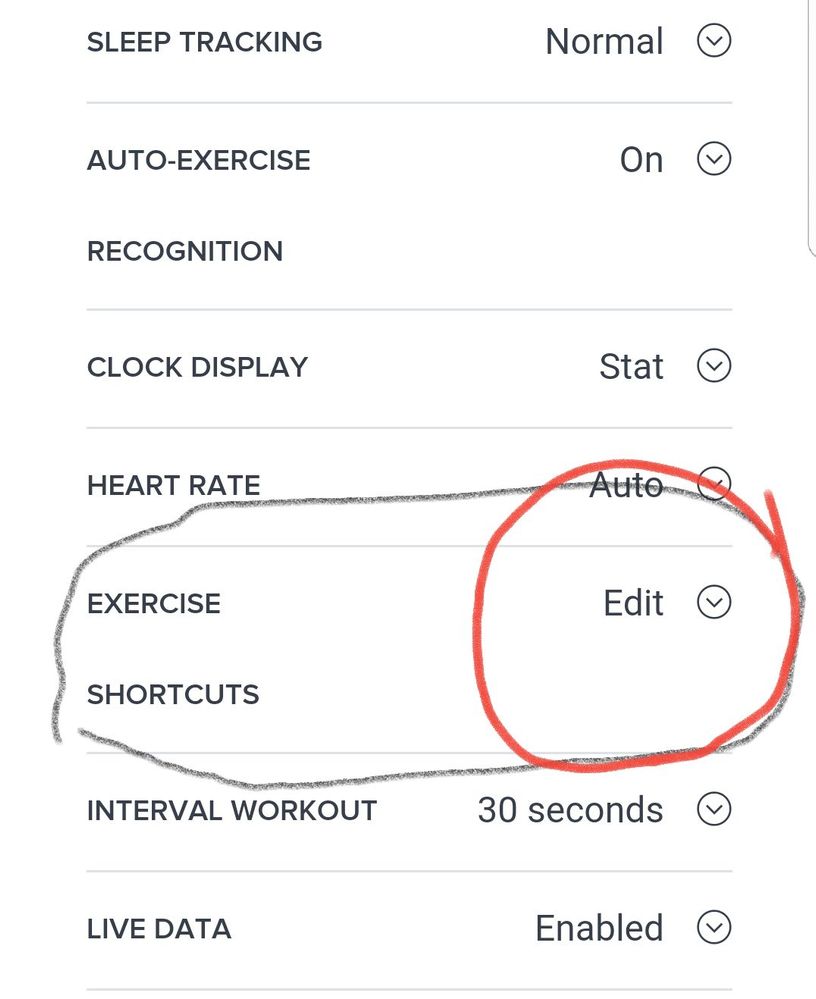
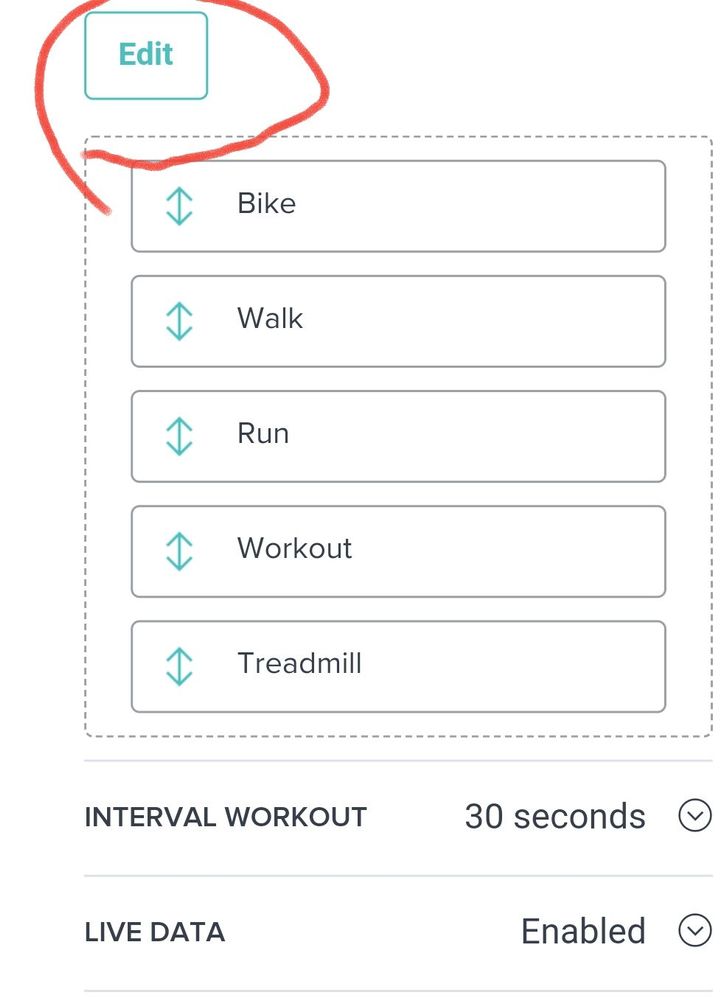
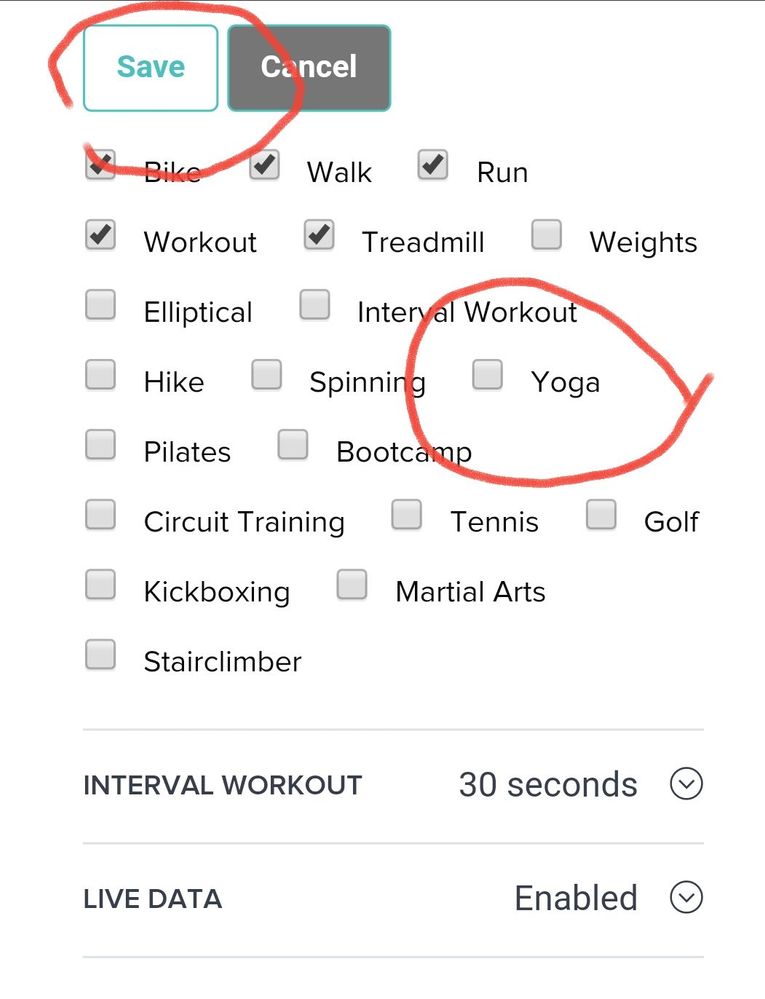

Thank you Rich_Laue, that actually helped! I can log yoga in my charge 2 now, I hope someone else sees this (I was looking in the app, not the website...was confused as hell).
Best Answer