
Join us on the Community Forums!
-
Community Guidelines
The Fitbit Community is a gathering place for real people who wish to exchange ideas, solutions, tips, techniques, and insight about the Fitbit products and services they love. By joining our Community, you agree to uphold these guidelines, so please take a moment to look them over. -
Learn the Basics
Check out our Frequently Asked Questions page for information on Community features, and tips to make the most of your time here. -
Join the Community!
Join an existing conversation, or start a new thread to ask your question. Creating your account is completely free, and takes about a minute.
Not finding your answer on the Community Forums?
- Community
- Product Help Forums
- Other Charge Trackers
- Re: Using the driving activity to cancel out steps
- Mark Topic as New
- Mark Topic as Read
- Float this Topic for Current User
- Bookmark
- Subscribe
- Mute
- Printer Friendly Page
- Community
- Product Help Forums
- Other Charge Trackers
- Re: Using the driving activity to cancel out steps
Using the driving activity to cancel out steps
ANSWERED- Mark Topic as New
- Mark Topic as Read
- Float this Topic for Current User
- Bookmark
- Subscribe
- Mute
- Printer Friendly Page
10-12-2017
16:58
- last edited on
09-09-2020
09:26
by
MatthewFitbit


10-12-2017
16:58
- last edited on
09-09-2020
09:26
by
MatthewFitbit
Hi, I am trying to cancel out some steps by logging a driving activity. This seems to be the recommended method of dealing with this issue. The problem is that when add the activity it does not seem to remove the steps from my total.
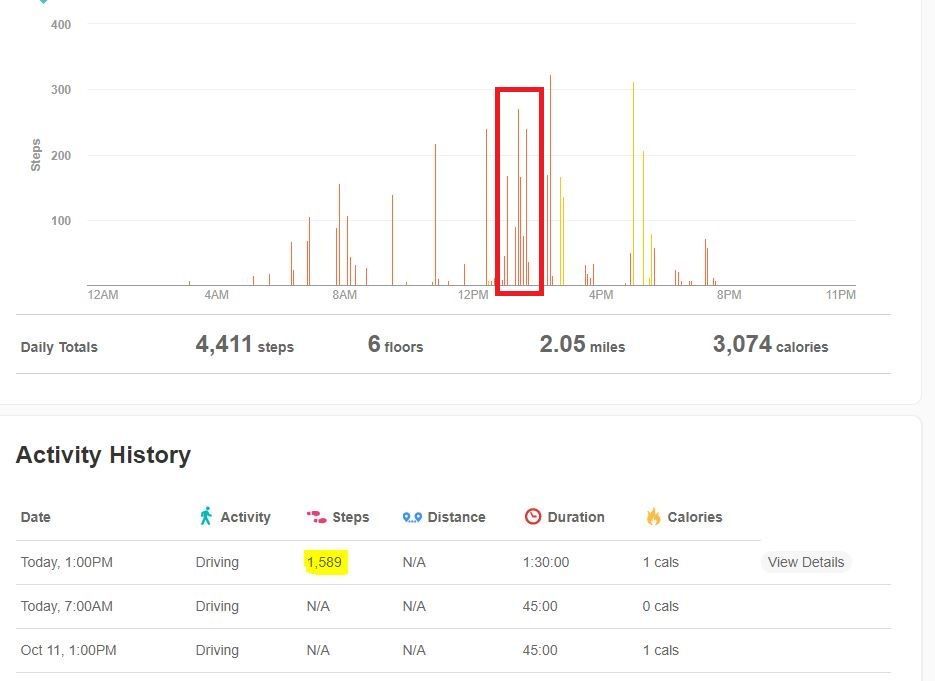
Any help or advice would be appreciated.
FYI, Im trying to follow the steps outlined in This FAQ.
Answered! Go to the Best Answer.
Accepted Solutions

 Fitbit Product Experts Alumni are retired members of the Fitbit Product Expert Program. Learn more
Hi @Sk3y.0n3,
One thing that article doesn't mention, that I will, is how you enter the Driving activity.
If you just type Driving into the text box, it won't trigger the step removal.
You have to start by typing "Dr", then there should be a menu that pops up, where you can select Driving from the list. Not sure why this is, but it's been verified this is the case.
Try that and let us know how it works. You might also be interested in the android/ios app called DriveBit, which let's you do all that from the app instead of having to fix it in the dashboard.
Hope this helps.
 Best Answer
Fitbit Product Experts Alumni are retired members of the Fitbit Product Expert Program. Learn more
Best Answer
Fitbit Product Experts Alumni are retired members of the Fitbit Product Expert Program. Learn more
Hi @Sk3y.0n3,
One thing that article doesn't mention, that I will, is how you enter the Driving activity.
If you just type Driving into the text box, it won't trigger the step removal.
You have to start by typing "Dr", then there should be a menu that pops up, where you can select Driving from the list. Not sure why this is, but it's been verified this is the case.
Try that and let us know how it works. You might also be interested in the android/ios app called DriveBit, which let's you do all that from the app instead of having to fix it in the dashboard.
Hope this helps.
Best Answer
@WavyDavey wrote:Hi @Sk3y.0n3,
One thing that article doesn't mention, that I will, is how you enter the Driving activity.
If you just type Driving into the text box, it won't trigger the step removal.
You have to start by typing "Dr", then there should be a menu that pops up, where you can select Driving from the list. Not sure why this is, but it's been verified this is the case.
Try that and let us know how it works. You might also be interested in the android/ios app called DriveBit, which let's you do all that from the app instead of having to fix it in the dashboard.
Hope this helps.
That did it. i was able to use that to cancel out the steps that were counted while i was driving.
Now only have one issue that i hope you also have an answer for. When i first tried to enter the driving activity i typed in "Driving" and chose that activity. It looks like i created a custom activity that is now always in that list. How do i remove it? There is the custom activity i accidentally created and the pre made one that i want to use.
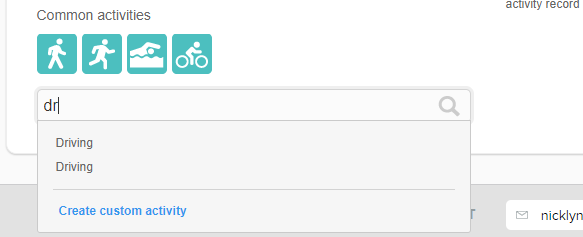
Hope someone can help me out with this last piece to the puzzle.
Best Answer
Fitbit Product Experts Alumni are retired members of the Fitbit Product Expert Program. Learn more
I don't think that's listing your custom Driving activity.
For some reason, whenever you start to type in an activity, two entries show up. Try typing "Spin", and you'll see two Spinning activities. All of them seem to do this, and either entry seems to work. I guess it's a quirk?
Best Answer
@WavyDavey wrote:I don't think that's listing your custom Driving activity.
For some reason, whenever you start to type in an activity, two entries show up. Try typing "Spin", and you'll see two Spinning activities. All of them seem to do this, and either entry seems to work. I guess it's a quirk?
Thanks Wavy. I am satisfied with your advice, but just FYI both of the driving entries are slightly different. Check out the screenshot i attached. I know that the uppermost(left image) entry was not canceling out my steps but the lower option for driving (right image) did do the job.
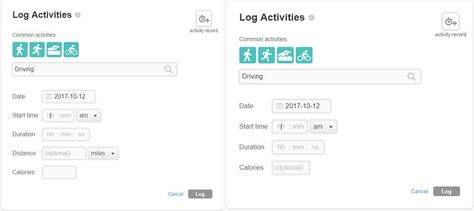
The difference IMO is the distance field. I don't know why they have the same "name" but i believe they have two different functions.
Hope this info helps u out in the future. Thanks for your help figuring this out



Where do you add driving please? Iv tried in the fitbit app and looked on line but still I don't know where to go to do this.
Best Answer
I ended up finding and using this app to cancel out driving.
If you want to enter the logs manually you need to add an exercise called Driving and add the begin and end time of you trip. That should negate all steps taken withing those times.
Best Answer
I understand now, thanks for that.

Hey wavy thanks for this - was able to cancel out the steps. However, it does not remove from the challenge of the week. Any idea how to deduct those steps from the challenge ?
Already tried leaving and going back into the challenge. Seems like they have a lot of work to do on these challenges and adventures
Best Answer
Nope I have no idea, the best course iIcan think of would be to get the request flooded with votes. At least 3000 would be nice, and will get the developers attention.

I would like to use the drivebit app but the google playstore only has a app called Travelbit which then requires a different app than FitBit to work. Any one know where I can get the Drivebit app from?
Best Answer
The developer of drivebit has removed it from the play store.
When it come to travelbit, there is only the paid version now, and it does not require any other app on your phone and only works with Fitbit.
It does its magic directly through Fitbit's API communicating with the cloud server.

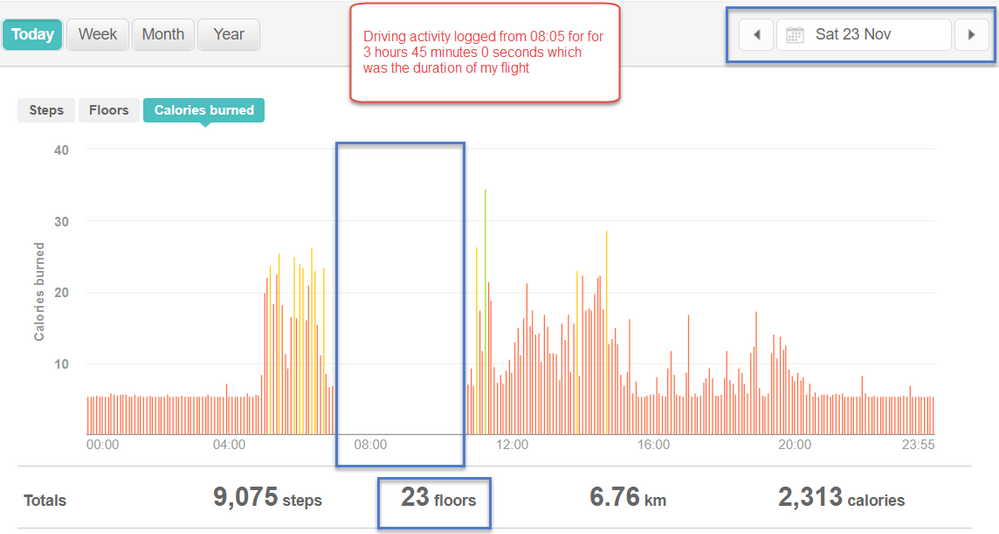
This doesn't work at all with floors. It removes the calories burned, but not the floors and steps.
It adds 559 steps if I leave the kilometers/miles field blank, and 1288 steps if I enter 0.01 km.
 Best Answer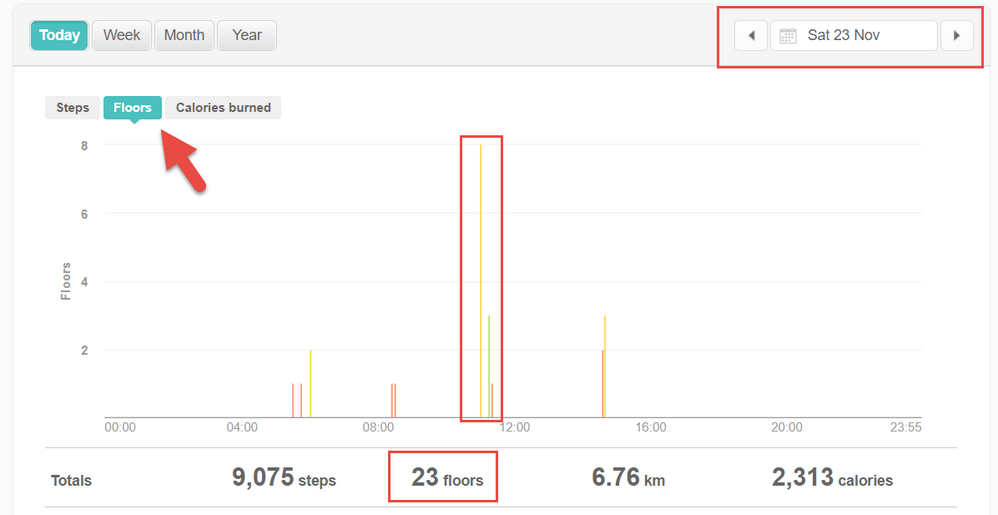
When typing in Driving you need to tap on the word driving that pops up.
It does work.
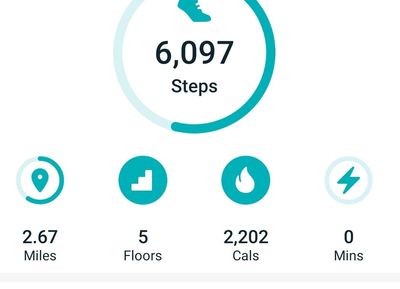
Without driving 6K steps 5 floors
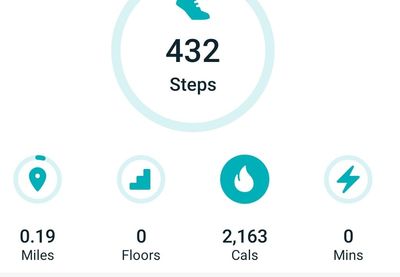
With driving added as an event. 432 steps 0 floors
Best Answer
Hi All
Trued this work around and as of today it does not work any longer. Was there an update recently that messed this solution up?
Best Answer
I just tried it @Junkie0430, it still works.
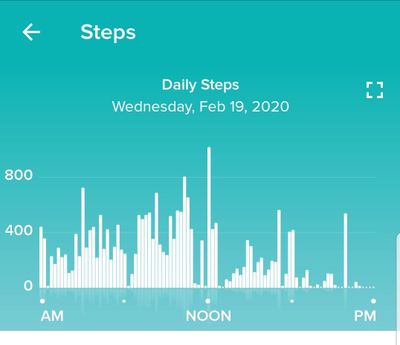
Wednesday before.
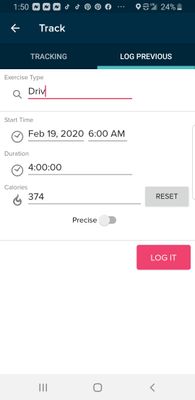
Add Driving
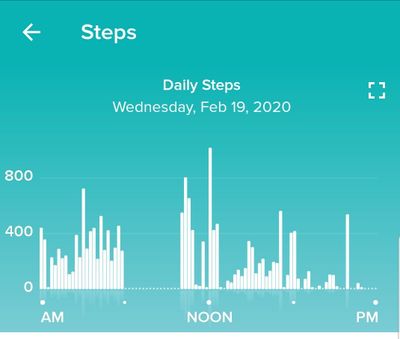
Wednesday after. Notice that all steps starting at 6am for 4 hours have been removed.
Please note that you want to start typing the word Drive, when the popup shows
, tap on the popup with the word Driving. This will remove steps.
Typing in the word driving and taping enter will create a new type of unknown event.
This also works with Motorcycle.
Best Answer
Doesn’t work for me.
I do tap on the word “Driving” when it pops up.
I must be doing something else wrong.
In my GUI when I start typing “Driv...”, I get a dropdown with multiple “Driving” words and others I registered at some stage.
Is there a way to wipe out all those choices and start from scratch?
Best Answer