
Join us on the Community Forums!
-
Community Guidelines
The Fitbit Community is a gathering place for real people who wish to exchange ideas, solutions, tips, techniques, and insight about the Fitbit products and services they love. By joining our Community, you agree to uphold these guidelines, so please take a moment to look them over. -
Learn the Basics
Check out our Frequently Asked Questions page for information on Community features, and tips to make the most of your time here. -
Join the Community!
Join an existing conversation, or start a new thread to ask your question. Creating your account is completely free, and takes about a minute.
Not finding your answer on the Community Forums?
- Community
- Product Help Forums
- Other Versa Smartwatches
- Re: Versa 2 button not working
- Mark Topic as New
- Mark Topic as Read
- Float this Topic for Current User
- Bookmark
- Subscribe
- Mute
- Printer Friendly Page
- Community
- Product Help Forums
- Other Versa Smartwatches
- Re: Versa 2 button not working
Versa 2 button not working
- Mark Topic as New
- Mark Topic as Read
- Float this Topic for Current User
- Bookmark
- Subscribe
- Mute
- Printer Friendly Page

My versa two button will not work, will not turn screen on, I have to keep tapping the screen to wake it up and show anything??? I customised it so the clock stayed on all the time but it runs the battery down to quick and glows all night ??
I have held the button down to reset it but this doesn’t work as the button is non responsive 🤷:female_sign:🤷:female_sign:

It’s a bloody pain as can’t seem to change settings for clock not to stay on, so all night it’s glowing. This was a replacement for my last versa that was recalled in august 22, think I am going to upgrade to an Apple Watch , as nothing but problems with fitbits
 Best Answer
 Fitbit Product Experts Alumni are retired members of the Fitbit Product Expert Program. Learn more
@Sharonpovey- if you can, long press the button to get to Quick Settings, turn off the Always On icon.
Also in watch Settings, Sleep mode, schedule a sleep time, this will dim the display, turn it off and stop notifications.
You may also reach Quick Settings by pull down the watch face once and then again and click on the 2 white bars.
Author | ch, passion for improvement.
Thankyou for this info, problem is once I’ve done that pulled down and clicked on settings the clock face is then stuck on that screen , I then have to plug it in and wait for it to go back to the clock face 🤷:female_sign:🤷:female_sign:😩😩
Best Answer
Fitbit Product Experts Alumni are retired members of the Fitbit Product Expert Program. Learn more
@Sharonpovey - if you were able to remove the Always On, the Settings screen should time out after about 2 minutes and return to the clock face.
Author | ch, passion for improvement.
Best Answer
Yes thanks for you answer, i did manage to do this and last night didn’t glow in the dark and clock face worked , this morning though it’s stuck saying
“off hours - your display turns off to not disturb your sleep. Go to always on in settings to customise “ tried charging it to see if this will clear the screen but nothing working 😫😫😫
Best Answer
Fitbit Product Experts Alumni are retired members of the Fitbit Product Expert Program. Learn more
@Sharonpovey - the Settings screen should time out after about 2 minutes and return to the clock face as long as Always On is not selected, so just wait.
If you can sync the watch and then get to the Settings, About menu and at the bottom do Shutdown, then wait at least 10 seconds before placing on charge to restart it and charge it, it might resolve the issue. However if charging it doesn't restart it you might have to have several goes.
You can also chat via the Fitbit App, click profile photo, Help & Support, Contact Customer Support, for direct support.
Author | ch, passion for improvement.
Chat no longer works 🤷:female_sign:
screen still stuck on off hours message. So can’t use Fitbit 😫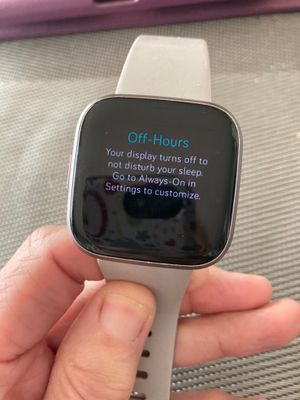
Best Answer
Fitbit Product Experts Alumni are retired members of the Fitbit Product Expert Program. Learn more
@Sharonpovey- thanks for the photo - you can probably get out of that mode.
Sync your watch with the Fitbit App, then in Gallery tile change the clock face to another clock - this should break Settings mode.
Then go back to Settings being careful to not click on anything but About in order to do the Shutdown.
Once it's rebooted you can select your preferred clock face.
Author | ch, passion for improvement.
Best Answer
Hi thanks for the response, but I cant do anything with the fitbit , I can press sync on the app on my phone but that’s about it
Best Answer
Fitbit Product Experts Alumni are retired members of the Fitbit Product Expert Program. Learn more
@Sharonpovey - in the Fitbit App, click profile photo, device photo, Gallery tile and change or load a new clock face, even though the button on the watch doesn't work.
Author | ch, passion for improvement.
Best Answer
Hi
went to change clock face and my Fitbit vibrated but still hasn’t changed the screen from original message 🤷:female_sign:think I will be sending back to Fitbit
Best Answer
Fitbit Product Experts Alumni are retired members of the Fitbit Product Expert Program. Learn more
@Sharonpovey - if it is under warranty you can replace it where you bought it
Did you try CHAT to support?
Author | ch, passion for improvement.
Best Answer
Chat is no longer on Fitbit , I bought direct from Fitbit after they recalled my previous versa 1
Best Answer
Fitbit Product Experts Alumni are retired members of the Fitbit Product Expert Program. Learn more
@Sharonpovey - did you try chat via the Fitbit App, click profile photo, Help & support, Contact Customer support?
Author | ch, passion for improvement.
Best Answer
Thankyou for your help, no I was on the Fitbit web page and chat has now gone, I will now try on my Fitbit app,
thank you again
Best Answer
Fitbit Product Experts Alumni are retired members of the Fitbit Product Expert Program. Learn more
@Sharonpovey- thanks for the update, glad you got a favorable resolution after all your efforts.
Author | ch, passion for improvement.
Best Answer