
Join us on the Community Forums!
-
Community Guidelines
The Fitbit Community is a gathering place for real people who wish to exchange ideas, solutions, tips, techniques, and insight about the Fitbit products and services they love. By joining our Community, you agree to uphold these guidelines, so please take a moment to look them over. -
Learn the Basics
Check out our Frequently Asked Questions page for information on Community features, and tips to make the most of your time here. -
Join the Community!
Join an existing conversation, or start a new thread to ask your question. Creating your account is completely free, and takes about a minute.
Not finding your answer on the Community Forums?
- Community
- Product Help Forums
- Other Versa Smartwatches
- Re: Versa problems not counting steps
- Mark Topic as New
- Mark Topic as Read
- Float this Topic for Current User
- Bookmark
- Subscribe
- Mute
- Printer Friendly Page
- Community
- Product Help Forums
- Other Versa Smartwatches
- Re: Versa problems not counting steps
Versa problems not counting steps
- Mark Topic as New
- Mark Topic as Read
- Float this Topic for Current User
- Bookmark
- Subscribe
- Mute
- Printer Friendly Page

I have had my versa 5 days and it's not counting steps accurately. It's is very intermittent. Sometime I can walk for 10 to 20 steps and it doesn't count any. I contacted fitbit and they got me to do a test. In this test I had to walk in a straight line and like a solider, it counted 97 out of 100 steps so they said there is not an issue. I explained that you don't always walk in a straight line and it's very intermittent. Fitbit don't want to know and are been unhelpful. Has anyone else had this same issue? Also the exercises are not recording in the app dashboard on workout and circuit training mode, they record stats on the watch but in the app it doesn't show stats for time or calories in the front exercise screen. The charge 2 used to record time.and calories burnt. The versa just shows a -- for.calories burnt. Think maybe there are still some small issues to resolve with the versa.

@NH77 When you open the app, click on the top left corner where there's a picture of your Fitbit. Then scroll down to the bottom. There's a red button the reads: Remove This Tracker. Click on that and you're good!
 Best Answer
@NH77 When you open the app, click on the top left corner where there's a picture of your Fitbit. Then scroll down to the bottom. There's a red button that reads: Remove This Tracker. Click on that and you're good!
Sorry, I don't know why it posted twice. Ignore the first one!!
Best Answer
@VEGAS_726 could you by any chance take a screenshot on what you see? Thanks!
Best Answer
You might not have Mobile Tracker installed. Open your Fitbit app on your phone, click on the square in the top right corner. On the next page, you should see your name and Versa, and, if you installed it, Mobile Tracker. If you see Mobile Tracker, click on it then scroll down to the red Remove and click that.
Best Answer
Sent from Yahoo Mail on Android
Best Answer
I don't have the tracker installed, so do you have any ideas on what I need to do. I really don't want yo send it back. This is my first Fitbit and I've waited for the Versa to become a Fitbit Fan.
Best Answer
What is mobile tracker
Best Answer
Thank you
Best Answer
Thank you. I’ll try that
Best Answer
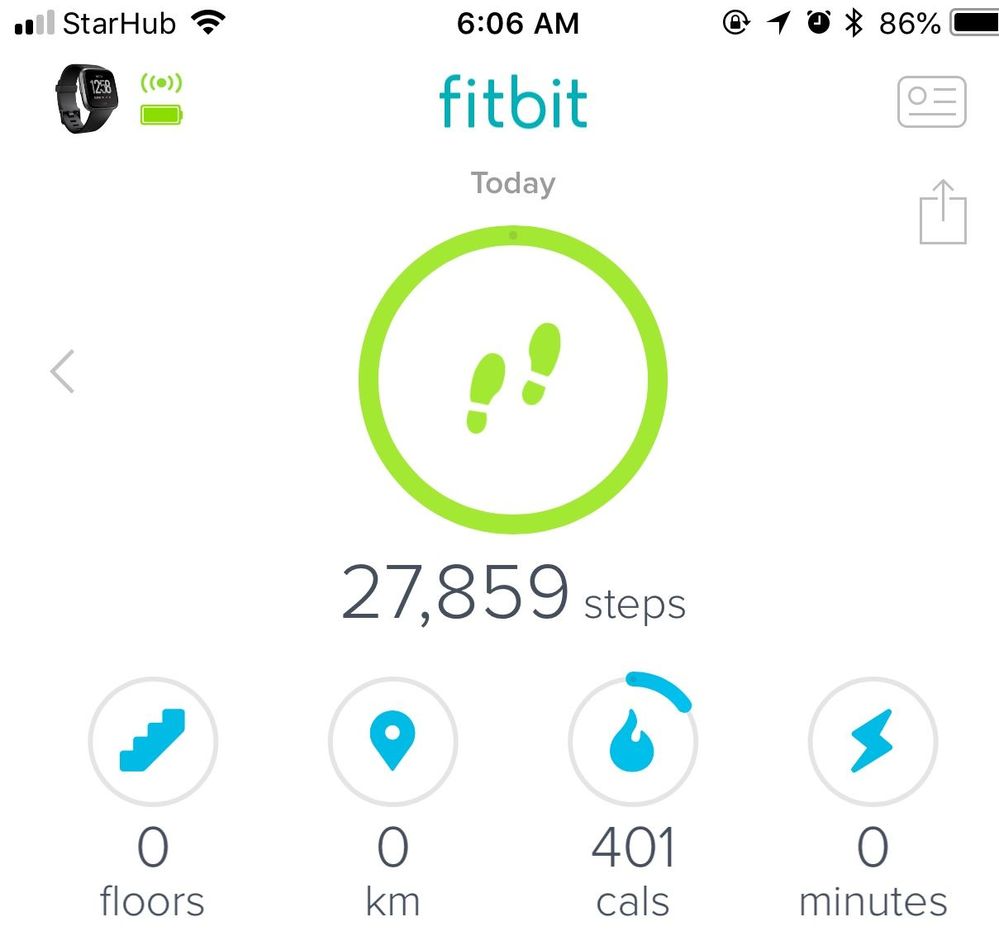
I too have problem of steps counting with my versa. First day after I got it (last Thurs) it recorded over 1600 a while later after it was fully charge although I didn’t wear it. Wrote to Fitbit and it’s customer support team advised me to wear it to monitor its progress. Wore it whole day yesterday (Fri) and the it hit few hundred steps although I just walked for few steps. I have turned it on and off but nothing changed. Finally I took if off and put it on the table last night before going to bed and it hit beyond 27000 steps this morning it’s own when I checked. I wrote in to Fitbit again for an exchange and yet to receive reply. I’m quite disappointed as this is the first Fitbit I own after reading so many good reviews about it. Anyone knows how to go about doing it to request for exchange?
Best Answer
@wtchambers wrote:Update: After removing Mobile Tracker from my phone and resetting my phone, everything with the Fitbit has been perfect.
Can you tell me how to remove mobile tracker from my phone? Thanks.
Best Answer
Thanks, but I guess I don' have a mobile tracker installed. I still can't figure out what to do to get my Versa working properly. My steps are way off. It's very dissappointing.
@NH77 I never had mobile tracker on mine either. It is very frustrating as step counting should be the simplest feature of this device. The disappointing thing is fitbit will not accept this as an issue and they just say it's how the versa works. I had to return mine Which I was disappointed with because the look and feel of the versa is good in my opinion. Fitbit need to accept the issues and resolve them. Then they will have a good product.
After resetting my Versa, things seem to be fine. Hold the left button and the bottom right button until the Versa logo appears - I hope that helps.
Best Answer