
Join us on the Community Forums!
-
Community Guidelines
The Fitbit Community is a gathering place for real people who wish to exchange ideas, solutions, tips, techniques, and insight about the Fitbit products and services they love. By joining our Community, you agree to uphold these guidelines, so please take a moment to look them over. -
Learn the Basics
Check out our Frequently Asked Questions page for information on Community features, and tips to make the most of your time here. -
Join the Community!
Join an existing conversation, or start a new thread to ask your question. Creating your account is completely free, and takes about a minute.
Not finding your answer on the Community Forums?
- Community
- Product Help Forums
- Other Versa Smartwatches
- Re: Versa showing wrong map
- Mark Topic as New
- Mark Topic as Read
- Float this Topic for Current User
- Bookmark
- Subscribe
- Mute
- Printer Friendly Page
- Community
- Product Help Forums
- Other Versa Smartwatches
- Re: Versa showing wrong map
Versa showing wrong map
ANSWERED- Mark Topic as New
- Mark Topic as Read
- Float this Topic for Current User
- Bookmark
- Subscribe
- Mute
- Printer Friendly Page

 Please help me fix it.
Accepted Solutions

Thank you for the reply. I logged out of the app and restarted the Versa. once I logged back in it was looking correct. Did not actually need to remove and re download the app.
Thanks for the help.
 Best Answer
Hi
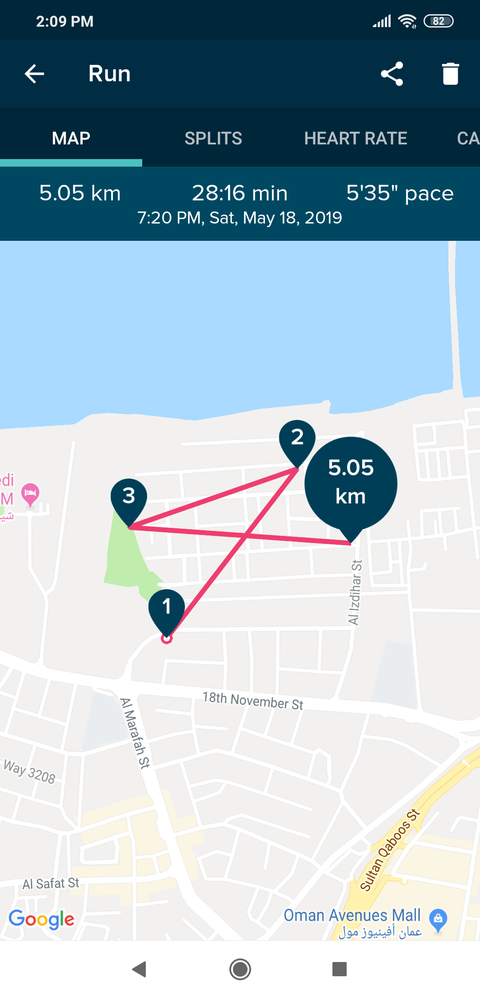
After finishing my 5k run when i see the summary of my run in fitbit app it is showing incomplete and wrong map. Screen shot attached.
Best Answer
Hello @unmanifested and welcome to the Help forums. Lines like those on you map appear from bad GPS connectivity.
- What model phone are you using?
- Do you have the current version of the app?
- I peeked at you profile and see that you are not a new user.
- Is this a completely new problem?
- Did you ever get a correct map with your Versa and this phone?
Laurie | Maryland
Sense 2, Luxe, Aria 2 | iOS | Mac OS
Take a look at the Fitbit help site for further assistance and information.
Best Answer
Hello Laurie
I'm using Xiaomi's poco f1. (Since 28th march before that sony Xperia xa2)
My Fitbit app is up-to-date
I've been using my versa since December 2018.
I've been getting correct maps until 2nd may.
I was getting correct maps in my Xiaomi's poco f1 phone. Since may 2nd it's showing incorrect maps.
Best Answer
@unmanifested It's easy to say that your Xiaomi is not on the list of compatible phones. But you had correct maps and now they are gone. So, it's not a fair answer.
Here is a link to a Help article that has advice for trouble shooting GPS errors. I think you should review it. Sometimes we make changes in settings, sometimes changes appear mysteriously. Make sure a setting hasn't changed.
This is my systematic approach when these things go wacky:
- Log out of your app and delete it
- Turn your phone off
- Restart your Versa
- Restart your phone
- Re-download the app and log in
I am an iPhone user and I would never claim to be an expert in Android issues. Perhaps an Android user will have some better advice.
Laurie | Maryland
Sense 2, Luxe, Aria 2 | iOS | Mac OS
Take a look at the Fitbit help site for further assistance and information.
Best Answer
Thanks Ms. Laurie
Best Answer
Hey Mike, try this..
- Log out of your app and delete it
- Turn your phone off
- Restart your Versa
- Restart your phone
- Re-download the app and log in
Best Answer
Thank you for the reply. I logged out of the app and restarted the Versa. once I logged back in it was looking correct. Did not actually need to remove and re download the app.
Thanks for the help.
Best Answer
You're welcome mate !
Best Answer