
Join us on the Community Forums!
-
Community Guidelines
The Fitbit Community is a gathering place for real people who wish to exchange ideas, solutions, tips, techniques, and insight about the Fitbit products and services they love. By joining our Community, you agree to uphold these guidelines, so please take a moment to look them over. -
Learn the Basics
Check out our Frequently Asked Questions page for information on Community features, and tips to make the most of your time here. -
Join the Community!
Join an existing conversation, or start a new thread to ask your question. Creating your account is completely free, and takes about a minute.
Not finding your answer on the Community Forums?
- Community
- Product Help Forums
- Other Versa Smartwatches
- Re: Wallet application not appearing
- Mark Topic as New
- Mark Topic as Read
- Float this Topic for Current User
- Bookmark
- Subscribe
- Mute
- Printer Friendly Page
- Community
- Product Help Forums
- Other Versa Smartwatches
- Re: Wallet application not appearing
Wallet application not appearing
ANSWERED- Mark Topic as New
- Mark Topic as Read
- Float this Topic for Current User
- Bookmark
- Subscribe
- Mute
- Printer Friendly Page

I've tried several fixes that have been mentioned on other posts... but have had no luck!
I've tried:
- Removing and re-installing the Fitbit Application
- Removing my Versa from the app and then re-installing it
- Restarting my phone
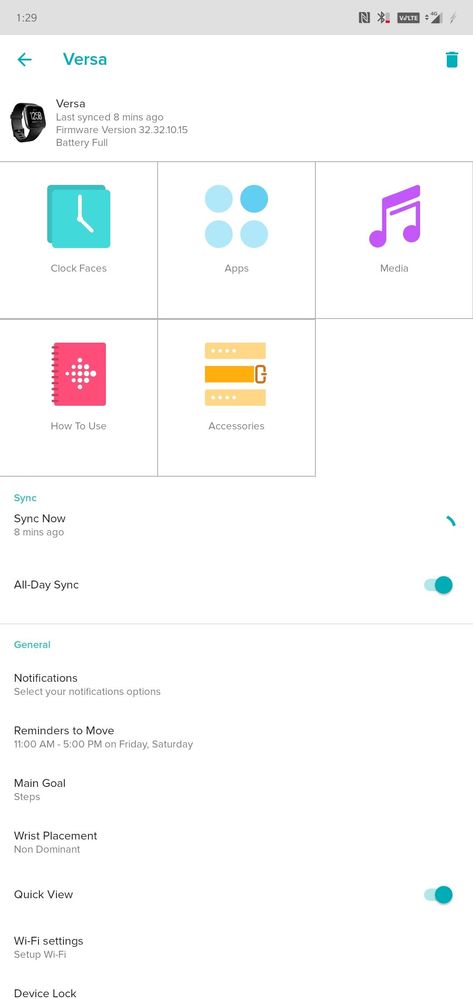
I see all the other options (Clock Faces, Apps, Media, How To Use, and Accessories), but no Wallet.
Also, to note, I am in the United States.
Answered! Go to the Best Answer.

Did a live chat with customer support very unhelpful- scripted responses
thanked me for my feedback and said they we're hopeful the problem would be fixed in the future once more people provided this feedback,. The option of Wallet free app is only available on the special edition watch- this is very unclear on the website and is quite misleading
I said I was unhappy and would return the Fitbit the response was here's the link to return it
 Best Answer
Hello My problem is that there is NO wallet icon of the wallet app at the versa menu.
In the phone app it is installed but not in the versa
I have uninstall and reinstall the wallet up .... restart the phone reinstall the app....

SunsetRunner
@Gianisxx I'm also from Greece and I also don't have the wallet option. This is absolutely normal as there's no bank that supports Fitbit pay. You can check it on the list of the supported Banks.
I activated it by changing my region to USA, and I used my USA bank card. I can use it only by charging my USA card. I tried to add a Greek bank card but it can't verify the card.
Best Answer
Gianni kalispera
Skeftomai na agoraso to versa k ego Alla vlepo oti den exei support gia ellinika. **ahem** emfanizontai ta sms ,calls k ta loipa???
Eftakse to them me to nfc pay you eleges.
Dose merika tip an oxi na psaxto gia Kati allo
Thanks
Best Answer
Good afternoon,
Can't appear to see my wallet,
Ok, so what i know:
That I should be able to use it as Fitbit sent me an email telling me how good it is.
I'm uk based, have a Samsung Galaxy S8 and a Fitbit versa SE, with fitbit pay inscribed on the back.
My phone runs android v.8 kernel 4.4.13, my fitbit runs software version 32.32.10.15 and requires no new update as per the Google play store.
I have had my fitbit for a little over a month now, so the wallet doesn't appear to be time locked?
before posting this (over the last week or so) I have un-installed and re-installed by fitbit completely twice, both from my phone and desyncing my account, restarting my S8 each time.
I have read through a lot of these posts and am running out of ideas..
any help would be greatly appreciated.
ps I love my Versa and it actually appears to be helping to motivate me to be fitter.
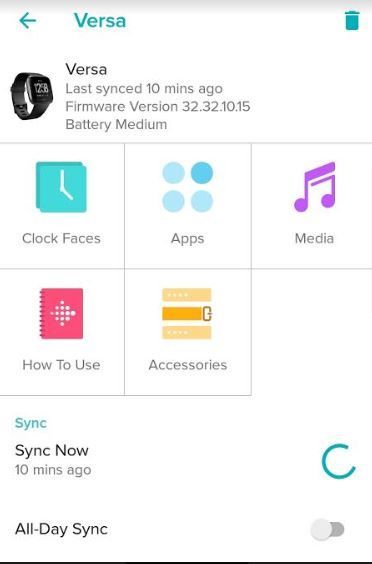

But the wallet tab is not there with clock faces ,apps,media,how to use and accessories! On the fit bit application,talking about Android.
Best Answer
Best Answer
I wish I had known this when I bought my Versa. I might have sprung for the more expensive version.
Best Answer
the Wallet tile does not appear so I don't have a chance to set up a bank card
I've tried:
- Removing and re-installing the Fitbit Application
- Removing my Versa from the app and then re-installing it
- Restarting my phone
my watch does say fitbit pay, I was so excited to use my fitbit pay but now I’m very frustrated!
Best Answer
Mine doesn't say FitBit Pay on the watch but it says it in the materials so I assumed but on further reading, it seems that only some Charge 3 FitBits actually have this functionality. Is that right?
Best Answer
Best Answer
ISSUE: Not able to see the WALLET in my Andriod App.
SOLVED : Changed the language in Andriod->Setting->Language> To English(United States).
After that just sync it and if your band has the FITBIT PAY option then it will show you the WALLET ICON in the mobile app.
It worked for me.
Best Answer
Please help to find the android settings in the phone?
Best Answer
I could find the language settings and it is already in English (United States) but the Wallet is not appearing on my Versa SE
Best Answer
SunsetRunner
My versa does not say fitbit pay on the back but on my face there is an icon for wallet. I want to remove the icon help! how do I remove it? it does not show up on my iPhone 11 in the app so I can't delete it from there
tia
Best Answer