
Join us on the Community Forums!
-
Community Guidelines
The Fitbit Community is a gathering place for real people who wish to exchange ideas, solutions, tips, techniques, and insight about the Fitbit products and services they love. By joining our Community, you agree to uphold these guidelines, so please take a moment to look them over. -
Learn the Basics
Check out our Frequently Asked Questions page for information on Community features, and tips to make the most of your time here. -
Join the Community!
Join an existing conversation, or start a new thread to ask your question. Creating your account is completely free, and takes about a minute.
Not finding your answer on the Community Forums?
- Community
- Product Help Forums
- Sense
- Re: Google assistant connection lost
- Mark Topic as New
- Mark Topic as Read
- Float this Topic for Current User
- Bookmark
- Subscribe
- Mute
- Printer Friendly Page
- Community
- Product Help Forums
- Sense
- Re: Google assistant connection lost
Google assistant connection lost
ANSWERED- Mark Topic as New
- Mark Topic as Read
- Float this Topic for Current User
- Bookmark
- Subscribe
- Mute
- Printer Friendly Page

Hi,
I have my sense since few days and I cannot have it consistently work with Google assistant without reaching some kind of problem. For instance, I have used it for the whole day today but now I am facing the following error.
My phone is next to me. I have just sync the fitbit and my Google assistant is allowed to run in the background since it respond to the OK GOOGLE instructions.
What am I missing ?
Pierre
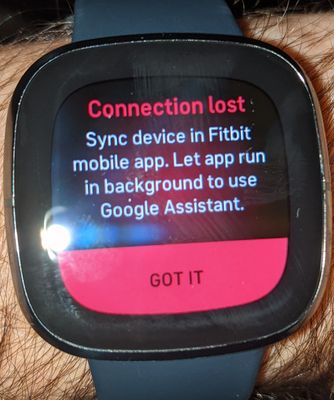
Answered! Go to the Best Answer.
 Best Answer
- Labels:
-
Voice Assistant
Accepted Solutions

@lemayp happens when Bluetooth connection is unstable. Only way out is to reboot the Fitbit. At least in my case...

Marrrmaduke | Canada
Charge HR, Blaze, Charge 2, Charge 3, Inspire HR, Versa Lite, Versa SE, Aria
@lemayp happens when Bluetooth connection is unstable. Only way out is to reboot the Fitbit. At least in my case...
Marrrmaduke | Canada
Charge HR, Blaze, Charge 2, Charge 3, Inspire HR, Versa Lite, Versa SE, Aria
@Marrrmaduke Thanks a lot for responding to my message and confirming that I am not the only one facing this problem. Actually, I faced the same problem for a second time yesterday evening, so for me, since I received my Sense, there was not a single day without a glitch with my experience with this new device.
This situation is worst than I initially thought, particularly for a user experience. Initially, I thought that it was "just" the Google Assistant that was impacted, but now I just realized that it impacts all my SMS/Emails/Etc notifications as I missed several of them during the evening. So I can't trust anymore my watch as I don't know if the Bluetooth died or not. There is no warning when the Bluetooth is not working anymore, and I discovered about the situation only because I pressed the Google Assistant button.
I did what you suggested, and after I reboot the watch the google assistant start to work again... and I received about 10 missed notifications.
Wow, as I was typing this, I just realised that the problem occurred once again for me.. The watch was rebooted about 3hrs ago and I am facing the exact same problem once again!

@LizzyFitbit Would you be able to tell us if there is any bug tracking system used by the Fitbit development team to track bugs reported by customers and if so, if this situation is part of such a bug list? Is there a way to either follow such bugs or at least have some kind of way to refer to it in the future or request for an update?
When the Fitbit is no longer able to contact the phone, the user must be warned at the minimum. As I have several other Bluetooth devices using my phone and not losing their connections, this appears to me as a pure Fitbit problem.
@lemayp can you share your phone model and OS?
Marrrmaduke | Canada
Charge HR, Blaze, Charge 2, Charge 3, Inspire HR, Versa Lite, Versa SE, Aria
Best Answer
@lemayp I must say it's bizarre. Only recently I switched from Pixel 3 to 5 and haven't had such issues. Silly question - have you made sure Fitbit app is not being optimized by Android? Do you have any other BT devices connected?
Marrrmaduke | Canada
Charge HR, Blaze, Charge 2, Charge 3, Inspire HR, Versa Lite, Versa SE, Aria
Best Answer
@Marrrmaduke I wouldn't be able to answer this question as I don't how to control that:
"Silly question - have you made sure Fitbit app is not being optimized by Android"
As for other BT devices, yes I do have several such as my windows laptop ( I use the Microsoft application YourPhone), I have some wireless earbuds, etc. That being said, I don't recall experiencing the problem while using those. But sometimes I don't know since how long I have lost my connection.
Thanks for your concerns. Let's see if things improve over time. Today was the 6th days I use the Sense only.
Best Answer
@lemayp go to settings on your android, Apps and Notifications, find Fitbit app, tap and scroll down to Advanced, tap Battery. Under Battery optimization it should say Not optimized.
Another thing to try is to turn off Adaptive bettery under main Battery settings of Android.
Marrrmaduke | Canada
Charge HR, Blaze, Charge 2, Charge 3, Inspire HR, Versa Lite, Versa SE, Aria
Best Answer
@Marrrmaduke Regarding the first setting, it seems like I don't have control over it and the current value is "Background usage can't be restricted"
As suggested, I have disabled the adaptive battery and we will see the outcome.
This morning I woke up with the problem once again, although it was ok when I went to bed. My phone was on the main floor while I sleep on the first floor, is that enough to get into such situation? I restarted the Sense immediately, I don't know if getting closer to the phone would have resolved the situation, but in the past it wasn't: as soon as I faced the problem, only a restart resolved the problem.
Best Answer
@lemayp yeah. It probably lost BT depending on the layout of your house. I usually manage ok with different floors but depending in which room I'm in, I may lose the connection.
Marrrmaduke | Canada
Charge HR, Blaze, Charge 2, Charge 3, Inspire HR, Versa Lite, Versa SE, Aria
Best Answer
I still have daily problem with this and yesterday I officially reached support and they said they will reach to me by email eventually. I provided a link to this community exchange so they could see what I have tried to resolve the situation.
Here is the thing for me:
- Every single morning I must restart my fitbit because of this situation.
- As I start to Walk more outside, I am also using my Bluetooth ear pod, and I must restart my watch after such Walk because of this situation.
- I recall this occurred while driving my car.. where I have a handsfree system
- And today I have charged my sense and after doing so I had to redo the whole setting of the Google assistant.
Basically, the feature is not available most of the time I want to use it.
No other Bluetooth device is requiring so much attention from me, not even close.

Hi there! I read up on your issue with Google assistant notifications and saw how the community suggested restarting the phone and restarting the watch. Your last post explained you were still having the issue so you reached out to the Fitbit Team and referenced this thread. What was their resolve? It's pretty frustrating since Google assistant isn't even a feature that I use. If I have to call them I'll probably want to start the process of a return! Thank you in advance ..
hi @Krysless2 with the help of the community I have completely resolved this situation over a couple of days of observations. My Sense might lose the connection with the google assistant once in a while now, maybe on a monthly basis when the app requires reconnecting it, or when my watch is too far from the phone to interact with it.
Few things that appeared as "annoying" during the first few days of owning the Sense got resolved over a small amount of time for me and I no longer face any big problems with it. I use the Google Assistant daily now, and I have found new ways to extend it with some IFTTT @"recipes", so I definitively use such integration much more than anticipated.
My biggest problem was an environmental one. I use the Fitbit application on my phone (where I synch ) and on my tablet (where I consume or look at stats) and the tablet was not properly configured since it was still attempting to sync with the watch. Two devices synchronizing with a single fitbit is not supported. Once I made sure the tablet would no longer attempt to connect to the Sense watch. and only gets its data from the web, all my problems with the google assistant connection got resolve.
I hope this helps.


Me too.. Fitbit broke it and won't acknowledge it -- I saw they're no longer including G.A. in new watches(?!), but they shouldn't be allowed to remove features for which we paid for.
Best Answer